Page 1 of 2
App Developer - Text Array / Values Table
Posted: Wed Jun 12, 2024 12:09 pm
by jay_dee
Hi,
I think the following would be very flexible and helpful to App Dev users.
A Display element that is a user defineable grid of textboxs. X Columns by Y Rows.
The user can then specifiy the Text String for each cell by the defined Row,Column.
This would allow very quick way to build a results table and show lots of information in a compact manner.
Name | Value | Units
Pot1 | 123 | Counts
Dist | 65 | mm
This would be very helpful for development and field problem solving as you can have a string of values being sent out over UART and displayed in App Developer in a table.
You could build something using individual elements but a table would be much quicker and cleaner.
J.
Re: App Developer - Text Array / Values Table
Posted: Tue Jun 16, 2026 12:17 pm
by jay_dee
Hi, I noted from another post that App Dev may seen some more development soon, so a cheeky bump for this idea.
A simple user defined array of textboxes, x Columns * Y Rows.
With a macro that populates each cell with a text string or value.

Re: App Developer - Text Array / Values Table
Posted: Tue Jun 16, 2026 12:27 pm
by Steve-Matrix
Thanks for the reminder. Are you referring to Web Developer or PC Developer?
Re: App Developer - Text Array / Values Table
Posted: Tue Jun 16, 2026 2:59 pm
by jay_dee
Ah... yeah. Mostly I thinking for PC developer. Which may be on a different development path to Web Dev. J.
Re: App Developer - Text Array / Values Table
Posted: Tue Jul 21, 2026 2:19 pm
by stefan.erni
Hi Jay_dee, Hi Steve
Is there already a table for PC Developer?
Re: App Developer - Text Array / Values Table
Posted: Tue Jul 21, 2026 3:43 pm
by Steve-Matrix
Not yet.
Re: App Developer - Text Array / Values Table
Posted: Mon Jul 27, 2026 2:08 pm
by stefan.erni
Hi Steve
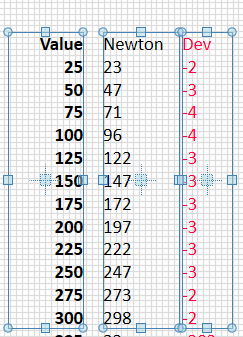
Maybe we could start by improving the text component.
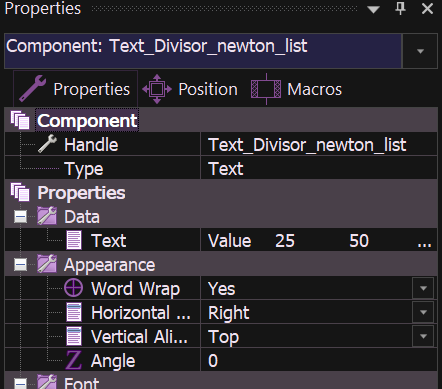
The text component in addition to word wrap, set to small size and some space it create a nice colum
If the text component had "/r/n" for a new line it would be much easier.
And if the value could be copied with a single mouse click, it would also be useful for pasting the result into another Flowcode program.
- 2026-07-27_14-55-57.PNG (41.39 KiB) Viewed 13693 times
- 2026-07-27_15-02-37.PNG (35.45 KiB) Viewed 13693 times
Re: App Developer - Text Array / Values Table
Posted: Mon Jul 27, 2026 4:57 pm
by Steve-Matrix
Thanks, Stefan.
If you have Word Wrap set to "No" then you can have "\r\n" in the text.
Being able to copy out the text is interesting and perhaps I can add a menu to allow this, similar to charts and the richtext component primitives.
And the richtext primitive can also be used to display tables. For example, if you copy the following and paste it into the "Data" property of a richtext component, then you will see a table.
Code: Select all
{\rtf1\ansi\ansicpg1252\deff0\nouicompat\deflang2057{\fonttbl{\f0\fswiss\fprq2\fcharset0 Calibri; }{\f1\fnil\fcharset0 Segoe UI; } }
{\colortbl; \red255\green0\blue0; }
{\*\generatorRiched20 10.0.19041}\viewkind4\uc1
\pard\intbl\widctlpar\kerning2\f1\fs22 Col1\cell Col2\cell Col3\cell\row
\pard\intbl\widctlpar 4\cell 43\cell 998\cell\row
\pard\intbl\widctlpar 6\cell 675\cell 75\cell\row
\pard\kerning0\f1\fs20\par
}
You can then copy this out of the richtext component using the right-click menu and paste it as a table directly into Excel (etc).
The "Data" property can be written to within project macro code, so you should be able to create a table from your program. You can also format the text and change the column widths, although I don't know RTF format well enough to tell you how to do it.
One way to learn more about the RTF formats is to paste a formatted table into a richtext component and then inspect the "Data" property to view the raw RTF code.
For example, here's the same table with bold headings, thick lines and one of the values in red:
Code: Select all
{\rtf1\ansi\ansicpg1252\deff0\nouicompat\deflang2057{\fonttbl{\f0\fnil Aptos Narrow;}{\f1\fnil\fcharset0 Segoe UI;}}
{\colortbl ;\red0\green0\blue0;\red255\green0\blue0;\red255\green255\blue255;}
{\*\generator Riched20 10.0.26100}\viewkind4\uc1\trowd\trgaph30\trleft-30\trrh305\trpaddl30\trpaddr30\trpaddfl3\trpaddfr3
\clbrdrl\brdrw15\brdrs\brdrcf3\clbrdrt\brdrw15\brdrs\brdrcf3\clbrdrr\brdrw15\brdrs\brdrcf3\clbrdrb\brdrw15\brdrs\brdrcf3 \cellx1002\clbrdrl\brdrw15\brdrs\brdrcf3\clbrdrt\brdrw15\brdrs\brdrcf3\clbrdrr\brdrw15\brdrs\brdrcf3\clbrdrb\brdrw15\brdrs\brdrcf3 \cellx2034\clbrdrl\brdrw15\brdrs\brdrcf3\clbrdrt\brdrw15\brdrs\brdrcf3\clbrdrr\brdrw15\brdrs\brdrcf3\clbrdrb\brdrw15\brdrs\brdrcf3 \cellx3066
\pard\intbl\qc\cf1\b\f0\fs22 Col1\cell Col2\cell Col3\cell\row\trowd\trgaph30\trleft-30\trrh305\trpaddl30\trpaddr30\trpaddfl3\trpaddfr3
\clbrdrl\brdrw15\brdrs\brdrcf3\clbrdrt\brdrw15\brdrs\brdrcf3\clbrdrr\brdrw15\brdrs\brdrcf3\clbrdrb\brdrw15\brdrs\brdrcf3 \cellx1002\clbrdrl\brdrw15\brdrs\brdrcf3\clbrdrt\brdrw15\brdrs\brdrcf3\clbrdrr\brdrw15\brdrs\brdrcf3\clbrdrb\brdrw15\brdrs\brdrcf3 \cellx2034\clbrdrl\brdrw15\brdrs\brdrcf3\clbrdrt\brdrw15\brdrs\brdrcf3\clbrdrr\brdrw15\brdrs\brdrcf3\clbrdrb\brdrw15\brdrs\brdrcf3 \cellx3066
\pard\intbl\qr\b0 4\cell 43\cell 998\cell\row\trowd\trgaph30\trleft-30\trrh305\trpaddl30\trpaddr30\trpaddfl3\trpaddfr3
\clbrdrl\brdrw15\brdrs\brdrcf3\clbrdrt\brdrw15\brdrs\brdrcf3\clbrdrr\brdrw15\brdrs\brdrcf3\clbrdrb\brdrw15\brdrs\brdrcf3 \cellx1002\clbrdrl\brdrw15\brdrs\brdrcf3\clbrdrt\brdrw15\brdrs\brdrcf3\clbrdrr\brdrw15\brdrs\brdrcf3\clbrdrb\brdrw15\brdrs\brdrcf3 \cellx2034\clbrdrl\brdrw15\brdrs\brdrcf3\clbrdrt\brdrw15\brdrs\brdrcf3\clbrdrr\brdrw15\brdrs\brdrcf3\clbrdrb\brdrw15\brdrs\brdrcf3 \cellx3066
\pard\intbl\qr 6\cell\cf2 675\cell\cf1 75\cell\row
\pard\cf0\f1\fs20\par
}
Re: App Developer - Text Array / Values Table
Posted: Tue Jul 28, 2026 9:57 am
by stefan.erni
Hi Steve
Ok It's working nice if I set Word Wrap set to "No"
Perhaps, when it comes to text, it would also be possible to have a "Get Text" macro similar to a "Set Text" macro?
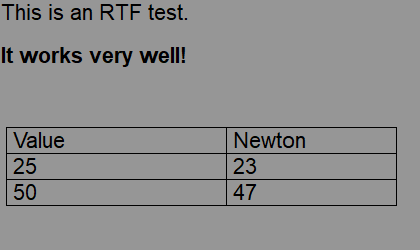
And RTF test —it's works really well!
But it is a bit time-consuming.
- 2026-07-28_10-47-05.PNG (10.62 KiB) Viewed 13662 times
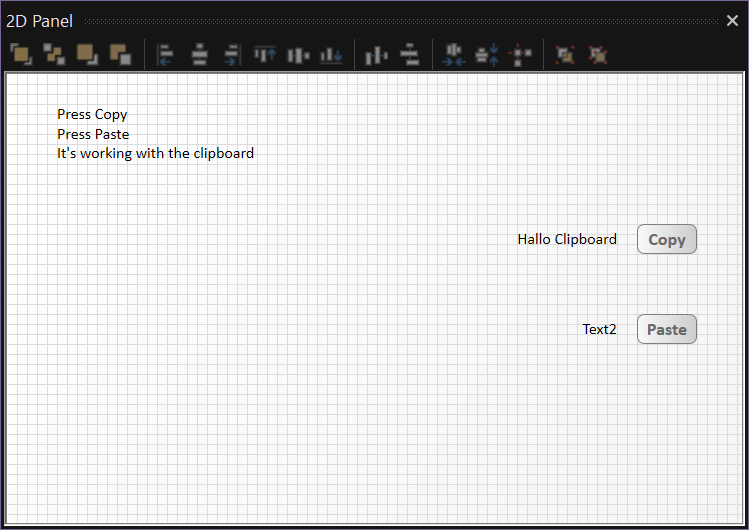
I've found a convenient way to use the clipboard with FC11
It can copy to the clipboard or retrieve items from the clipboard, including from other PC programs
- 2026-07-28_10-25-19.PNG (52.37 KiB) Viewed 13662 times
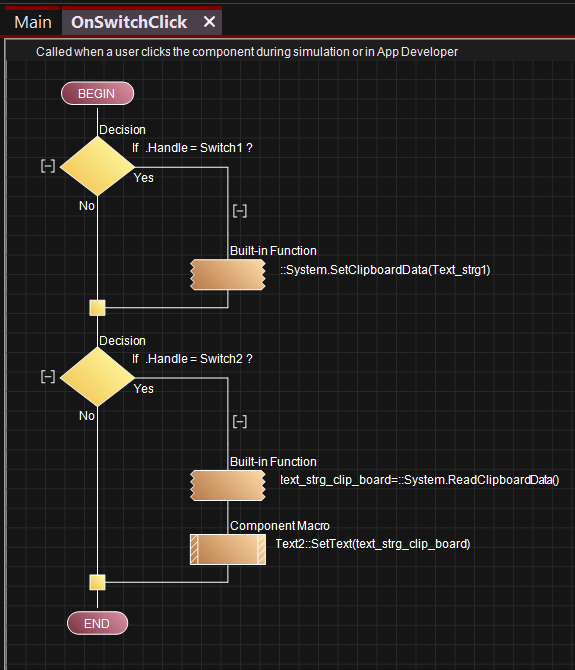
- 2026-07-28_10-51-51.PNG (61.39 KiB) Viewed 13662 times
Re: App Developer - Text Array / Values Table
Posted: Tue Jul 28, 2026 10:55 am
by Steve-Matrix
That's all really good, Stefan. Thanks for sharing.
stefan.erni wrote: ↑Tue Jul 28, 2026 9:57 am
Perhaps, when it comes to text, it would also be possible to have a "Get Text" macro similar to a "Set Text" macro?
That's a great idea. I've put that on our TODO list.
