Page 1 of 1
RGB LED "TICK"
Posted: Fri May 10, 2013 6:14 pm
by acestu
Hi,
I have a simple circuit that works fine in simulation however when I look at the help file it says that I must use the Tick command in a loop otherwise the LED modulation will not work properley, could anybody spread any light on this please...

- Tick.jpg (82.78 KiB) Viewed 9911 times
thanks in advance
Acestu
- RGB.fcf
- (13.5 KiB) Downloaded 263 times
EDIT: I have just noticed that the display numbers are not working correctly either
Re: RGB LED "TICK"
Posted: Fri May 10, 2013 6:27 pm
by JohnCrow
Hi Stuart
You need to put the tick command in on hardware.
Think this file works, not got time to test it at the moment.
Re: RGB LED "TICK"
Posted: Fri May 10, 2013 6:31 pm
by acestu
Hi John,
Thanks for the info, I will have another look at my chart because I see that you have the command in there 3 times..
cheers
Acestu
Re: RGB LED "TICK"
Posted: Fri May 10, 2013 7:51 pm
by acestu
Hi
I have changed the chart to include the ticks, I haven't got my rgb leds yet so I cant try in hardware but when I run the simulation, I change the sliders around and the values update on the lcd but when I bring them back to zero, zero is not what it says on the lcd, have I got the code wrong somewhere ?
thanks
Acestu
Re: RGB LED "TICK"
Posted: Fri May 10, 2013 7:57 pm
by JohnCrow
Hi Stuart
You only need the tick after the RGB led icon
If you dont have a RGB led, you can always use 3 standard leds, resistors in the anodes to the PIC and common the cathodes together to ground.
That way at least you can test the flowchart.
Think the reason the LCD does not show 0 is its not clearing the last reading, when you come from 3 digits to 2 if you move it quickly it might skip 100 and the 3 digit will not change form 99 to 0
Re: RGB LED "TICK"
Posted: Fri May 10, 2013 8:08 pm
by JohnCrow
Re: RGB LED "TICK"
Posted: Fri May 10, 2013 8:29 pm
by acestu
Hi John
When you say "Think the reason the LCD does not show 0 is its not clearing the last reading, when you come from 3 digits to 2 if you move it quickly it might skip 100 and the 3 digit will not change form 99 to 0"
Is this in the simulation or will it do the same in hardware ?
And I have plenty of leds so I think i will try that John
thanks
Stuart
Re: RGB LED "TICK"
Posted: Fri May 10, 2013 8:33 pm
by acestu
Hi John
Sorry about the time lagg there, your MK3 works fine now, I am just having a go at hardware but I can't find any sliders, I can use some rotary pots though can't I ?
thanks
Stuart
Re: RGB LED "TICK"
Posted: Fri May 10, 2013 8:42 pm
by JohnCrow
Yes any type of pot should work.
Proberbly best if you have all 3 the same value.
Re: RGB LED "TICK"
Posted: Fri May 10, 2013 10:18 pm
by acestu
Hi
Ok I have changed the device to a Pic16F877A because I have a spare one and I have 3 x linear 10k pots so I am going to have a go at building it with an ICSP header, I am enclosing a pic of the circuit if anyone else wants to have a go...
cheers
Stuart
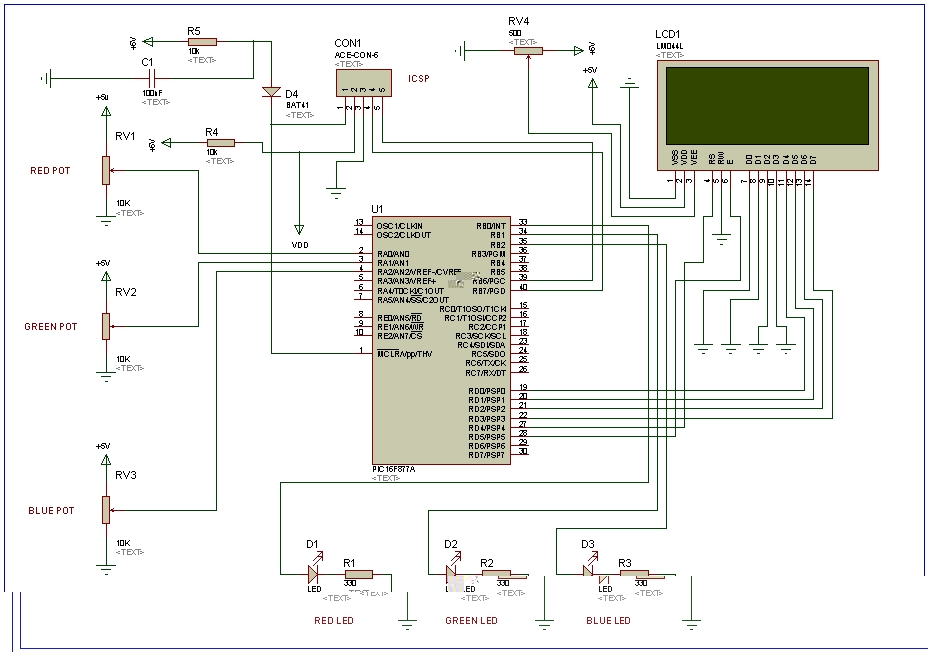
- RGB_MK3.jpg (203.35 KiB) Viewed 9835 times
Re: RGB LED "TICK"
Posted: Fri May 10, 2013 11:31 pm
by acestu
Hi,
I have put the circuit together but I have some strange results, the leds are flashing on and off, do you think it might be because I am using separate leds and I have the Tick component in the code ?, have a look at the video here:
http://www.youtube.com/watch?v=yn2KfKyz ... tion=share
thanks
Stuart
Re: RGB LED "TICK"
Posted: Sat May 11, 2013 10:48 am
by acestu
Hi,
I am not sure if the circuit is right either, I have had a look at a few other circuits and they have resisters and caps on the pot inputs, if anyone can help I would appreciate it . . .
Cheers
Stuart
Re: RGB LED "TICK"
Posted: Sat May 11, 2013 11:10 am
by JohnCrow
Hi Stuart
I would maybe try just the pots and leds to start with, using the programmer and a protoboard (Keep it as simple as possible)
Do not connect the ISP header and maybe even leave of the lcd.
Re: RGB LED "TICK"
Posted: Sat May 11, 2013 12:20 pm
by acestu
Hi John,
Yes that is what I have done in the video, the pots are showing changes in the lcd but the leds are behaving weirdly ie flashing on and off when I am not even touching the pots..
thanksStuart
Re: RGB LED "TICK"
Posted: Wed May 15, 2013 12:30 pm
by acestu
Hi,
OMG I bought some RGB leds from Ebay the other day so I could look at this properly, they have just come and they are common Anode, I never even thought about that, oh well I will just have to order some more and wait again...
cheers
Acestu

Re: RGB LED "TICK"
Posted: Wed May 15, 2013 12:39 pm
by JohnCrow
Hi Stuart
I'm at work so not able to check, but I think you can select common anode
or cathode in properties.
Re: RGB LED "TICK"
Posted: Wed May 15, 2013 2:26 pm
by acestu
Hi John,
In External properties there is Active High & Active Low so if I change this and reprogram the chip do you think that will work ?
thanks
Acestu
EDIT: I have just changed the LED to active low and reprogrammed but it does not work the chip output polarity is still the same, just an opposite effect on the pots.
Re: RGB LED "TICK"
Posted: Wed May 15, 2013 3:34 pm
by Benj
Hello,
For a common anode LED you need to connect the anode to 5V and then connect each of the RGB cathodes to a pin on the microcontroller.
It sounds like the common anode/cathode functionality is working correctly if the pots now run the opposite way.
Basically when a channel is set to 255 a common anode will be off 100% of the time and a common cathode will be on 100% of the time.
Might be a bit late but Rapid sell some linear actuator pots.
http://www.rapidonline.com/Electronic-C ... ters-65234
Re: RGB LED "TICK"
Posted: Wed May 15, 2013 3:46 pm
by acestu
Hi Benj,
Thanks for that, yes my fault I forgot to change common from pos to neg, but even now I have done that the circuit acts really strangely ie flashes on and off as the separate LEDS did., am I right in thinking that each pin out to the LED is a variable smooth voltage controlled by the pot ?. I will post a video in a minute or 2.
Thanks
Acestu
Re: RGB LED "TICK"
Posted: Wed May 15, 2013 3:57 pm
by acestu
Hi,
This is a video of the circuit, for some reason without touching anything the LED flashes on and off in different colours, any ideas ?
https://www.youtube.com/watch?v=IpT9O0WGTmQ
thanks
Acestu
Re: RGB LED "TICK"
Posted: Wed May 15, 2013 4:08 pm
by Benj
Hello,
Aha yes I see it is off on one a bit isn't it. Can you attach your current program and I will have a look for you.
Re: RGB LED "TICK"
Posted: Wed May 15, 2013 4:15 pm
by acestu
Hi Benj,
Thanks here is my current chart....
Thanks
Acestu
Re: RGB LED "TICK"
Posted: Wed May 15, 2013 4:25 pm
by Benj
Hello,
Ok try this, I have moved the tick command into a timer interrupt to allow it to run at high speed in the background and leave your main application for reading ADC channels and writing to the LCD. Hopefully the actual output colour should now be stable.
Let me know how you get on.
Re: RGB LED "TICK"
Posted: Wed May 15, 2013 5:04 pm
by acestu
Hi Benj,
That seems to of done the trick:
https://www.youtube.com/watch?v=YPSI_fDRJPo
"I have moved the tick command into a timer interrupt to allow it to run at high speed in the background"
I am just trying to understand what you have changed, does this mean that the program is halted when it is time to implement the Tick command so that it is priority ?
EDIT: I see that you have put the Tick command in its own Macro, Does TMR0 interupt on TMR0 mean that when the program gets down to that line it starts the timer and interrupts straight away and calls the Tick Macro ?
And could you tell me what method the RGB module is using to dim the LED's
Thanks
Acestu
Re: RGB LED "TICK"
Posted: Thu May 16, 2013 10:25 am
by Benj
Hello,
Thanks for the updated video looks very nice and stable now

The timer interrupt is enabled just before you enter the infinite main loop so we can rattle around the loop at any speed we wish but the timer tick will remain constant.
The timer interrupt is used to call the RGB Tick macro which basically compares an internal counter with the current specified values of R, G and B. If the counter is less then the R, G, B value then the relevant R, G, B pin is switched on. If the counter is more then the R, G, B value then the output is switched off. Essentially we have a 3-channel software PWM.
The counter looks after itself and so will automatically wrap around and begin again. As long as the tick macro is called at least (64 ticks * 30Hz) timer per second then you shouldn't see any flickering on the output. You can change how many ticks per cycle if you like by editing a definition but 64 seems to work quite well and allows a large colour selection (18-bit colour). The max possible colour depth with 8-bit variables is 24-bit colour.