Page 1 of 1
Setting up decision windows
Posted: Mon Jul 13, 2009 10:38 am
by medelec35
I need Flowcode to make decisions, depending on input range to an analogue i/p.
In the real world there will be a tolerance.
E.G. instead of : If i/p = 2.821V then do something Or if i/p = 1.276V do something else.
It should be If i/p is between 2.921V and 2.721V then do something Or If i/p 1.176V and 1.376V do something else.
If I have the following voltages:
0.448
0.904
1.276
1.552
1.874
2.205
2.481
2.821
3.055
3.297
3.501
3.651
3.833
4.037
4.197
How do I set Flowcode up to make a unique decision based on the above voltages with 100mV tolerance either side?
If just given example for the 1st and 2nd set of figures, I can fill in the rest.
Thank you.
Re: Setting up decision windows
Posted: Mon Jul 13, 2009 10:55 am
by Benj
Hello
You could use a lookup table and a switch case statement.
Firstly use Excel to map out 256 values these 256 values correspond to the full range of 0-5 V on the ADC reading. Then for each analogue reading specify the mode you want the device to go into.
Eg.
Analogue value out of range - 0
Analogue Mode 1 - 1
Analogue Mode 2 - 2
etc.
Reading: 0, 1, 2, 3, 4, 5, ..., 255
Mode: 0, 0, 0, 1, 1, 0, ..., 0
Use Seans article on Lookup Tables to get the excel data into Flowcode and then use the analogue reading as the index value for your lookup table. Use the return value from this in your switch case icon and hey presto you can switch to different macros etc to process the diffferent modes etc.
For higher resolution you could use the 10-bit adc reading but you would have to create 4 arrays of 256 bytes to allow the lookup table to work for every potential ADC reading. Arrays cannot be over 256 bytes therefore the reason for needing 4 of them.
Hope this helps.
Re: Setting up decision windows
Posted: Mon Jul 13, 2009 11:19 am
by medelec35
Thanks Ben.
I am using 4 switches so its 4 bit. There will be a tolerance in components, so with switches in the same position I have to allow for this tolerance.
Won’t the lookup table assume there is a 0% tolerance of components? I may of misread what you said.
I am looking for a way to detect reading between two figures.
Here is my 1st attempt. Im sure there could be a better way using calulations!
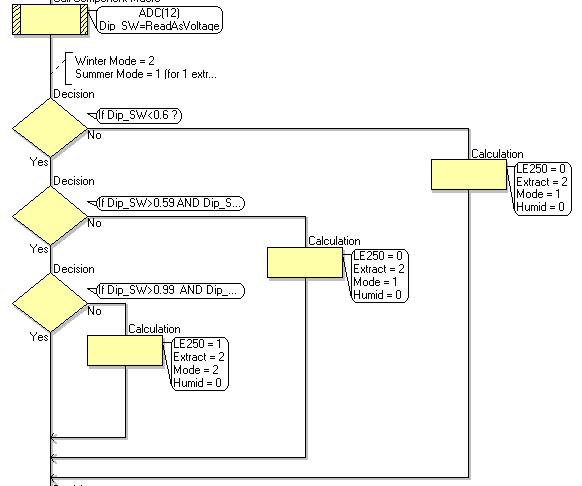
- Decision.JPG (33.59 KiB) Viewed 8481 times
If more than one unit is produced with a tolerence in components, and power supply, without a window, one unit might work, but the next one may not work.
I am already using 4 sets of lookup tables, I have to be careful don't run out of memory.
Re: Setting up decision windows
Posted: Mon Jul 13, 2009 11:59 am
by medelec35
Zoomed in so more of calulations can be seen. Also correct a couple of things.
Ben. I understand what you are saying about the lookup table. I will give it a try, but with just 1 set of numbers 0 to 255.
Then will have to d: If mode= 0 or mode =1 or mode = 2 or mode =3or mode = 4 then.
If mode= 5 or mode =6 or mode = 6 or mode = 8 or mode = 9 then.
Since each number = 5/255=0.196mV
Correction: Just had a look and using 6 sets of look up tables(0 to 255) sofar not 4!
Re: Setting up decision windows
Posted: Mon Jul 13, 2009 12:24 pm
by Steve
I think decisions will only work for integers, and not for floating point values.
Re: Setting up decision windows
Posted: Mon Jul 13, 2009 12:41 pm
by medelec35
Ah. Thanks Steve will change all to integers.
What way would you go with, lookup table or 15 decisions?
Or even something else?
I can totally understand why Ben said about lookup tables.
Just looking for most reliable and simplest solution.
Re: Setting up decision windows
Posted: Mon Jul 13, 2009 1:27 pm
by Benj
Hello
If you have 4 switches connected to your DAC then can you simply take an 8-bit analogue reading, divide the result by 16 and then use the result as the switch result. This may not work if your tolerances are slightly off but you may be able to get away with using this method. This way you would not need the 256 byte lookup table.
If this will not work then you could divide by 2 to get a 128 byte lookup table or divide by 4 to get a 64 byte lookup table etc.
Re: Setting up decision windows
Posted: Mon Jul 13, 2009 1:40 pm
by medelec35
Thanks Ben, that's another good suggestion!
Re: Setting up decision windows
Posted: Mon Jul 13, 2009 2:50 pm
by Steve
Another possibility is to have a function that accepts the analogue input voltage and compares it to each "ideal" voltage in turn. When it finds the closest match (i.e. the one with the smallest value for |Vin - Videal| , the absolute value of the difference), then it will know that is the one. Here's a brief example of what I mean:
Code: Select all
Vdiff = 255
Switch = 255

//Check reading 1 (21 is the first "ideal" reading)
if (Vin > 21)
  ThisDiff = Vin - 21
else
  ThisDiff = 21 - Vin
endif
if (ThisDiff < Vdiff)
  Vdiff = ThisDiff
  Switch = 1
endif

//Check reading 2 (36 is the "ideal" reading)
if (Vin > 36)
  ThisDiff = Vin - 36
else
  ThisDiff = 36 - Vin
endif
if (ThisDiff < Vdiff)
  Vdiff = ThisDiff
  Switch = 2
endif

.
.
.
If you had spare ram, you could create an array of "ideal" values and implement this function as a loop.
I would also keep all of your arithmetic in integer form - using floating point makes the code much more bulky and slow and is best avoided in most situations. So, rather than using a value for the voltage, work with the actual 10-bit ADC reading.
I think Flowcode could do with an elegant way of implementing a look-up table. Also, the new "switch" icon could be changed to accept individual conditions instead of just numbers. Either of these ways would make your code look neater.
Re: Setting up decision windows
Posted: Mon Jul 13, 2009 7:21 pm
by medelec35
Thanks Steve, What you posted last, takes a bit of working out. In the mean time.I have got a working version. do think yours or Ben's way is simpler?
I have posted results form a different set of resistors and completed a Flowchart based on results.
Re: Setting up decision windows
Posted: Tue Jul 14, 2009 7:44 am
by Steve
My way is far superior in every way, but I would say that!!

Seriously though, if you have something that works and you're happy with it then I would probably leave it as it is.
Re: Setting up decision windows
Posted: Tue Jul 14, 2009 8:59 am
by medelec35
lol thanks.