Page 1 of 1
SRM32F411RE Interrupts don't work
Posted: Thu Sep 02, 2021 1:51 am
by nnnnff
This example works fine in FLOWCODE emulation, but does not work when downloaded to the actual chip。WHY?
Re: SRM32F411RE Interrupts don't work
Posted: Thu Sep 02, 2021 9:02 am
by LeighM
Hi,
The timer interrupt is likely working on the target device, but much faster than you expect.
Unfortunately, the calculated period in the Flowcode timer interrupt properties dialogue is incorrect.
This is because Flowcode is not aware of the PLL multiplier and other clock configuration parameters.
You have the Project Options clock speed correctly set to 8MHz for the HSI.
You will need to manually calculate the pre-scaler and rollover values,
based on the clock multipliers and divisors that you have set, to give your desired time period.
Hope that helps
Leigh
Re: SRM32F411RE Interrupts don't work
Posted: Fri Sep 03, 2021 2:13 am
by nnnnff
Thank you very much. You can set the parameters for this example, or you can give me a set example. thank you
Re: SRM32F411RE Interrupts don't work
Posted: Fri Sep 03, 2021 2:57 am
by nnnnff
How do I set the parameters?

- Parameter Settings.jpg (65.9 KiB) Viewed 15399 times
Re: SRM32F411RE Interrupts don't work
Posted: Fri Sep 03, 2021 8:56 am
by LeighM
Hi,
I've done an example based on your original Flowchart,
because on your settings above you have changed to HSE,
but I don't know your external crystal frequency.
btw. For HSI the clock speed should be set to 16MHz (not 8MHz, I was getting confused with the Nucleo board)

- clock_speed.jpg (6.44 KiB) Viewed 15389 times
Or set this to your external crystal frequency if you use HSE.
Using the settings in your previously attached Flowcode project,
the internal HCLK will be 96MHz, and your APB1 Timer clock will also be 96MHz.
So, for example if you require a 100Hz Timer interrupt, the Interrupt properties should be:
Prescaler= 1:64
Rollover = 15000

- properties.jpg (7.31 KiB) Viewed 15389 times
The STM32CubeMX application is useful for visualising the clocks, here's a screen shot
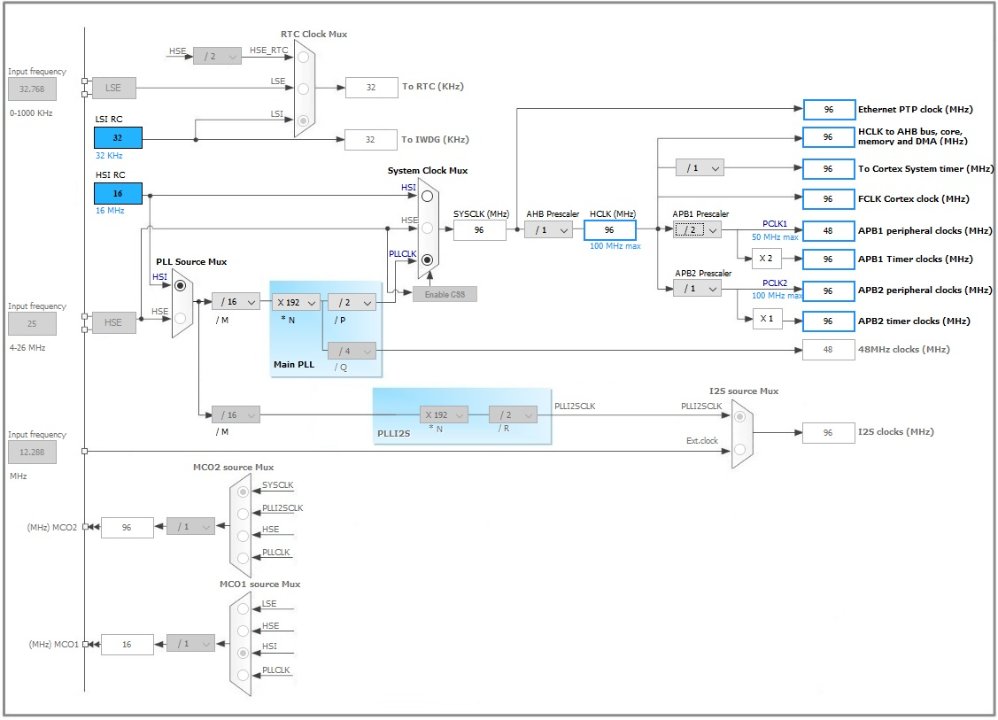
- clocks.jpg (67.72 KiB) Viewed 15389 times
Hope that helps
Leigh
Re: SRM32F411RE Interrupts don't work
Posted: Fri Sep 03, 2021 10:39 am
by nnnnff
8MHZ,external crystal frequency . HSE
Downloaded it to the chip. It doesn't work
Can you help me check if there are any mistakes in the Settings?Thank you very much
Re: SRM32F411RE Interrupts don't work
Posted: Fri Sep 03, 2021 11:24 am
by LeighM
It looks Ok.
Have you tried a simple 1 second LED flash loop, with LED on/off and 1/2 second delays?
Without the timer interrupt.
Just to check the chip is programming and running OK?
Re: SRM32F411RE Interrupts don't work
Posted: Fri Sep 03, 2021 2:53 pm
by LeighM
I've just run a similar program on a 32F446 and it works fine.
I also just noticed that in your latest Flowcode project that you have not changed the Timer Interrupt properties,
you still have Rollover as 1000, so unless you have an oscilloscope on your LED you might not see the on/off state change.
Re: SRM32F411RE Interrupts don't work
Posted: Mon Sep 06, 2021 2:55 am
by nnnnff
Thank you very much! Post your examples so I can study them
Re: SRM32F411RE Interrupts don't work
Posted: Mon Sep 06, 2021 7:56 am
by LeighM
Hi,
I don't have them with me at the moment.
But I suggest you use the project that you first posted.
That used the internal HSI. (So will eliminate any possible issues with your external crystal)
In the project options screen, change the clock speed to 16MHz (from 8MHz)
and then in the Timer interrupt properties, change the Rollover Value to 15000,
as shown in my second post.