Page 1 of 1
Lost panel
Posted: Sun Sep 06, 2009 5:18 pm
by Eric
Hello,
This afternoon ,after a long session, I encountered the same problem that was already mentioned in this forum: I lost my panel.
The vertical height of the panel is reduced to zero. I tried everything I can imagin. but until now I didn't found a way to retrieve it.

- snap0141.jpg (14.78 KiB) Viewed 10953 times
I worked several days on this project without a problem and I have no clue what triggered the disappearance. I didn't touched the panel properies since the start.
I did noticed however that after reopening the session, the panel randomly changed its size frequently.
I also checked the registry to find out if I could change the panelheight manualy, but I find every other window sizes, except the one from the panel.
Can you explain me how to reset the panel height, because in the property window it is not changable and I prefer not to re-enter the complete program.
Recovering from a previous backup is not an option because the problem is already on the backup, which I didn't noticed at the time.

- snap0139.jpg (65.66 KiB) Viewed 10954 times
Thanks for your help,
Eric
Re: Lost panel
Posted: Sun Sep 06, 2009 6:07 pm
by saschech@gmx.de
Hello
For these problem i get the answer...... show screenshot
Steve wrote there is a patch ready,but:
We've fixed this behaviour in the panel now, but we will not release this just yet
Regards Wolfgang
Re: Lost panel
Posted: Mon Sep 07, 2009 9:49 am
by Steve
I think I know what is going on with this. If the panel is attached to the top or the bottom of the workspace, then it can be increased or decreased in size by dragging its edge. By doing this, you can actually reduce its height to zero.
When the height is zero, you should still be able to drag the edge of the panel away from the edge of the workspace. This should solve the problem.
Re: Lost panel
Posted: Mon Sep 07, 2009 10:13 am
by saschech@gmx.de
Hello Steve
I have do advisedly nothing on the panel if i lost!!!!
But all worktime on the panel is for nothing........
Regards Wolfgang
Re: Lost panel
Posted: Mon Sep 07, 2009 10:21 am
by Eric
Hi Steve,
Mmmmm,
I don't think so.
If you grab the titelbar of the panel and move it as far as possible to the top, you get this:

- snap0145.jpg (25.63 KiB) Viewed 10909 times
If you now grab the lower edge of the panel and move it up as far as possible, there is a moment that you can't go further upwards.Like this:
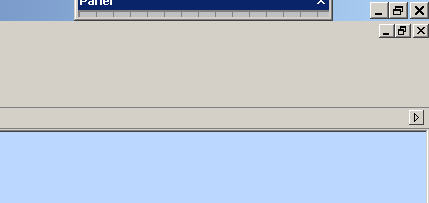
- snap0143.jpg (8.08 KiB) Viewed 10909 times
The same is valid if you shift the panel to the right.
It is impossible to shift the panel to zero. I really think it is a bug.
But if you can find out where I can restore the height ( if necessary in the registry) I can live with it for the moment.
Best regards,
Eric
Re: Lost panel
Posted: Mon Sep 07, 2009 10:37 am
by Steve
You are correct - there is no way of reducing its height to zero when the panel is "floating", but my point was that this happens when the panel is "attached" to the top or bottom of the workspace.
Re: Lost panel
Posted: Mon Sep 07, 2009 11:27 am
by saschech@gmx.de
Hello Eric
I can reproduce now:
show the screenshot`s.
I can open the panel if i go with the mouse over the line for " = " > left mouse-button down > move down > panel open.
Regards Wolfgang
Re: Lost panel
Posted: Mon Sep 07, 2009 12:04 pm
by Eric
Nice, Wolfgang.
But I cannot.
Your panel is docked. I always make make panel floating so that I can shift it aside and have more workspace.
There is no way to grab my panel and expand it back.
It should be here:
And this is were it is (compare the coordinates):

- snap0152.jpg (44.74 KiB) Viewed 10883 times
Steve, no way to change the size value?
Rgds,
Eric
Re: Lost panel
Posted: Mon Sep 07, 2009 1:39 pm
by Steve
Have you tried dragging it from the bottom of the workspace?
Re: Lost panel
Posted: Mon Sep 07, 2009 3:05 pm
by Eric
I checked every spot on the screen: nothing to grab.
I think i have the same problem as Wolfgang (height returned to 0 ), but because his panel was docked and not floating, he still could find a point to grab.
Mine was floating, so I don't know where to grab.
Re: Lost panel
Posted: Mon Sep 07, 2009 3:56 pm
by Steve
The data for the size and position of the panel is saved in the FCF file that Flowcode generates. Please post your program here or send it to me and I'll see if I can modify it so you get your panel back.
Re: Lost panel
Posted: Mon Sep 07, 2009 4:19 pm
by saschech@gmx.de
Hallo Eric
I simulate only Steve`s opinion for lost panel !
In my case of panel-lost without do advisedly nothing , i have the same problem as you.
Regards Wolfgang
Re: Lost panel
Posted: Tue Sep 08, 2009 8:05 pm
by Eric
Hi Steve,
This is it ( far from finished ).
I hope you can recover the panel and find out the reason for it.
Remember: it was a floating panel.
Best regards,
Eric
Re: Lost panel
Posted: Tue Sep 08, 2009 8:08 pm
by Eric
Forgot to tell: the size of the file is very big because in one of my attempts to recover the panel, I added an image to find out if this action could make it visble again. This image ( even don't know anymore which one ) is not needed and can be deleted.
Eric
Re: Lost panel
Posted: Wed Sep 09, 2009 9:24 am
by Steve
Ok, I think I know what is going on, but I'm struggling to get the panel back. It looks like it is floating, but is off screen. Could it be that you had moved it and then reduced your monitor resolution? Or perhaps you previously edited it in a multi-monitor setup and are now trying to view it on a single monitor?
Anyway, I'll try to resurrect the panel in this file and post it up here later today. Watch this space...
Re: Lost panel
Posted: Wed Sep 09, 2009 10:10 am
by Steve
Here it is.
Re: Lost panel
Posted: Wed Sep 09, 2009 1:18 pm
by Eric
Hi Steve,
Perfect.
But what do I have to do to prevent it from happening again in the future?
I don't use 2 monitors and I didn't changed my resolution. In fact I am simply working on a notebook.
Anyway, thanks a lot.
Eric
Re: Lost panel
Posted: Wed Sep 09, 2009 1:32 pm
by Steve
Unfortunately, I don't know why your panel disappeared (the 2 monitor thing was only a guess). If you get this problem again and know what you did please let me know.
In the next release of v4, I'll put some things in place so that the panel can be retrieved more easily (e.g. with a "reset panel position" command or similar).
Re: Lost panel
Posted: Wed Sep 09, 2009 1:52 pm
by Eric
Ok, I will keep an eye on it.