|
|
| (10 intermediate revisions by 2 users not shown) |
| Line 2: |
Line 2: |
| | |- | | |- |
| | | width="20%" style="color:gray;" | Author | | | width="20%" style="color:gray;" | Author |
| − | | Matrix Ltd. | + | | MatrixTSL |
| | |- | | |- |
| | | width="20%" style="color:gray;" | Version | | | width="20%" style="color:gray;" | Version |
| − | | 2.0 | + | | 13.13 |
| | |- | | |- |
| | | width="20%" style="color:gray;" | Category | | | width="20%" style="color:gray;" | Category |
| Line 13: |
Line 13: |
| | | | |
| | ==Switch Array (Slide) component== | | ==Switch Array (Slide) component== |
| − | An array of up to eight slide switches, each connected to a single pin of the specified port. | + | An array of up to eight slide switches. In embedded mode each switch is connected to a single pin of the specified port. |
| | | | |
| − | ==Component Source Code== | + | ==Version information== |
| | | | |
| − | Please click here to download the component source project: [https://www.flowcode.co.uk/wikicopy/componentsource/FC_Comp_Source_switch_array_slide.fcfx FC_Comp_Source_switch_array_slide.fcfx]
| + | Library Version, Component Version, Date, Author, Info |
| − | | + | 9, 9.0, 25-06-24, MW, Added option to customise appearance of individual or all switches |
| − | Please click here to view the component source code (Beta): [https://www.flowcode.co.uk/FlowchartView/?wfile=componentsource/FC_Comp_Source_switch_array_slide.fcfx FC_Comp_Source_switch_array_slide.fcfx]
| + | 10, 10.0, 26-06-24, MW, Corrected switch and component name bug |
| | + | 12, 11.0, 16-04-25, MW, Corrected bug when sim stopped Switch changed from on to off, but pin remained at VCC |
| | + | 12, 11.0, 16-04-25, MW, Added properties of Ev_PropertiesEX to Ev_Initialise |
| | + | 12, 11.0, 16-04-25, MW, Fixed bug so individual customisation now works |
| | + | 12, 11.0, 16-04-25, MW, Created a new component icon |
| | + | 13, 13.0, 25-09-25, MW, updated to brig in-line with Switch Array Push |
| | | | |
| | ==Detailed description== | | ==Detailed description== |
| Line 28: |
Line 33: |
| | | | |
| | | | |
| − |
| |
| − |
| |
| − |
| |
| − |
| |
| − |
| |
| − |
| |
| − |
| |
| − |
| |
| − |
| |
| − |
| |
| − |
| |
| − | ''No detailed description exists yet for this component''
| |
| − |
| |
| − | ==Examples==
| |
| | | | |
| | | | |
| Line 57: |
Line 48: |
| | | | |
| | | | |
| | + | ''No detailed description exists yet for this component'' |
| | | | |
| | + | ==Examples== |
| | | | |
| | Here is an example Flowcode program to read the values of a switch array. | | Here is an example Flowcode program to read the values of a switch array. |
| Line 81: |
Line 74: |
| | (5V / 11K) * 10K = 4.54545V | | (5V / 11K) * 10K = 4.54545V |
| | | | |
| − | ==Macro reference==
| |
| | | | |
| − | {| class="wikitable" style="width:60%; background-color:#FFFFFF;"
| |
| − | |-
| |
| − | | width="10%" align="center" style="background-color:#D8C9D8;" align="center" | [[File:Fc9-comp-macro.png]]
| |
| − | | width="90%" style="background-color:#D8C9D8; color:#4B008D;" | '''ReadState'''
| |
| − | |-
| |
| − | | colspan="2" | Read the state of the switch at the given index.
| |
| − | |-
| |
| − | |-
| |
| − | | width="10%" align="center" | [[File:Fc9-u8-icon.png]] - BYTE
| |
| − | | width="90%" | Index
| |
| − | |-
| |
| − | | colspan="2" | The switch to read the status of.
| |
| − | |-
| |
| − | | width="10%" align="center" style="border-top: 2px solid #000;" | [[File:Fc9-bool-icon.png]] - BOOL
| |
| − | | width="90%" style="border-top: 2px solid #000;" | ''Return''
| |
| − | |}
| |
| − |
| |
| − |
| |
| − | {| class="wikitable" style="width:60%; background-color:#FFFFFF;"
| |
| − | |-
| |
| − | | width="10%" align="center" style="background-color:#D8C9D8;" align="center" | [[File:Fc9-comp-macro.png]]
| |
| − | | width="90%" style="background-color:#D8C9D8; color:#4B008D;" | '''WaitUntilHigh'''
| |
| − | |-
| |
| − | | colspan="2" | Pause the program until the switch at the given index is turned on.
| |
| − | |-
| |
| − | |-
| |
| − | | width="10%" align="center" | [[File:Fc9-u8-icon.png]] - BYTE
| |
| − | | width="90%" | Index
| |
| − | |-
| |
| − | | colspan="2" | Index of the switch to wait for.
| |
| − | |-
| |
| − | | width="10%" align="center" style="border-top: 2px solid #000;" | [[File:Fc9-void-icon.png]] - VOID
| |
| − | | width="90%" style="border-top: 2px solid #000;" | ''Return''
| |
| − | |}
| |
| | | | |
| | + | ==Macro reference== |
| | | | |
| | + | ===ReadAll=== |
| | {| class="wikitable" style="width:60%; background-color:#FFFFFF;" | | {| class="wikitable" style="width:60%; background-color:#FFFFFF;" |
| | |- | | |- |
| Line 132: |
Line 92: |
| | | | |
| | | | |
| − | {| class="wikitable" style="width:60%; background-color:#FFFFFF;"
| + | ===ReadState=== |
| − | |-
| |
| − | | width="10%" align="center" style="background-color:#D8C9D8;" align="center" | [[File:Fc9-comp-macro.png]]
| |
| − | | width="90%" style="background-color:#D8C9D8; color:#4B008D;" | '''GetHandle'''
| |
| − | |-
| |
| − | | colspan="2" | Retrieves the object handle of the switch component at the given index.
| |
| − | |-
| |
| − | |-
| |
| − | | width="10%" align="center" | [[File:Fc9-u8-icon.png]] - BYTE
| |
| − | | width="90%" | Index
| |
| − | |-
| |
| − | | colspan="2" |
| |
| − | |-
| |
| − | | width="10%" align="center" style="border-top: 2px solid #000;" | [[File:Fc9-h32-icon.png]] - HANDLE
| |
| − | | width="90%" style="border-top: 2px solid #000;" | ''Return''
| |
| − | |}
| |
| − | | |
| − | | |
| − | {| class="wikitable" style="width:60%; background-color:#FFFFFF;"
| |
| − | |-
| |
| − | | width="10%" align="center" style="background-color:#D8C9D8;" align="center" | [[File:Fc9-comp-macro.png]]
| |
| − | | width="90%" style="background-color:#D8C9D8; color:#4B008D;" | '''WaitUntilLow'''
| |
| − | |-
| |
| − | | colspan="2" | Pause the program until the switch at the given index is turned on.
| |
| − | |-
| |
| − | |-
| |
| − | | width="10%" align="center" | [[File:Fc9-u8-icon.png]] - BYTE
| |
| − | | width="90%" | Index
| |
| − | |-
| |
| − | | colspan="2" | Index of the switch to wait for.
| |
| − | |-
| |
| − | | width="10%" align="center" style="border-top: 2px solid #000;" | [[File:Fc9-void-icon.png]] - VOID
| |
| − | | width="90%" style="border-top: 2px solid #000;" | ''Return''
| |
| − | |}
| |
| − | | |
| − | | |
| − | | |
| − | | |
| − | ==Property reference==
| |
| − | | |
| − | {| class="wikitable" style="width:60%; background-color:#FFFFFF;"
| |
| − | |-
| |
| − | | width="10%" align="center" style="background-color:#D8C9D8;" | [[File:Fc9-prop-icon.png]]
| |
| − | | width="90%" style="background-color:#D8C9D8; color:#4B008D;" | '''Properties'''
| |
| − | |-
| |
| − | |-
| |
| − | | width="10%" align="center" | [[File:Fc9-type-16-icon.png]]
| |
| − | | width="90%" | Count
| |
| − | |-
| |
| − | | colspan="2" | The number of LEDs in the array from 1 to 8.
| |
| − | |-
| |
| − | | width="10%" align="center" style="background-color:#EAE1EA;" | [[File:Fc9-conn-icon.png]]
| |
| − | | width="90%" style="background-color:#EAE1EA; color:#4B008D;" | Connections
| |
| − | |-
| |
| − | |-
| |
| − | | width="10%" align="center" | [[File:Fc9-type-16-icon.png]]
| |
| − | | width="90%" | Input Mode
| |
| − | |-
| |
| − | | colspan="2" | Choose a single port for all LEDs - pins are allocated in sequence from pin 0 - 7 ...or choose 'Custom pins' to assign each switch individually.
| |
| − | |-
| |
| − | | width="10%" align="center" | [[File:Fc9-type-19-icon.png]]
| |
| − | | width="90%" | Port
| |
| − | |-
| |
| − | | colspan="2" |
| |
| − | |-
| |
| − | | width="10%" align="center" | [[File:Fc9-type-16-icon.png]]
| |
| − | | width="90%" | Polarity
| |
| − | |-
| |
| − | | colspan="2" | Active High = LEDs light when the chosen chip pin is ON Active Low = LEDs light when the chosen chip pin is OFF
| |
| − | |-
| |
| − | | width="10%" align="center" | [[File:Fc9-type-14-icon.png]]
| |
| − | | width="90%" | Debounce
| |
| − | |-
| |
| − | | colspan="2" | Time in milliseconds allowed for the pin to settle following a change of state.
| |
| − | |-
| |
| − | | width="10%" align="center" | [[File:Fc9-type-16-icon.png]]
| |
| − | | width="90%" | Operation
| |
| − | |-
| |
| − | | colspan="2" | Sets whether switches toggle or are press/release. NB) This option can only be set when the original target includes this option.
| |
| − | |-
| |
| − | | width="10%" align="center" style="background-color:#EAE1EA;" | [[File:Fc9-conn-icon.png]]
| |
| − | | width="90%" style="background-color:#EAE1EA; color:#4B008D;" | Simulation
| |
| − | |-
| |
| − | |-
| |
| − | | width="10%" align="center" | [[File:Fc9-type-16-icon.png]]
| |
| − | | width="90%" | Alignment
| |
| − | |-
| |
| − | | colspan="2" | Which 3D axis to align the copies along.
| |
| − | |-
| |
| − | | width="10%" align="center" | [[File:Fc9-type-15-icon.png]]
| |
| − | | width="90%" | Spacing
| |
| − | |-
| |
| − | | colspan="2" | The distance between LEDs in the array. LEDs will be spaced symmetrically around the component centre. Use a negative value to reverse the order of the LEDs.
| |
| − | |-
| |
| − | | width="10%" align="center" | [[File:Fc9-type-7-icon.png]]
| |
| − | | width="90%" | Reverse
| |
| − | |-
| |
| − | | colspan="2" | Whether to reverse the order of the switches.
| |
| − | |-
| |
| − | | width="10%" align="center" | [[File:Fc9-type-16-icon.png]]
| |
| − | | width="90%" | Show Labels
| |
| − | |-
| |
| − | | colspan="2" | Whether to show labels giving each switch's pin connection.
| |
| − | |-
| |
| − | | width="10%" align="center" | [[File:Fc9-type-1-icon.png]]
| |
| − | | width="90%" | Label color
| |
| − | |-
| |
| − | | colspan="2" | Color of the port and pin labels
| |
| − | |}==Macro reference==
| |
| − | | |
| | {| class="wikitable" style="width:60%; background-color:#FFFFFF;" | | {| class="wikitable" style="width:60%; background-color:#FFFFFF;" |
| | |- | | |- |
| Line 260: |
Line 111: |
| | | | |
| | | | |
| | + | ===WaitUntilHigh=== |
| | {| class="wikitable" style="width:60%; background-color:#FFFFFF;" | | {| class="wikitable" style="width:60%; background-color:#FFFFFF;" |
| | |- | | |- |
| Line 278: |
Line 130: |
| | | | |
| | | | |
| − | {| class="wikitable" style="width:60%; background-color:#FFFFFF;"
| + | ===WaitUntilLow=== |
| − | |-
| |
| − | | width="10%" align="center" style="background-color:#D8C9D8;" align="center" | [[File:Fc9-comp-macro.png]]
| |
| − | | width="90%" style="background-color:#D8C9D8; color:#4B008D;" | '''ReadAll'''
| |
| − | |-
| |
| − | | colspan="2" | Reads all of the switches at once, returning a byte containing one bit per switch.
| |
| − | |-
| |
| − | |-
| |
| − | | width="10%" align="center" style="border-top: 2px solid #000;" | [[File:Fc9-u8-icon.png]] - BYTE
| |
| − | | width="90%" style="border-top: 2px solid #000;" | ''Return''
| |
| − | |}
| |
| − | | |
| − | | |
| − | {| class="wikitable" style="width:60%; background-color:#FFFFFF;"
| |
| − | |-
| |
| − | | width="10%" align="center" style="background-color:#D8C9D8;" align="center" | [[File:Fc9-comp-macro.png]]
| |
| − | | width="90%" style="background-color:#D8C9D8; color:#4B008D;" | '''GetHandle'''
| |
| − | |-
| |
| − | | colspan="2" | Retrieves the object handle of the switch component at the given index.
| |
| − | |-
| |
| − | |-
| |
| − | | width="10%" align="center" | [[File:Fc9-u8-icon.png]] - BYTE
| |
| − | | width="90%" | Index
| |
| − | |-
| |
| − | | colspan="2" |
| |
| − | |-
| |
| − | | width="10%" align="center" style="border-top: 2px solid #000;" | [[File:Fc9-h32-icon.png]] - HANDLE
| |
| − | | width="90%" style="border-top: 2px solid #000;" | ''Return''
| |
| − | |}
| |
| − | | |
| − | | |
| | {| class="wikitable" style="width:60%; background-color:#FFFFFF;" | | {| class="wikitable" style="width:60%; background-color:#FFFFFF;" |
| | |- | | |- |
| Line 325: |
Line 147: |
| | | width="90%" style="border-top: 2px solid #000;" | ''Return'' | | | width="90%" style="border-top: 2px solid #000;" | ''Return'' |
| | |} | | |} |
| − |
| |
| − |
| |
| | | | |
| | | | |
| Line 343: |
Line 163: |
| | |- | | |- |
| | | width="10%" align="center" style="background-color:#EAE1EA;" | [[File:Fc9-conn-icon.png]] | | | width="10%" align="center" style="background-color:#EAE1EA;" | [[File:Fc9-conn-icon.png]] |
| − | | width="90%" style="background-color:#EAE1EA; color:#4B008D;" | Connections | + | | width="90%" style="background-color:#EAE1EA; color:#4B008D;" | Function |
| | + | |- |
| | + | |- |
| | + | | width="10%" align="center" | [[File:Fc9-type-7-icon.png]] |
| | + | | width="90%" | Simulation Only |
| | + | |- |
| | + | | colspan="2" | |
| | + | |- |
| | + | | width="10%" align="center" style="background-color:#EAE1EA;" | [[File:Fc9-conn-icon.png]] |
| | + | | width="90%" style="background-color:#EAE1EA; color:#4B008D;" | Switch Settings |
| | |- | | |- |
| | |- | | |- |
| Line 372: |
Line 201: |
| | |- | | |- |
| | | width="10%" align="center" style="background-color:#EAE1EA;" | [[File:Fc9-conn-icon.png]] | | | width="10%" align="center" style="background-color:#EAE1EA;" | [[File:Fc9-conn-icon.png]] |
| − | | width="90%" style="background-color:#EAE1EA; color:#4B008D;" | Simulation | + | | width="90%" style="background-color:#EAE1EA; color:#4B008D;" | Appearance |
| | |- | | |- |
| | |- | | |- |
| | | width="10%" align="center" | [[File:Fc9-type-16-icon.png]] | | | width="10%" align="center" | [[File:Fc9-type-16-icon.png]] |
| − | | width="90%" | Alignment | + | | width="90%" | Component Label |
| | |- | | |- |
| − | | colspan="2" | Which 3D axis to align the copies along. | + | | colspan="2" | Allows you to add your own label to each switch. If Same as Handle is selected then all custom text will be erased. |
| − | |-
| |
| − | | width="10%" align="center" | [[File:Fc9-type-15-icon.png]]
| |
| − | | width="90%" | Spacing
| |
| − | |-
| |
| − | | colspan="2" | The distance between LEDs in the array. LEDs will be spaced symmetrically around the component centre. Use a negative value to reverse the order of the LEDs.
| |
| − | |-
| |
| − | | width="10%" align="center" | [[File:Fc9-type-7-icon.png]]
| |
| − | | width="90%" | Reverse
| |
| − | |-
| |
| − | | colspan="2" | Whether to reverse the order of the switches.
| |
| | |- | | |- |
| | | width="10%" align="center" | [[File:Fc9-type-16-icon.png]] | | | width="10%" align="center" | [[File:Fc9-type-16-icon.png]] |
| − | | width="90%" | Show Labels | + | | width="90%" | Switch layout |
| − | |-
| |
| − | | colspan="2" | Whether to show labels giving each switch's pin connection.
| |
| − | |-
| |
| − | | width="10%" align="center" | [[File:Fc9-type-1-icon.png]]
| |
| − | | width="90%" | Label color
| |
| − | |-
| |
| − | | colspan="2" | Color of the port and pin labels
| |
| − | |}==Macro reference==
| |
| − | | |
| − | {| class="wikitable" style="width:60%; background-color:#FFFFFF;"
| |
| − | |-
| |
| − | | width="10%" align="center" style="background-color:#D8C9D8;" align="center" | [[File:Fc9-comp-macro.png]]
| |
| − | | width="90%" style="background-color:#D8C9D8; color:#4B008D;" | '''ReadState'''
| |
| − | |-
| |
| − | | colspan="2" | Read the state of the switch at the given index.
| |
| − | |-
| |
| − | |-
| |
| − | | width="10%" align="center" | [[File:Fc9-u8-icon.png]] - BYTE
| |
| − | | width="90%" | Index
| |
| − | |-
| |
| − | | colspan="2" | The switch to read the status of.
| |
| − | |-
| |
| − | | width="10%" align="center" style="border-top: 2px solid #000;" | [[File:Fc9-bool-icon.png]] - BOOL
| |
| − | | width="90%" style="border-top: 2px solid #000;" | ''Return''
| |
| − | |}
| |
| − | | |
| − | | |
| − | {| class="wikitable" style="width:60%; background-color:#FFFFFF;"
| |
| − | |-
| |
| − | | width="10%" align="center" style="background-color:#D8C9D8;" align="center" | [[File:Fc9-comp-macro.png]]
| |
| − | | width="90%" style="background-color:#D8C9D8; color:#4B008D;" | '''WaitUntilHigh'''
| |
| − | |-
| |
| − | | colspan="2" | Pause the program until the switch at the given index is turned on.
| |
| − | |-
| |
| − | |-
| |
| − | | width="10%" align="center" | [[File:Fc9-u8-icon.png]] - BYTE
| |
| − | | width="90%" | Index
| |
| − | |-
| |
| − | | colspan="2" | Index of the switch to wait for.
| |
| − | |-
| |
| − | | width="10%" align="center" style="border-top: 2px solid #000;" | [[File:Fc9-void-icon.png]] - VOID
| |
| − | | width="90%" style="border-top: 2px solid #000;" | ''Return''
| |
| − | |}
| |
| − | | |
| − | | |
| − | {| class="wikitable" style="width:60%; background-color:#FFFFFF;"
| |
| − | |-
| |
| − | | width="10%" align="center" style="background-color:#D8C9D8;" align="center" | [[File:Fc9-comp-macro.png]]
| |
| − | | width="90%" style="background-color:#D8C9D8; color:#4B008D;" | '''ReadAll'''
| |
| − | |-
| |
| − | | colspan="2" | Reads all of the switches at once, returning a byte containing one bit per switch.
| |
| − | |-
| |
| − | |-
| |
| − | | width="10%" align="center" style="border-top: 2px solid #000;" | [[File:Fc9-u8-icon.png]] - BYTE
| |
| − | | width="90%" style="border-top: 2px solid #000;" | ''Return''
| |
| − | |}
| |
| − | | |
| − | | |
| − | {| class="wikitable" style="width:60%; background-color:#FFFFFF;"
| |
| − | |-
| |
| − | | width="10%" align="center" style="background-color:#D8C9D8;" align="center" | [[File:Fc9-comp-macro.png]]
| |
| − | | width="90%" style="background-color:#D8C9D8; color:#4B008D;" | '''GetHandle'''
| |
| − | |-
| |
| − | | colspan="2" | Retrieves the object handle of the switch component at the given index.
| |
| − | |-
| |
| − | |-
| |
| − | | width="10%" align="center" | [[File:Fc9-u8-icon.png]] - BYTE
| |
| − | | width="90%" | Index
| |
| | |- | | |- |
| | | colspan="2" | | | | colspan="2" | |
| | |- | | |- |
| − | | width="10%" align="center" style="border-top: 2px solid #000;" | [[File:Fc9-h32-icon.png]] - HANDLE | + | | width="10%" align="center" | [[File:Fc9-type-21-icon.png]] |
| − | | width="90%" style="border-top: 2px solid #000;" | ''Return''
| + | | width="90%" | Distance between switches |
| − | |}
| |
| − | | |
| − | | |
| − | {| class="wikitable" style="width:60%; background-color:#FFFFFF;"
| |
| − | |-
| |
| − | | width="10%" align="center" style="background-color:#D8C9D8;" align="center" | [[File:Fc9-comp-macro.png]]
| |
| − | | width="90%" style="background-color:#D8C9D8; color:#4B008D;" | '''WaitUntilLow'''
| |
| − | |-
| |
| − | | colspan="2" | Pause the program until the switch at the given index is turned on.
| |
| − | |-
| |
| − | |-
| |
| − | | width="10%" align="center" | [[File:Fc9-u8-icon.png]] - BYTE
| |
| − | | width="90%" | Index | |
| − | |-
| |
| − | | colspan="2" | Index of the switch to wait for.
| |
| − | |-
| |
| − | | width="10%" align="center" style="border-top: 2px solid #000;" | [[File:Fc9-void-icon.png]] - VOID
| |
| − | | width="90%" style="border-top: 2px solid #000;" | ''Return''
| |
| − | |}
| |
| − | | |
| − | | |
| − | | |
| − | | |
| − | ==Property reference==
| |
| − | | |
| − | {| class="wikitable" style="width:60%; background-color:#FFFFFF;"
| |
| − | |-
| |
| − | | width="10%" align="center" style="background-color:#D8C9D8;" | [[File:Fc9-prop-icon.png]]
| |
| − | | width="90%" style="background-color:#D8C9D8; color:#4B008D;" | '''Properties'''
| |
| | |- | | |- |
| | + | | colspan="2" | Set distance betwwn each switch. Default = 55 |
| | |- | | |- |
| | | width="10%" align="center" | [[File:Fc9-type-16-icon.png]] | | | width="10%" align="center" | [[File:Fc9-type-16-icon.png]] |
| − | | width="90%" | Count | + | | width="90%" | Style |
| − | |-
| |
| − | | colspan="2" | The number of LEDs in the array from 1 to 8.
| |
| − | |-
| |
| − | | width="10%" align="center" style="background-color:#EAE1EA;" | [[File:Fc9-conn-icon.png]]
| |
| − | | width="90%" style="background-color:#EAE1EA; color:#4B008D;" | Connections
| |
| | |- | | |- |
| | + | | colspan="2" | |
| | |- | | |- |
| | | width="10%" align="center" | [[File:Fc9-type-16-icon.png]] | | | width="10%" align="center" | [[File:Fc9-type-16-icon.png]] |
| − | | width="90%" | Input Mode | + | | width="90%" | Type |
| | |- | | |- |
| − | | colspan="2" | Choose a single port for all LEDs - pins are allocated in sequence from pin 0 - 7 ...or choose 'Custom pins' to assign each switch individually. | + | | colspan="2" | |
| | |- | | |- |
| − | | width="10%" align="center" | [[File:Fc9-type-19-icon.png]] | + | | width="10%" align="center" | [[File:Fc9-type-10-icon.png]] |
| − | | width="90%" | Port | + | | width="90%" | On Label |
| | |- | | |- |
| | | colspan="2" | | | | colspan="2" | |
| | |- | | |- |
| − | | width="10%" align="center" | [[File:Fc9-type-16-icon.png]] | + | | width="10%" align="center" | [[File:Fc9-type-10-icon.png]] |
| − | | width="90%" | Polarity | + | | width="90%" | Off Label |
| | |- | | |- |
| − | | colspan="2" | Active High = LEDs light when the chosen chip pin is ON Active Low = LEDs light when the chosen chip pin is OFF | + | | colspan="2" | |
| | |- | | |- |
| − | | width="10%" align="center" | [[File:Fc9-type-14-icon.png]] | + | | width="10%" align="center" | [[File:Fc9-type-1-icon.png]] |
| − | | width="90%" | Debounce | + | | width="90%" | Label Colour |
| | |- | | |- |
| − | | colspan="2" | Time in milliseconds allowed for the pin to settle following a change of state. | + | | colspan="2" | |
| | |- | | |- |
| − | | width="10%" align="center" | [[File:Fc9-type-16-icon.png]] | + | | width="10%" align="center" | [[File:Fc9-type-7-icon.png]] |
| − | | width="90%" | Operation | + | | width="90%" | Show Connection Label |
| | |- | | |- |
| − | | colspan="2" | Sets whether switches toggle or are press/release. NB) This option can only be set when the original target includes this option. | + | | colspan="2" | |
| − | |-
| |
| − | | width="10%" align="center" style="background-color:#EAE1EA;" | [[File:Fc9-conn-icon.png]]
| |
| − | | width="90%" style="background-color:#EAE1EA; color:#4B008D;" | Simulation
| |
| − | |-
| |
| − | |-
| |
| − | | width="10%" align="center" | [[File:Fc9-type-16-icon.png]]
| |
| − | | width="90%" | Alignment
| |
| − | |-
| |
| − | | colspan="2" | Which 3D axis to align the copies along.
| |
| − | |-
| |
| − | | width="10%" align="center" | [[File:Fc9-type-15-icon.png]]
| |
| − | | width="90%" | Spacing
| |
| − | |-
| |
| − | | colspan="2" | The distance between LEDs in the array. LEDs will be spaced symmetrically around the component centre. Use a negative value to reverse the order of the LEDs.
| |
| | |- | | |- |
| | | width="10%" align="center" | [[File:Fc9-type-7-icon.png]] | | | width="10%" align="center" | [[File:Fc9-type-7-icon.png]] |
| − | | width="90%" | Reverse | + | | width="90%" | Show Pin Value |
| | |- | | |- |
| − | | colspan="2" | Whether to reverse the order of the switches. | + | | colspan="2" | |
| − | |-
| |
| − | | width="10%" align="center" | [[File:Fc9-type-16-icon.png]]
| |
| − | | width="90%" | Show Labels
| |
| − | |-
| |
| − | | colspan="2" | Whether to show labels giving each switch's pin connection.
| |
| − | |-
| |
| − | | width="10%" align="center" | [[File:Fc9-type-1-icon.png]]
| |
| − | | width="90%" | Label color
| |
| − | |-
| |
| − | | colspan="2" | Color of the port and pin labels
| |
| | |} | | |} |
| | + | |
| | + | ==Component Source Code== |
| | + | |
| | + | Please click here to download the component source project: [https://www.flowcode.co.uk/wiki/componentsource/FC_Comp_Source_Switch_Array_Slide_2dgi.fcfx FC_Comp_Source_Switch_Array_Slide_2dgi.fcfx] |
| | + | |
| | + | Please click here to view the component source code (Beta): [https://www.flowcode.co.uk/FlowchartView/?wfile=componentsource/FC_Comp_Source_Switch_Array_Slide_2dgi.fcfx FC_Comp_Source_Switch_Array_Slide_2dgi.fcfx] |
| Author
|
MatrixTSL
|
| Version
|
13.13
|
| Category
|
Switches
|
Switch Array (Slide) component
An array of up to eight slide switches. In embedded mode each switch is connected to a single pin of the specified port.
Version information
Library Version, Component Version, Date, Author, Info
9, 9.0, 25-06-24, MW, Added option to customise appearance of individual or all switches
10, 10.0, 26-06-24, MW, Corrected switch and component name bug
12, 11.0, 16-04-25, MW, Corrected bug when sim stopped Switch changed from on to off, but pin remained at VCC
12, 11.0, 16-04-25, MW, Added properties of Ev_PropertiesEX to Ev_Initialise
12, 11.0, 16-04-25, MW, Fixed bug so individual customisation now works
 12, 11.0, 16-04-25, MW, Created a new component icon
13, 13.0, 25-09-25, MW, updated to brig in-line with Switch Array Push
Detailed description
No detailed description exists yet for this component
Examples
Here is an example Flowcode program to read the values of a switch array.
 Switch Array
Here is a schematic of how to connect a basic switch to a microcontroller pin.
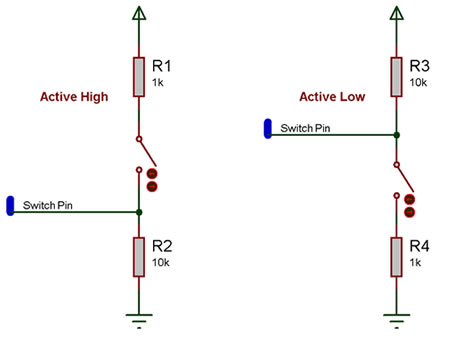
The active high circuit will pass a logical 0 to the input pin when the switch is not pressed and a logical 1 when the switch is pressed.
The active low circuit will pass a logical 1 to the input pin when the switch is not pressed and a logical 0 when the switch is pressed.
There are some differences depending on the type of switch you have, the above states assume a generic push to make type switch, however a push to break type switch would have reversed logic and a toggle switch can work well with either setup.
The resistors are required for correct operation because when a microcontroller's input pin is essentially connected to nothing it will pick up noise in the environment and provide inconsistent readings. This state is referred to as floating i.e. the pin is floating. To test this remove the resistors (if possible) and touch the unconnected pin with your finger the output LED from the example file above will toggle on and off at high speed.
Any values of resistor can be used but it is important to keep the smaller resistor at least 10X smaller then the larger resistor to ensure that the pressed state provides at least 0.91% of the required pressed state voltage. For example a active high switch circuit using 1K and 10K resistors should pull up to about 4.54V when the switch is pressed.
(5V / 11K) * 10K = 4.54545V
Macro reference
ReadAll

|
ReadAll
|
| Reads all of the switches at once, returning a byte containing one bit per switch.
|
 - BYTE - BYTE
|
Return
|
ReadState
|
|
ReadState
|
| Read the state of the switch at the given index.
|
| - BYTE
|
Index
|
| The switch to read the status of.
|
 - BOOL - BOOL
|
Return
|
WaitUntilHigh
|
|
WaitUntilHigh
|
| Pause the program until the switch at the given index is turned on.
|
| - BYTE
|
Index
|
| Index of the switch to wait for.
|
 - VOID - VOID
|
Return
|
WaitUntilLow
|
|
WaitUntilLow
|
| Pause the program until the switch at the given index is turned on.
|
| - BYTE
|
Index
|
| Index of the switch to wait for.
|
| - VOID
|
Return
|
Property reference

|
Properties
|

|
Count
|
| The number of LEDs in the array from 1 to 8.
|

|
Function
|

|
Simulation Only
|
|
|
|
|
Switch Settings
|
|
|
Input Mode
|
| Choose a single port for all LEDs - pins are allocated in sequence from pin 0 - 7 ...or choose 'Custom pins' to assign each switch individually.
|

|
Port
|
|
|
|
|
Polarity
|
| Active High = LEDs light when the chosen chip pin is ON Active Low = LEDs light when the chosen chip pin is OFF
|

|
Debounce
|
| Time in milliseconds allowed for the pin to settle following a change of state.
|
|
|
Operation
|
| Sets whether switches toggle or are press/release. NB) This option can only be set when the original target includes this option.
|
|
|
Appearance
|
|
|
Component Label
|
| Allows you to add your own label to each switch. If Same as Handle is selected then all custom text will be erased.
|
|
|
Switch layout
|
|
|

|
Distance between switches
|
| Set distance betwwn each switch. Default = 55
|
|
|
Style
|
|
|
|
|
Type
|
|
|

|
On Label
|
|
|
|
|
Off Label
|
|
|

|
Label Colour
|
|
|
|
|
Show Connection Label
|
|
|
|
|
Show Pin Value
|
|
|
Component Source Code
Please click here to download the component source project: FC_Comp_Source_Switch_Array_Slide_2dgi.fcfx
Please click here to view the component source code (Beta): FC_Comp_Source_Switch_Array_Slide_2dgi.fcfx


 - BYTE
 - BOOL
 - VOID


