|
|
| (11 intermediate revisions by 2 users not shown) |
| Line 17: |
Line 17: |
| ==Component Source Code== | | ==Component Source Code== |
|
| |
|
| Please click here to download the component source project: [https://www.flowcode.co.uk/wikicopy/componentsource/FC_Comp_Source_InjectorCAN.fcfx FC_Comp_Source_InjectorCAN.fcfx] | | Please click here to download the component source project: [https://www.flowcode.co.uk/wiki/componentsource/FC_Comp_Source_InjectorCAN.fcfx FC_Comp_Source_InjectorCAN.fcfx] |
|
| |
|
| Please click here to view the component source code (Beta): [https://www.flowcode.co.uk/FlowchartView/?wfile=componentsource/FC_Comp_Source_InjectorCAN.fcfx FC_Comp_Source_InjectorCAN.fcfx] | | Please click here to view the component source code (Beta): [https://www.flowcode.co.uk/FlowchartView/?wfile=componentsource/FC_Comp_Source_InjectorCAN.fcfx FC_Comp_Source_InjectorCAN.fcfx] |
|
| |
|
| ==Detailed description== | | ==Detailed description== |
| | |
| | |
| | |
| | |
|
| |
|
|
| |
|
| Line 46: |
Line 50: |
|
| |
|
| ==Examples== | | ==Examples== |
| | |
| | |
| | |
| | |
|
| |
|
|
| |
|
| Line 96: |
Line 104: |
| [[File:CAN_DataFile.jpg]] | | [[File:CAN_DataFile.jpg]] |
|
| |
|
| ==Macro reference==
| |
|
| |
|
| {| class="wikitable" style="width:60%; background-color:#FFFFFF;"
| |
| |-
| |
| | width="10%" align="center" style="background-color:#D8C9D8;" align="center" | [[File:Fc9-comp-macro.png]]
| |
| | width="90%" style="background-color:#D8C9D8; color:#4B008D;" | '''InitialiseInjector'''
| |
| |-
| |
| | colspan="2" | Sets up the injector ready to receive commands or send data
| |
| |-
| |
| |-
| |
| | width="10%" align="center" | [[File:Fc9-string-icon.png]] - STRING
| |
| | width="90%" | InjectorName
| |
| |-
| |
| | colspan="2" | Name of the console that will be created
| |
| |-
| |
| | width="10%" align="center" style="border-top: 2px solid #000;" | [[File:Fc9-u8-icon.png]] - BYTE
| |
| | width="90%" style="border-top: 2px solid #000;" | ''Return''
| |
| |}
| |
|
| |
|
|
| |
|
| {| class="wikitable" style="width:60%; background-color:#FFFFFF;"
| |
| |-
| |
| | width="10%" align="center" style="background-color:#D8C9D8;" align="center" | [[File:Fc9-comp-macro.png]]
| |
| | width="90%" style="background-color:#D8C9D8; color:#4B008D;" | '''TxByte'''
| |
| |-
| |
| | colspan="2" | Puts a byte onto the comms channel. CAN packet is inserted into injector like this: ID3, ID2, ID1, ID0, D7, D6, D5, D4, D3, D2, D1, D0, \n
| |
| |-
| |
| |-
| |
| | width="10%" align="center" | [[File:Fc9-u8-icon.png]] - BYTE
| |
| | width="90%" | DataByte
| |
| |-
| |
| | colspan="2" |
| |
| |-
| |
| | width="10%" align="center" style="border-top: 2px solid #000;" | [[File:Fc9-void-icon.png]] - VOID
| |
| | width="90%" style="border-top: 2px solid #000;" | ''Return''
| |
| |}
| |
|
| |
|
|
| |
|
| {| class="wikitable" style="width:60%; background-color:#FFFFFF;"
| |
| |-
| |
| | width="10%" align="center" style="background-color:#D8C9D8;" align="center" | [[File:Fc9-comp-macro.png]]
| |
| | width="90%" style="background-color:#D8C9D8; color:#4B008D;" | '''RxByte'''
| |
| |-
| |
| | colspan="2" | Attempt to receive a byte back from the injector 0 - 255 = Valid data 256 = RX timeout no data available
| |
| |-
| |
| |-
| |
| | width="10%" align="center" style="border-top: 2px solid #000;" | [[File:Fc9-u16-icon.png]] - UINT
| |
| | width="90%" style="border-top: 2px solid #000;" | ''Return''
| |
| |}
| |
|
| |
|
|
| |
|
| {| class="wikitable" style="width:60%; background-color:#FFFFFF;" | | |
| | |
| | |
| | ==Macro reference== |
| | |
| | ===GetConsoleHandle=== |
| | {| class="mtx-class-macrotable wikitable" |
| |- | | |- |
| | width="10%" align="center" style="background-color:#D8C9D8;" align="center" | [[File:Fc9-comp-macro.png]] | | | width="10%" align="center" class="mtx-class-macrohead" | [[File:Fc9-comp-macro.png]] |
| | width="90%" style="background-color:#D8C9D8; color:#4B008D;" | '''GetConsoleHandle''' | | | width="90%" class="mtx-class-macrohead" | '''GetConsoleHandle''' |
| |- | | |- |
| | colspan="2" | Gets the handle to the console allowing data displaying on the panel etc. | | | colspan="2" | Gets the handle to the console allowing data displaying on the panel etc. |
| Line 165: |
Line 135: |
|
| |
|
|
| |
|
| | | ===InitialiseInjector=== |
| | | {| class="mtx-class-macrotable wikitable" |
| ==Property reference== | |
| | |
| {| class="wikitable" style="width:60%; background-color:#FFFFFF;" | |
| |- | | |- |
| | width="10%" align="center" style="background-color:#D8C9D8;" | [[File:Fc9-prop-icon.png]] | | | width="10%" align="center" class="mtx-class-macrohead" | [[File:Fc9-comp-macro.png]] |
| | width="90%" style="background-color:#D8C9D8; color:#4B008D;" | '''Properties'''
| | | width="90%" class="mtx-class-macrohead" | '''InitialiseInjector''' |
| |-
| |
| |-
| |
| | width="10%" align="center" style="background-color:#EAE1EA;" | [[File:Fc9-conn-icon.png]]
| |
| | width="90%" style="background-color:#EAE1EA; color:#4B008D;" | CAN Injector Settings
| |
| |-
| |
| |-
| |
| | width="10%" align="center" | [[File:Fc9-type-21-icon.png]]
| |
| | width="90%" | Circular Buffer Size
| |
| |-
| |
| | colspan="2" | Number of bytes that can be held in the injector's circular buffer
| |
| |-
| |
| | width="10%" align="center" | [[File:Fc9-type-16-icon.png]]
| |
| | width="90%" | Termination Character
| |
| |-
| |
| | colspan="2" | Used to signify the end of a message, in the case of CAN it will end a specific identifier message
| |
| |-
| |
| | width="10%" align="center" | [[File:Fc9-type-13-icon.png]]
| |
| | width="90%" | CSV ID File
| |
| |-
| |
| | colspan="2" | Location of comma seperated ID description file. e.g. ID,Description 1,Door Open 2,Door Closed 3,Window Open 4,Window Closed 1023,System Disable 1024,System Enable
| |
| |}==Macro reference==
| |
| | |
| {| class="wikitable" style="width:60%; background-color:#FFFFFF;"
| |
| |-
| |
| | width="10%" align="center" style="background-color:#D8C9D8;" align="center" | [[File:Fc9-comp-macro.png]]
| |
| | width="90%" style="background-color:#D8C9D8; color:#4B008D;" | '''InitialiseInjector''' | |
| |- | | |- |
| | colspan="2" | Sets up the injector ready to receive commands or send data | | | colspan="2" | Sets up the injector ready to receive commands or send data |
| Line 213: |
Line 154: |
|
| |
|
|
| |
|
| {| class="wikitable" style="width:60%; background-color:#FFFFFF;"
| | ===RxByte=== |
| |-
| | {| class="mtx-class-macrotable wikitable" |
| | width="10%" align="center" style="background-color:#D8C9D8;" align="center" | [[File:Fc9-comp-macro.png]]
| |
| | width="90%" style="background-color:#D8C9D8; color:#4B008D;" | '''TxByte''' | |
| |-
| |
| | colspan="2" | Puts a byte onto the comms channel. CAN packet is inserted into injector like this: ID3, ID2, ID1, ID0, D7, D6, D5, D4, D3, D2, D1, D0, \n
| |
| |-
| |
| |-
| |
| | width="10%" align="center" | [[File:Fc9-u8-icon.png]] - BYTE
| |
| | width="90%" | DataByte
| |
| |-
| |
| | colspan="2" |
| |
| |-
| |
| | width="10%" align="center" style="border-top: 2px solid #000;" | [[File:Fc9-void-icon.png]] - VOID
| |
| | width="90%" style="border-top: 2px solid #000;" | ''Return''
| |
| |}
| |
| | |
| | |
| {| class="wikitable" style="width:60%; background-color:#FFFFFF;"
| |
| |- | | |- |
| | width="10%" align="center" style="background-color:#D8C9D8;" align="center" | [[File:Fc9-comp-macro.png]] | | | width="10%" align="center" class="mtx-class-macrohead" | [[File:Fc9-comp-macro.png]] |
| | width="90%" style="background-color:#D8C9D8; color:#4B008D;" | '''RxByte''' | | | width="90%" class="mtx-class-macrohead" | '''RxByte''' |
| |- | | |- |
| | colspan="2" | Attempt to receive a byte back from the injector 0 - 255 = Valid data 256 = RX timeout no data available | | | colspan="2" | Attempt to receive a byte back from the injector 0 - 255 = Valid data 256 = RX timeout no data available |
| Line 244: |
Line 168: |
|
| |
|
|
| |
|
| {| class="wikitable" style="width:60%; background-color:#FFFFFF;"
| | ===TxByte=== |
| |-
| | {| class="mtx-class-macrotable wikitable" |
| | width="10%" align="center" style="background-color:#D8C9D8;" align="center" | [[File:Fc9-comp-macro.png]]
| |
| | width="90%" style="background-color:#D8C9D8; color:#4B008D;" | '''GetConsoleHandle'''
| |
| |-
| |
| | colspan="2" | Gets the handle to the console allowing data displaying on the panel etc.
| |
| |-
| |
| |-
| |
| | width="10%" align="center" | [[File:Fc9-u8-icon.png]] - BYTE
| |
| | width="90%" | HandleIndex
| |
| |-
| |
| | colspan="2" | Selects which console handle to obtain - 0=ID/Data 1=ID Meanings
| |
| |-
| |
| | width="10%" align="center" style="border-top: 2px solid #000;" | [[File:Fc9-h32-icon.png]] - HANDLE
| |
| | width="90%" style="border-top: 2px solid #000;" | ''Return''
| |
| |}
| |
| | |
| | |
| | |
| | |
| ==Property reference==
| |
| | |
| {| class="wikitable" style="width:60%; background-color:#FFFFFF;" | |
| |-
| |
| | width="10%" align="center" style="background-color:#D8C9D8;" | [[File:Fc9-prop-icon.png]]
| |
| | width="90%" style="background-color:#D8C9D8; color:#4B008D;" | '''Properties'''
| |
| |-
| |
| |-
| |
| | width="10%" align="center" style="background-color:#EAE1EA;" | [[File:Fc9-conn-icon.png]]
| |
| | width="90%" style="background-color:#EAE1EA; color:#4B008D;" | CAN Injector Settings
| |
| |- | | |- |
| |-
| | | width="10%" align="center" class="mtx-class-macrohead" | [[File:Fc9-comp-macro.png]] |
| | width="10%" align="center" | [[File:Fc9-type-21-icon.png]] | | | width="90%" class="mtx-class-macrohead" | '''TxByte''' |
| | width="90%" | Circular Buffer Size
| |
| |-
| |
| | colspan="2" | Number of bytes that can be held in the injector's circular buffer
| |
| |-
| |
| | width="10%" align="center" | [[File:Fc9-type-16-icon.png]]
| |
| | width="90%" | Termination Character
| |
| |-
| |
| | colspan="2" | Used to signify the end of a message, in the case of CAN it will end a specific identifier message
| |
| |-
| |
| | width="10%" align="center" | [[File:Fc9-type-13-icon.png]]
| |
| | width="90%" | CSV ID File
| |
| |-
| |
| | colspan="2" | Location of comma seperated ID description file. e.g. ID,Description 1,Door Open 2,Door Closed 3,Window Open 4,Window Closed 1023,System Disable 1024,System Enable
| |
| |}==Macro reference==
| |
| | |
| {| class="wikitable" style="width:60%; background-color:#FFFFFF;"
| |
| |-
| |
| | width="10%" align="center" style="background-color:#D8C9D8;" align="center" | [[File:Fc9-comp-macro.png]]
| |
| | width="90%" style="background-color:#D8C9D8; color:#4B008D;" | '''InitialiseInjector''' | |
| |-
| |
| | colspan="2" | Sets up the injector ready to receive commands or send data
| |
| |-
| |
| |-
| |
| | width="10%" align="center" | [[File:Fc9-string-icon.png]] - STRING
| |
| | width="90%" | InjectorName
| |
| |-
| |
| | colspan="2" | Name of the console that will be created
| |
| |-
| |
| | width="10%" align="center" style="border-top: 2px solid #000;" | [[File:Fc9-u8-icon.png]] - BYTE
| |
| | width="90%" style="border-top: 2px solid #000;" | ''Return''
| |
| |}
| |
| | |
| | |
| {| class="wikitable" style="width:60%; background-color:#FFFFFF;"
| |
| |-
| |
| | width="10%" align="center" style="background-color:#D8C9D8;" align="center" | [[File:Fc9-comp-macro.png]]
| |
| | width="90%" style="background-color:#D8C9D8; color:#4B008D;" | '''TxByte'''
| |
| |- | | |- |
| | colspan="2" | Puts a byte onto the comms channel. CAN packet is inserted into injector like this: ID3, ID2, ID1, ID0, D7, D6, D5, D4, D3, D2, D1, D0, \n | | | colspan="2" | Puts a byte onto the comms channel. CAN packet is inserted into injector like this: ID3, ID2, ID1, ID0, D7, D6, D5, D4, D3, D2, D1, D0, \n |
| Line 326: |
Line 185: |
| | width="90%" style="border-top: 2px solid #000;" | ''Return'' | | | width="90%" style="border-top: 2px solid #000;" | ''Return'' |
| |} | | |} |
|
| |
|
| |
| {| class="wikitable" style="width:60%; background-color:#FFFFFF;"
| |
| |-
| |
| | width="10%" align="center" style="background-color:#D8C9D8;" align="center" | [[File:Fc9-comp-macro.png]]
| |
| | width="90%" style="background-color:#D8C9D8; color:#4B008D;" | '''RxByte'''
| |
| |-
| |
| | colspan="2" | Attempt to receive a byte back from the injector 0 - 255 = Valid data 256 = RX timeout no data available
| |
| |-
| |
| |-
| |
| | width="10%" align="center" style="border-top: 2px solid #000;" | [[File:Fc9-u16-icon.png]] - UINT
| |
| | width="90%" style="border-top: 2px solid #000;" | ''Return''
| |
| |}
| |
|
| |
|
| |
| {| class="wikitable" style="width:60%; background-color:#FFFFFF;"
| |
| |-
| |
| | width="10%" align="center" style="background-color:#D8C9D8;" align="center" | [[File:Fc9-comp-macro.png]]
| |
| | width="90%" style="background-color:#D8C9D8; color:#4B008D;" | '''GetConsoleHandle'''
| |
| |-
| |
| | colspan="2" | Gets the handle to the console allowing data displaying on the panel etc.
| |
| |-
| |
| |-
| |
| | width="10%" align="center" | [[File:Fc9-u8-icon.png]] - BYTE
| |
| | width="90%" | HandleIndex
| |
| |-
| |
| | colspan="2" | Selects which console handle to obtain - 0=ID/Data 1=ID Meanings
| |
| |-
| |
| | width="10%" align="center" style="border-top: 2px solid #000;" | [[File:Fc9-h32-icon.png]] - HANDLE
| |
| | width="90%" style="border-top: 2px solid #000;" | ''Return''
| |
| |}
| |
|
| |
|
| |
|
| |
|
|
| |
|
| ==Property reference== | | ==Property reference== |
|
| |
|
| {| class="wikitable" style="width:60%; background-color:#FFFFFF;" | | {| class="mtx-class-macrotable wikitable" |
| |- | | |- |
| | width="10%" align="center" style="background-color:#D8C9D8;" | [[File:Fc9-prop-icon.png]] | | | width="10%" align="center" class="mtx-class-macrohead" | [[File:Fc9-prop-icon.png]] |
| | width="90%" style="background-color:#D8C9D8; color:#4B008D;" | '''Properties''' | | | width="90%" class="mtx-class-macrohead" | '''Properties''' |
| |- | | |- |
| |- | | |- |
| | width="10%" align="center" style="background-color:#EAE1EA;" | [[File:Fc9-conn-icon.png]] | | | width="10%" align="center" class="mtx-class-propfolder" | [[File:Fc9-conn-icon.png]] |
| | width="90%" style="background-color:#EAE1EA; color:#4B008D;" | CAN Injector Settings | | | width="90%" class="mtx-class-propfolder" | CAN Injector Settings |
| |- | | |- |
| |- | | |- |
| Author
|
Matrix Ltd
|
| Version
|
1.0
|
| Category
|
|
Injector (CAN) component
Comms data injector to allow CAN message identifiers to be decoded to specific message strings. Uses an external CSV file to specify the IDs and descriptive strings.
Component Source Code
Please click here to download the component source project: FC_Comp_Source_InjectorCAN.fcfx
Please click here to view the component source code (Beta): FC_Comp_Source_InjectorCAN.fcfx
Detailed description
No detailed description exists yet for this component
Examples
The CAN component works together with the injector component to allow you to decode a CAN message ID into a meaningful command.
Example File
 CAN_Example1
When a key on the keypad is pressed the CAN components transmits a CAN packet.
CAN_Example1
When a key on the keypad is pressed the CAN components transmits a CAN packet.
The CAN packet is decoded by the injector component to give us a meaningful log on the console window.
High Level CAN Data Console
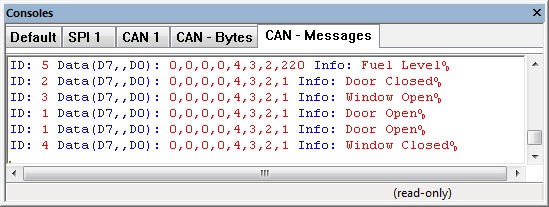
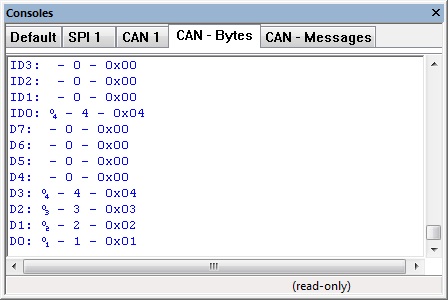
Low Level CAN Data Console
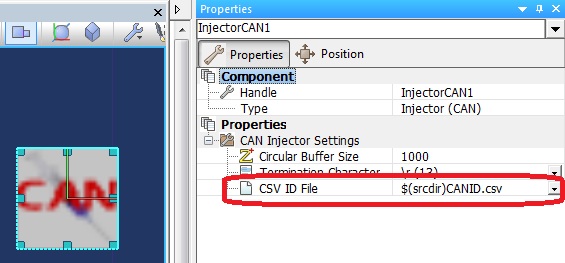
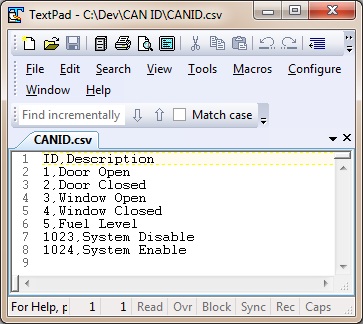
Reference from CAN Injector to ID decode file, $(srcdir) refers to the current project directory.
Demo CAN ID file File:CANID.csv
Macro reference
GetConsoleHandle

|
GetConsoleHandle
|
| Gets the handle to the console allowing data displaying on the panel etc.
|
 - BYTE - BYTE
|
HandleIndex
|
| Selects which console handle to obtain - 0=ID/Data 1=ID Meanings
|
 - HANDLE - HANDLE
|
Return
|
InitialiseInjector
|
|
InitialiseInjector
|
| Sets up the injector ready to receive commands or send data
|
 - STRING - STRING
|
InjectorName
|
| Name of the console that will be created
|
| - BYTE
|
Return
|
RxByte
|
|
RxByte
|
| Attempt to receive a byte back from the injector 0 - 255 = Valid data 256 = RX timeout no data available
|
 - UINT - UINT
|
Return
|
TxByte
|
|
TxByte
|
| Puts a byte onto the comms channel. CAN packet is inserted into injector like this: ID3, ID2, ID1, ID0, D7, D6, D5, D4, D3, D2, D1, D0, \n
|
| - BYTE
|
DataByte
|
|
|
 - VOID - VOID
|
Return
|
Property reference

|
Properties
|

|
CAN Injector Settings
|

|
Circular Buffer Size
|
| Number of bytes that can be held in the injector's circular buffer
|

|
Termination Character
|
| Used to signify the end of a message, in the case of CAN it will end a specific identifier message
|

|
CSV ID File
|
| Location of comma seperated ID description file. e.g. ID,Description 1,Door Open 2,Door Closed 3,Window Open 4,Window Closed 1023,System Disable 1024,System Enable
|


 - BYTE
 - HANDLE
 - STRING
 - UINT
 - VOID


