|
|
| (13 intermediate revisions by 2 users not shown) |
| Line 17: |
Line 17: |
| ==Component Source Code== | | ==Component Source Code== |
|
| |
|
| Please click here to download the component source project: [https://www.flowcode.co.uk/wikicopy/componentsource/FC_Comp_Source_Solenoid_DC.fcfx FC_Comp_Source_Solenoid_DC.fcfx] | | Please click here to download the component source project: [https://www.flowcode.co.uk/wiki/componentsource/FC_Comp_Source_Solenoid_DC.fcfx FC_Comp_Source_Solenoid_DC.fcfx] |
|
| |
|
| Please click here to view the component source code (Beta): [https://www.flowcode.co.uk/FlowchartView/?wfile=componentsource/FC_Comp_Source_Solenoid_DC.fcfx FC_Comp_Source_Solenoid_DC.fcfx] | | Please click here to view the component source code (Beta): [https://www.flowcode.co.uk/FlowchartView/?wfile=componentsource/FC_Comp_Source_Solenoid_DC.fcfx FC_Comp_Source_Solenoid_DC.fcfx] |
|
| |
|
| ==Detailed description== | | ==Detailed description== |
| | |
| | |
| | |
| | |
|
| |
|
|
| |
|
| Line 36: |
Line 40: |
|
| |
|
| ==Examples== | | ==Examples== |
| | |
| | |
| | |
| | |
|
| |
|
|
| |
|
| Line 59: |
Line 67: |
| If the solenoid requires a large DC voltage, say 12V then you can connect the 12V directly to the top of the solenoid as shown above rather than using VCC or VDD. The transistor / FET will protect the micro from the large Voltage. | | If the solenoid requires a large DC voltage, say 12V then you can connect the 12V directly to the top of the solenoid as shown above rather than using VCC or VDD. The transistor / FET will protect the micro from the large Voltage. |
|
| |
|
| ==Macro reference==
| |
|
| |
|
| {| class="wikitable" style="width:60%; background-color:#FFFFFF;"
| |
| |-
| |
| | width="10%" align="center" style="background-color:#D8C9D8;" align="center" | [[File:Fc9-comp-macro.png]]
| |
| | width="90%" style="background-color:#D8C9D8; color:#4B008D;" | '''SetTarget'''
| |
| |-
| |
| | colspan="2" | Choose an extermal object to move along with the solenoid's actuator
| |
| |-
| |
| |-
| |
| | width="10%" align="center" | [[File:Fc9-h32-icon.png]] - HANDLE
| |
| | width="90%" | Object
| |
| |-
| |
| | colspan="2" | An object to be moved by the solenoid
| |
| |-
| |
| | width="10%" align="center" style="border-top: 2px solid #000;" | [[File:Fc9-void-icon.png]] - VOID
| |
| | width="90%" style="border-top: 2px solid #000;" | ''Return''
| |
| |}
| |
|
| |
|
| |
| {| class="wikitable" style="width:60%; background-color:#FFFFFF;"
| |
| |-
| |
| | width="10%" align="center" style="background-color:#D8C9D8;" align="center" | [[File:Fc9-comp-macro.png]]
| |
| | width="90%" style="background-color:#D8C9D8; color:#4B008D;" | '''TurnOn'''
| |
| |-
| |
| | colspan="2" | Activate the solenoid
| |
| |-
| |
| |-
| |
| | width="10%" align="center" style="border-top: 2px solid #000;" | [[File:Fc9-void-icon.png]] - VOID
| |
| | width="90%" style="border-top: 2px solid #000;" | ''Return''
| |
| |}
| |
|
| |
|
|
| |
|
| {| class="wikitable" style="width:60%; background-color:#FFFFFF;"
| |
| |-
| |
| | width="10%" align="center" style="background-color:#D8C9D8;" align="center" | [[File:Fc9-comp-macro.png]]
| |
| | width="90%" style="background-color:#D8C9D8; color:#4B008D;" | '''SetState'''
| |
| |-
| |
| | colspan="2" | Trun the solenoid on or off using a boolean value.
| |
| |-
| |
| |-
| |
| | width="10%" align="center" | [[File:Fc9-bool-icon.png]] - BOOL
| |
| | width="90%" | State
| |
| |-
| |
| | colspan="2" | The new state for the solenoid to take.
| |
| |-
| |
| | width="10%" align="center" style="border-top: 2px solid #000;" | [[File:Fc9-void-icon.png]] - VOID
| |
| | width="90%" style="border-top: 2px solid #000;" | ''Return''
| |
| |}
| |
|
| |
|
|
| |
|
| {| class="wikitable" style="width:60%; background-color:#FFFFFF;"
| |
| |-
| |
| | width="10%" align="center" style="background-color:#D8C9D8;" align="center" | [[File:Fc9-comp-macro.png]]
| |
| | width="90%" style="background-color:#D8C9D8; color:#4B008D;" | '''TurnOff'''
| |
| |-
| |
| | colspan="2" | De-activate the solenoid
| |
| |-
| |
| |-
| |
| | width="10%" align="center" style="border-top: 2px solid #000;" | [[File:Fc9-void-icon.png]] - VOID
| |
| | width="90%" style="border-top: 2px solid #000;" | ''Return''
| |
| |}
| |
|
| |
|
|
| |
|
|
| |
|
|
| |
|
| ==Property reference==
| |
|
| |
|
| {| class="wikitable" style="width:60%; background-color:#FFFFFF;"
| |
| |-
| |
| | width="10%" align="center" style="background-color:#D8C9D8;" | [[File:Fc9-prop-icon.png]]
| |
| | width="90%" style="background-color:#D8C9D8; color:#4B008D;" | '''Properties'''
| |
| |-
| |
| |-
| |
| | width="10%" align="center" style="background-color:#EAE1EA;" | [[File:Fc9-conn-icon.png]]
| |
| | width="90%" style="background-color:#EAE1EA; color:#4B008D;" | Connection
| |
| |-
| |
| |-
| |
| | width="10%" align="center" | [[File:Fc9-type-5-icon.png]]
| |
| | width="90%" | Pin
| |
| |-
| |
| | colspan="2" | Chip pin to connect the solenoid circuit to. NB) Solenoid cannot be moved unless there is a valid connection.
| |
| |}==Macro reference==
| |
|
| |
|
| {| class="wikitable" style="width:60%; background-color:#FFFFFF;"
| |
| |-
| |
| | width="10%" align="center" style="background-color:#D8C9D8;" align="center" | [[File:Fc9-comp-macro.png]]
| |
| | width="90%" style="background-color:#D8C9D8; color:#4B008D;" | '''SetTarget'''
| |
| |-
| |
| | colspan="2" | Choose an extermal object to move along with the solenoid's actuator
| |
| |-
| |
| |-
| |
| | width="10%" align="center" | [[File:Fc9-h32-icon.png]] - HANDLE
| |
| | width="90%" | Object
| |
| |-
| |
| | colspan="2" | An object to be moved by the solenoid
| |
| |-
| |
| | width="10%" align="center" style="border-top: 2px solid #000;" | [[File:Fc9-void-icon.png]] - VOID
| |
| | width="90%" style="border-top: 2px solid #000;" | ''Return''
| |
| |}
| |
|
| |
|
|
| |
|
| {| class="wikitable" style="width:60%; background-color:#FFFFFF;"
| |
| |-
| |
| | width="10%" align="center" style="background-color:#D8C9D8;" align="center" | [[File:Fc9-comp-macro.png]]
| |
| | width="90%" style="background-color:#D8C9D8; color:#4B008D;" | '''TurnOn'''
| |
| |-
| |
| | colspan="2" | Activate the solenoid
| |
| |-
| |
| |-
| |
| | width="10%" align="center" style="border-top: 2px solid #000;" | [[File:Fc9-void-icon.png]] - VOID
| |
| | width="90%" style="border-top: 2px solid #000;" | ''Return''
| |
| |}
| |
|
| |
|
| | ==Macro reference== |
|
| |
|
| {| class="wikitable" style="width:60%; background-color:#FFFFFF;" | | ===SetState=== |
| | {| class="mtx-class-macrotable wikitable" |
| |- | | |- |
| | width="10%" align="center" style="background-color:#D8C9D8;" align="center" | [[File:Fc9-comp-macro.png]] | | | width="10%" align="center" class="mtx-class-macrohead" | [[File:Fc9-comp-macro.png]] |
| | width="90%" style="background-color:#D8C9D8; color:#4B008D;" | '''SetState''' | | | width="90%" class="mtx-class-macrohead" | '''SetState''' |
| |- | | |- |
| | colspan="2" | Trun the solenoid on or off using a boolean value. | | | colspan="2" | Trun the solenoid on or off using a boolean value. |
| Line 192: |
Line 102: |
|
| |
|
|
| |
|
| {| class="wikitable" style="width:60%; background-color:#FFFFFF;"
| | ===SetTarget=== |
| |-
| | {| class="mtx-class-macrotable wikitable" |
| | width="10%" align="center" style="background-color:#D8C9D8;" align="center" | [[File:Fc9-comp-macro.png]]
| |
| | width="90%" style="background-color:#D8C9D8; color:#4B008D;" | '''TurnOff'''
| |
| |-
| |
| | colspan="2" | De-activate the solenoid
| |
| |-
| |
| |-
| |
| | width="10%" align="center" style="border-top: 2px solid #000;" | [[File:Fc9-void-icon.png]] - VOID
| |
| | width="90%" style="border-top: 2px solid #000;" | ''Return''
| |
| |}
| |
| | |
| | |
| | |
| | |
| ==Property reference==
| |
| | |
| {| class="wikitable" style="width:60%; background-color:#FFFFFF;" | |
| |-
| |
| | width="10%" align="center" style="background-color:#D8C9D8;" | [[File:Fc9-prop-icon.png]]
| |
| | width="90%" style="background-color:#D8C9D8; color:#4B008D;" | '''Properties'''
| |
| |-
| |
| |-
| |
| | width="10%" align="center" style="background-color:#EAE1EA;" | [[File:Fc9-conn-icon.png]]
| |
| | width="90%" style="background-color:#EAE1EA; color:#4B008D;" | Connection
| |
| |-
| |
| |-
| |
| | width="10%" align="center" | [[File:Fc9-type-5-icon.png]]
| |
| | width="90%" | Pin
| |
| |-
| |
| | colspan="2" | Chip pin to connect the solenoid circuit to. NB) Solenoid cannot be moved unless there is a valid connection.
| |
| |}==Macro reference==
| |
| | |
| {| class="wikitable" style="width:60%; background-color:#FFFFFF;"
| |
| |- | | |- |
| | width="10%" align="center" style="background-color:#D8C9D8;" align="center" | [[File:Fc9-comp-macro.png]] | | | width="10%" align="center" class="mtx-class-macrohead" | [[File:Fc9-comp-macro.png]] |
| | width="90%" style="background-color:#D8C9D8; color:#4B008D;" | '''SetTarget''' | | | width="90%" class="mtx-class-macrohead" | '''SetTarget''' |
| |- | | |- |
| | colspan="2" | Choose an extermal object to move along with the solenoid's actuator | | | colspan="2" | Choose an extermal object to move along with the solenoid's actuator |
| Line 243: |
Line 121: |
|
| |
|
|
| |
|
| {| class="wikitable" style="width:60%; background-color:#FFFFFF;" | | ===TurnOff=== |
| | {| class="mtx-class-macrotable wikitable" |
| |- | | |- |
| | width="10%" align="center" style="background-color:#D8C9D8;" align="center" | [[File:Fc9-comp-macro.png]] | | | width="10%" align="center" class="mtx-class-macrohead" | [[File:Fc9-comp-macro.png]] |
| | width="90%" style="background-color:#D8C9D8; color:#4B008D;" | '''TurnOn''' | | | width="90%" class="mtx-class-macrohead" | '''TurnOff''' |
| |- | | |- |
| | colspan="2" | Activate the solenoid | | | colspan="2" | De-activate the solenoid |
| |- | | |- |
| |- | | |- |
| Line 256: |
Line 135: |
|
| |
|
|
| |
|
| {| class="wikitable" style="width:60%; background-color:#FFFFFF;" | | ===TurnOn=== |
| | {| class="mtx-class-macrotable wikitable" |
| |- | | |- |
| | width="10%" align="center" style="background-color:#D8C9D8;" align="center" | [[File:Fc9-comp-macro.png]] | | | width="10%" align="center" class="mtx-class-macrohead" | [[File:Fc9-comp-macro.png]] |
| | width="90%" style="background-color:#D8C9D8; color:#4B008D;" | '''SetState''' | | | width="90%" class="mtx-class-macrohead" | '''TurnOn''' |
| |- | | |- |
| | colspan="2" | Trun the solenoid on or off using a boolean value. | | | colspan="2" | Activate the solenoid |
| |- | | |- |
| |-
| |
| | width="10%" align="center" | [[File:Fc9-bool-icon.png]] - BOOL
| |
| | width="90%" | State
| |
| |-
| |
| | colspan="2" | The new state for the solenoid to take.
| |
| |- | | |- |
| | width="10%" align="center" style="border-top: 2px solid #000;" | [[File:Fc9-void-icon.png]] - VOID | | | width="10%" align="center" style="border-top: 2px solid #000;" | [[File:Fc9-void-icon.png]] - VOID |
| | width="90%" style="border-top: 2px solid #000;" | ''Return'' | | | width="90%" style="border-top: 2px solid #000;" | ''Return'' |
| |} | | |} |
|
| |
|
| |
| {| class="wikitable" style="width:60%; background-color:#FFFFFF;"
| |
| |-
| |
| | width="10%" align="center" style="background-color:#D8C9D8;" align="center" | [[File:Fc9-comp-macro.png]]
| |
| | width="90%" style="background-color:#D8C9D8; color:#4B008D;" | '''TurnOff'''
| |
| |-
| |
| | colspan="2" | De-activate the solenoid
| |
| |-
| |
| |-
| |
| | width="10%" align="center" style="border-top: 2px solid #000;" | [[File:Fc9-void-icon.png]] - VOID
| |
| | width="90%" style="border-top: 2px solid #000;" | ''Return''
| |
| |}
| |
|
| |
|
| |
|
| |
|
|
| |
|
| ==Property reference== | | ==Property reference== |
|
| |
|
| {| class="wikitable" style="width:60%; background-color:#FFFFFF;" | | {| class="mtx-class-macrotable wikitable" |
| |- | | |- |
| | width="10%" align="center" style="background-color:#D8C9D8;" | [[File:Fc9-prop-icon.png]] | | | width="10%" align="center" class="mtx-class-macrohead" | [[File:Fc9-prop-icon.png]] |
| | width="90%" style="background-color:#D8C9D8; color:#4B008D;" | '''Properties''' | | | width="90%" class="mtx-class-macrohead" | '''Properties''' |
| |- | | |- |
| |- | | |- |
| | width="10%" align="center" style="background-color:#EAE1EA;" | [[File:Fc9-conn-icon.png]] | | | width="10%" align="center" class="mtx-class-propfolder" | [[File:Fc9-conn-icon.png]] |
| | width="90%" style="background-color:#EAE1EA; color:#4B008D;" | Connection | | | width="90%" class="mtx-class-propfolder" | Connection |
| |- | | |- |
| |- | | |- |
| Author
|
Matrix Ltd
|
| Version
|
1.2
|
| Category
|
Mechatronics
|
Solenoid DC component
Simple open frame solenoid based on the Benson BDC.4 series.
Component Source Code
Please click here to download the component source project: FC_Comp_Source_Solenoid_DC.fcfx
Please click here to view the component source code (Beta): FC_Comp_Source_Solenoid_DC.fcfx
Detailed description
No detailed description exists yet for this component
Examples
A solenoid will likely require more current than a microcontroller device can supply to activate the mechanical mechanism.
To amplify the current from the microcontroller simply use a NPN transistor or N channel FET.
The diode is required as with any inductive loads to help protect the microcontroller from back EMF generated by the inductor as the control signal switches the current through the inductor on and off
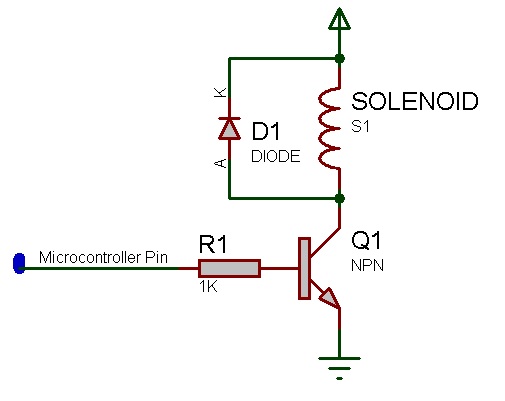
If the solenoid requires a large DC voltage, say 12V then you can connect the 12V directly to the top of the solenoid as shown above rather than using VCC or VDD. The transistor / FET will protect the micro from the large Voltage.
Macro reference
SetState

|
SetState
|
| Trun the solenoid on or off using a boolean value.
|
 - BOOL - BOOL
|
State
|
| The new state for the solenoid to take.
|
 - VOID - VOID
|
Return
|
SetTarget
|
|
SetTarget
|
| Choose an extermal object to move along with the solenoid's actuator
|
 - HANDLE - HANDLE
|
Object
|
| An object to be moved by the solenoid
|
| - VOID
|
Return
|
TurnOff
|
|
TurnOff
|
| De-activate the solenoid
|
| - VOID
|
Return
|
TurnOn
|
|
TurnOn
|
| Activate the solenoid
|
| - VOID
|
Return
|
Property reference

|
Properties
|

|
Connection
|

|
Pin
|
| Chip pin to connect the solenoid circuit to. NB) Solenoid cannot be moved unless there is a valid connection.
|


 - BOOL
 - VOID
 - HANDLE


