|
|
| Line 22: |
Line 22: |
|
| |
|
| ==Detailed description== | | ==Detailed description== |
| | |
| | |
|
| |
|
|
| |
|
| Line 48: |
Line 50: |
|
| |
|
| ==Examples== | | ==Examples== |
| | |
| | |
|
| |
|
|
| |
|
| Line 97: |
Line 101: |
| * If Show Border is enabled then Width and Height should be as above plus 2 to account for the border pixels | | * If Show Border is enabled then Width and Height should be as above plus 2 to account for the border pixels |
|
| |
|
| ==Macro reference==
| |
|
| |
|
| {| class="wikitable" style="width:60%; background-color:#FFFFFF;"
| |
| |-
| |
| | width="10%" align="center" style="background-color:#D8C9D8;" align="center" | [[File:Fc9-comp-macro.png]]
| |
| | width="90%" style="background-color:#D8C9D8; color:#4B008D;" | '''Initialise'''
| |
| |-
| |
| | colspan="2" | Configures the menu and assigns the coordinates on the LCD.
| |
| |-
| |
| |-
| |
| | width="10%" align="center" | [[File:Fc9-u16-icon.png]] - UINT
| |
| | width="90%" | X
| |
| |-
| |
| | colspan="2" |
| |
| |-
| |
| | width="10%" align="center" | [[File:Fc9-u16-icon.png]] - UINT
| |
| | width="90%" | Y
| |
| |-
| |
| | colspan="2" |
| |
| |-
| |
| | width="10%" align="center" | [[File:Fc9-u16-icon.png]] - UINT
| |
| | width="90%" | Width
| |
| |-
| |
| | colspan="2" |
| |
| |-
| |
| | width="10%" align="center" | [[File:Fc9-u16-icon.png]] - UINT
| |
| | width="90%" | Height
| |
| |-
| |
| | colspan="2" |
| |
| |-
| |
| | width="10%" align="center" | [[File:Fc9-u8-icon.png]] - BYTE
| |
| | width="90%" | Font
| |
| |-
| |
| | colspan="2" |
| |
| |-
| |
| | width="10%" align="center" style="border-top: 2px solid #000;" | [[File:Fc9-void-icon.png]] - VOID
| |
| | width="90%" style="border-top: 2px solid #000;" | ''Return''
| |
| |}
| |
|
| |
|
| | | ==Macro reference== |
| | |
| | |
| ==Property reference==
| |
| | |
| {| class="wikitable" style="width:60%; background-color:#FFFFFF;"
| |
| |-
| |
| | width="10%" align="center" style="background-color:#D8C9D8;" | [[File:Fc9-prop-icon.png]]
| |
| | width="90%" style="background-color:#D8C9D8; color:#4B008D;" | '''Properties'''
| |
| |-
| |
| |-
| |
| | width="10%" align="center" | [[File:Fc9-type-17-icon.png]]
| |
| | width="90%" | gLCD Object
| |
| |-
| |
| | colspan="2" | Graphical LCD Object to draw the bitmap image to
| |
| |-
| |
| | width="10%" align="center" | [[File:Fc9-type-21-icon.png]]
| |
| | width="90%" | Max Items
| |
| |-
| |
| | colspan="2" | Sets the maximum number of menu items available.
| |
| |-
| |
| | width="10%" align="center" | [[File:Fc9-type-21-icon.png]]
| |
| | width="90%" | Max Item Length
| |
| |-
| |
| | colspan="2" | Sets the maximum number of bytes to reserve for each menu item
| |
| |-
| |
| | width="10%" align="center" | [[File:Fc9-type-16-icon.png]]
| |
| | width="90%" | MarkerStyle
| |
| |-
| |
| | colspan="2" |
| |
| |-
| |
| | width="10%" align="center" | [[File:Fc9-type-1-icon.png]]
| |
| | width="90%" | Foreground Colour
| |
| |-
| |
| | colspan="2" |
| |
| |-
| |
| | width="10%" align="center" | [[File:Fc9-type-1-icon.png]]
| |
| | width="90%" | Background Colour
| |
| |-
| |
| | colspan="2" |
| |
| |-
| |
| | width="10%" align="center" | [[File:Fc9-type-7-icon.png]]
| |
| | width="90%" | ColourDisplay
| |
| |-
| |
| | colspan="2" | Automatically detects if the graphical LCD object is colour or monochrome
| |
| |}==Macro reference==
| |
| | |
| {| class="wikitable" style="width:60%; background-color:#FFFFFF;"
| |
| |-
| |
| | width="10%" align="center" style="background-color:#D8C9D8;" align="center" | [[File:Fc9-comp-macro.png]]
| |
| | width="90%" style="background-color:#D8C9D8; color:#4B008D;" | '''Initialise'''
| |
| |-
| |
| | colspan="2" | Configures the menu and assigns the coordinates on the LCD.
| |
| |-
| |
| |-
| |
| | width="10%" align="center" | [[File:Fc9-u16-icon.png]] - UINT
| |
| | width="90%" | X
| |
| |-
| |
| | colspan="2" |
| |
| |-
| |
| | width="10%" align="center" | [[File:Fc9-u16-icon.png]] - UINT
| |
| | width="90%" | Y
| |
| |-
| |
| | colspan="2" |
| |
| |-
| |
| | width="10%" align="center" | [[File:Fc9-u16-icon.png]] - UINT
| |
| | width="90%" | Width
| |
| |-
| |
| | colspan="2" |
| |
| |-
| |
| | width="10%" align="center" | [[File:Fc9-u16-icon.png]] - UINT
| |
| | width="90%" | Height
| |
| |-
| |
| | colspan="2" |
| |
| |-
| |
| | width="10%" align="center" | [[File:Fc9-u8-icon.png]] - BYTE
| |
| | width="90%" | Font
| |
| |-
| |
| | colspan="2" |
| |
| |-
| |
| | width="10%" align="center" style="border-top: 2px solid #000;" | [[File:Fc9-void-icon.png]] - VOID
| |
| | width="90%" style="border-top: 2px solid #000;" | ''Return''
| |
| |}
| |
| | |
| | |
| | |
| | |
| ==Property reference==
| |
| | |
| {| class="wikitable" style="width:60%; background-color:#FFFFFF;"
| |
| |-
| |
| | width="10%" align="center" style="background-color:#D8C9D8;" | [[File:Fc9-prop-icon.png]]
| |
| | width="90%" style="background-color:#D8C9D8; color:#4B008D;" | '''Properties'''
| |
| |-
| |
| |-
| |
| | width="10%" align="center" | [[File:Fc9-type-17-icon.png]]
| |
| | width="90%" | gLCD Object
| |
| |-
| |
| | colspan="2" | Graphical LCD Object to draw the bitmap image to
| |
| |-
| |
| | width="10%" align="center" | [[File:Fc9-type-21-icon.png]]
| |
| | width="90%" | Max Items
| |
| |-
| |
| | colspan="2" | Sets the maximum number of menu items available.
| |
| |-
| |
| | width="10%" align="center" | [[File:Fc9-type-21-icon.png]]
| |
| | width="90%" | Max Item Length
| |
| |-
| |
| | colspan="2" | Sets the maximum number of bytes to reserve for each menu item
| |
| |-
| |
| | width="10%" align="center" | [[File:Fc9-type-16-icon.png]]
| |
| | width="90%" | MarkerStyle
| |
| |-
| |
| | colspan="2" |
| |
| |-
| |
| | width="10%" align="center" | [[File:Fc9-type-1-icon.png]]
| |
| | width="90%" | Foreground Colour
| |
| |-
| |
| | colspan="2" |
| |
| |-
| |
| | width="10%" align="center" | [[File:Fc9-type-1-icon.png]]
| |
| | width="90%" | Background Colour
| |
| |-
| |
| | colspan="2" |
| |
| |-
| |
| | width="10%" align="center" | [[File:Fc9-type-7-icon.png]]
| |
| | width="90%" | ColourDisplay
| |
| |-
| |
| | colspan="2" | Automatically detects if the graphical LCD object is colour or monochrome
| |
| |}==Macro reference==
| |
| | |
| {| class="wikitable" style="width:60%; background-color:#FFFFFF;"
| |
| |-
| |
| | width="10%" align="center" style="background-color:#D8C9D8;" align="center" | [[File:Fc9-comp-macro.png]]
| |
| | width="90%" style="background-color:#D8C9D8; color:#4B008D;" | '''Initialise'''
| |
| |-
| |
| | colspan="2" | Configures the menu and assigns the coordinates on the LCD.
| |
| |-
| |
| |-
| |
| | width="10%" align="center" | [[File:Fc9-u16-icon.png]] - UINT
| |
| | width="90%" | X
| |
| |-
| |
| | colspan="2" |
| |
| |-
| |
| | width="10%" align="center" | [[File:Fc9-u16-icon.png]] - UINT
| |
| | width="90%" | Y
| |
| |-
| |
| | colspan="2" |
| |
| |-
| |
| | width="10%" align="center" | [[File:Fc9-u16-icon.png]] - UINT
| |
| | width="90%" | Width
| |
| |-
| |
| | colspan="2" |
| |
| |-
| |
| | width="10%" align="center" | [[File:Fc9-u16-icon.png]] - UINT
| |
| | width="90%" | Height
| |
| |-
| |
| | colspan="2" |
| |
| |-
| |
| | width="10%" align="center" | [[File:Fc9-u8-icon.png]] - BYTE
| |
| | width="90%" | Font
| |
| |-
| |
| | colspan="2" |
| |
| |-
| |
| | width="10%" align="center" style="border-top: 2px solid #000;" | [[File:Fc9-void-icon.png]] - VOID
| |
| | width="90%" style="border-top: 2px solid #000;" | ''Return''
| |
| |}
| |
| | |
| | |
| | |
| | |
| ==Property reference==
| |
| | |
| {| class="wikitable" style="width:60%; background-color:#FFFFFF;"
| |
| |-
| |
| | width="10%" align="center" style="background-color:#D8C9D8;" | [[File:Fc9-prop-icon.png]]
| |
| | width="90%" style="background-color:#D8C9D8; color:#4B008D;" | '''Properties'''
| |
| |-
| |
| |-
| |
| | width="10%" align="center" | [[File:Fc9-type-17-icon.png]]
| |
| | width="90%" | gLCD Object
| |
| |-
| |
| | colspan="2" | Graphical LCD Object to draw the bitmap image to
| |
| |-
| |
| | width="10%" align="center" | [[File:Fc9-type-21-icon.png]]
| |
| | width="90%" | Max Items
| |
| |-
| |
| | colspan="2" | Sets the maximum number of menu items available.
| |
| |-
| |
| | width="10%" align="center" | [[File:Fc9-type-21-icon.png]]
| |
| | width="90%" | Max Item Length
| |
| |-
| |
| | colspan="2" | Sets the maximum number of bytes to reserve for each menu item
| |
| |-
| |
| | width="10%" align="center" | [[File:Fc9-type-16-icon.png]]
| |
| | width="90%" | MarkerStyle
| |
| |-
| |
| | colspan="2" |
| |
| |-
| |
| | width="10%" align="center" | [[File:Fc9-type-1-icon.png]]
| |
| | width="90%" | Foreground Colour
| |
| |-
| |
| | colspan="2" |
| |
| |-
| |
| | width="10%" align="center" | [[File:Fc9-type-1-icon.png]]
| |
| | width="90%" | Background Colour
| |
| |-
| |
| | colspan="2" |
| |
| |-
| |
| | width="10%" align="center" | [[File:Fc9-type-7-icon.png]]
| |
| | width="90%" | ColourDisplay
| |
| |-
| |
| | colspan="2" | Automatically detects if the graphical LCD object is colour or monochrome
| |
| |}==Macro reference==
| |
|
| |
|
| {| class="wikitable" style="width:60%; background-color:#FFFFFF;" | | {| class="wikitable" style="width:60%; background-color:#FFFFFF;" |
| Author
|
Matrix TSL
|
| Version
|
1.2
|
| Category
|
Displays: Graphical
|
Bitmap Drawer component
A component to simplify the process of drawing bitmap images to a graphical display. Stores the bitmap image inside a ROM look up table. Compatible with 24-bit Bitmaps and Monochrome Bitmaps. The gLCD object property specifies which LCD component to draw the bitmap to. Use multiple BitmapDrawer components for multiple bitmap images.
Component Source Code
Please click here to download the component source project: FC_Comp_Source_Lib_GLCD_Menu_Unfinished.fcfx
Please click here to view the component source code (Beta): FC_Comp_Source_Lib_GLCD_Menu_Unfinished.fcfx
Detailed description
No detailed description exists yet for this component
Examples
The graph creator XY component must be linked to the graphical LCD using the gLCD Object property.
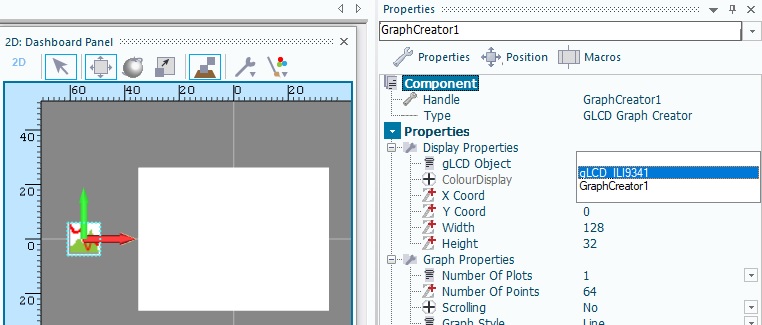
The X Coord, Y Coord, Width and Height component properties set the size and position of the graph on the gLCD.
In the attached example the ADC component sets the input to the graph. Every 50ms a sample is taken and added to the graph.
 Graph Creator Demo
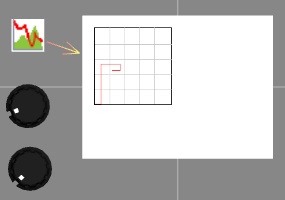
Any size of graph can be created. For efficiency it is best to try and stick to the following rules.
- The width should be equal to or a multiple of the X input range - Min Value 0 to Max Value 255 = input range of 256
- The height should be equal to or a multiple of the Y input range - Min Value 0 to Max Value 255 = input range of 256
- If Show Border is enabled then Width and Height should be as above plus 2 to account for the border pixels
Macro reference

|
Initialise
|
| Configures the menu and assigns the coordinates on the LCD.
|
 - UINT - UINT
|
X
|
|
|
| - UINT
|
Y
|
|
|
| - UINT
|
Width
|
|
|
| - UINT
|
Height
|
|
|
 - BYTE - BYTE
|
Font
|
|
|
 - VOID - VOID
|
Return
|
Property reference

|
Properties
|

|
gLCD Object
|
| Graphical LCD Object to draw the bitmap image to
|

|
Max Items
|
| Sets the maximum number of menu items available.
|
|
|
Max Item Length
|
| Sets the maximum number of bytes to reserve for each menu item
|

|
MarkerStyle
|
|
|

|
Foreground Colour
|
|
|
|
|
Background Colour
|
|
|

|
ColourDisplay
|
| Automatically detects if the graphical LCD object is colour or monochrome
|


 - UINT
 - BYTE
 - VOID


