|
|
| (18 intermediate revisions by 2 users not shown) |
| Line 14: |
Line 14: |
| ==Data Injector Template component== | | ==Data Injector Template component== |
| A base data injector used as a placeholder in components which reference the data injector interface. Not recommended for use in projects. | | A base data injector used as a placeholder in components which reference the data injector interface. Not recommended for use in projects. |
| | |
| | ==Component Source Code== |
| | |
| | Please click here to download the component source project: [https://www.flowcode.co.uk/wiki/componentsource/FC_Comp_Source_InjectorBase.fcfx FC_Comp_Source_InjectorBase.fcfx] |
| | |
| | Please click here to view the component source code (Beta): [https://www.flowcode.co.uk/FlowchartView/?wfile=componentsource/FC_Comp_Source_InjectorBase.fcfx FC_Comp_Source_InjectorBase.fcfx] |
|
| |
|
| ==Detailed description== | | ==Detailed description== |
| | |
| | |
| | |
| | |
| | |
| | |
| | |
| | |
| | |
| | |
| | |
| | |
| | |
| | |
| | |
| | |
| | |
| | |
| | |
| | |
| | |
| | |
|
| |
|
|
| |
|
| Line 22: |
Line 50: |
|
| |
|
| ==Examples== | | ==Examples== |
| | |
| | |
| | |
| | |
| | |
| | |
| | |
| | |
| | |
| | |
| | |
| | |
| | |
| | |
| | |
| | |
| | |
| | |
| | |
| | |
| | |
| | |
|
| |
|
|
| |
|
| Line 160: |
Line 210: |
| More information is available here: [http://www.matrixtsl.com/blog/flowcode-and-injector-components/ Matrix Flowcode Blog: Flowcode and Injector Components] | | More information is available here: [http://www.matrixtsl.com/blog/flowcode-and-injector-components/ Matrix Flowcode Blog: Flowcode and Injector Components] |
|
| |
|
| ==Downloadable macro reference==
| |
|
| |
|
| {| class="wikitable" style="width:60%; background-color:#FFFFFF;"
| |
| |-
| |
| | width="10%" align="center" style="background-color:#D8C9D8;" align="center" | [[File:Fc9-comp-macro.png]]
| |
| | width="90%" style="background-color:#D8C9D8; color:#4B008D;" | '''InitialiseInjector'''
| |
| |-
| |
| | colspan="2" |
| |
| |-
| |
| |-
| |
| | width="10%" align="center" | [[File:Fc9-string-icon.png]] - STRING
| |
| | width="90%" | InjectorName
| |
| |-
| |
| | colspan="2" |
| |
| |-
| |
| | width="10%" align="center" style="border-top: 2px solid #000;" | [[File:Fc9-u8-icon.png]] - BYTE
| |
| | width="90%" style="border-top: 2px solid #000;" | ''Return''
| |
| |}
| |
|
| |
|
|
| |
|
| {| class="wikitable" style="width:60%; background-color:#FFFFFF;"
| |
| |-
| |
| | width="10%" align="center" style="background-color:#D8C9D8;" align="center" | [[File:Fc9-comp-macro.png]]
| |
| | width="90%" style="background-color:#D8C9D8; color:#4B008D;" | '''RxByteCount'''
| |
| |-
| |
| | colspan="2" | Returns the number of bytes currently sat in the receive buffer.
| |
| |-
| |
| |-
| |
| | width="10%" align="center" style="border-top: 2px solid #000;" | [[File:Fc9-u16-icon.png]] - UINT
| |
| | width="90%" style="border-top: 2px solid #000;" | ''Return''
| |
| |}
| |
|
| |
|
|
| |
|
| {| class="wikitable" style="width:60%; background-color:#FFFFFF;"
| |
| |-
| |
| | width="10%" align="center" style="background-color:#D8C9D8;" align="center" | [[File:Fc9-comp-macro.png]]
| |
| | width="90%" style="background-color:#D8C9D8; color:#4B008D;" | '''TxByte'''
| |
| |-
| |
| | colspan="2" | Transmit a byte out to the Injector
| |
| |-
| |
| |-
| |
| | width="10%" align="center" | [[File:Fc9-u8-icon.png]] - BYTE
| |
| | width="90%" | Data
| |
| |-
| |
| | colspan="2" |
| |
| |-
| |
| | width="10%" align="center" style="border-top: 2px solid #000;" | [[File:Fc9-void-icon.png]] - VOID
| |
| | width="90%" style="border-top: 2px solid #000;" | ''Return''
| |
| |}
| |
|
| |
|
|
| |
|
| {| class="wikitable" style="width:60%; background-color:#FFFFFF;"
| |
| |-
| |
| | width="10%" align="center" style="background-color:#D8C9D8;" align="center" | [[File:Fc9-comp-macro.png]]
| |
| | width="90%" style="background-color:#D8C9D8; color:#4B008D;" | '''RxByte'''
| |
| |-
| |
| | colspan="2" | Attempt to receive a byte back from the injector 0 - 255 = Valid data 256 = RX timeout no data available
| |
| |-
| |
| |-
| |
| | width="10%" align="center" style="border-top: 2px solid #000;" | [[File:Fc9-u16-icon.png]] - UINT
| |
| | width="90%" style="border-top: 2px solid #000;" | ''Return''
| |
| |}
| |
|
| |
|
|
| |
|
| {| class="wikitable" style="width:60%; background-color:#FFFFFF;"
| |
| |-
| |
| | width="10%" align="center" style="background-color:#D8C9D8;" align="center" | [[File:Fc9-comp-macro.png]]
| |
| | width="90%" style="background-color:#D8C9D8; color:#4B008D;" | '''GetTxConsoleHandle'''
| |
| |-
| |
| | colspan="2" | Gets the handle to the console allowing data displaying on the panel etc.
| |
| |-
| |
| |-
| |
| | width="10%" align="center" style="border-top: 2px solid #000;" | [[File:]] -
| |
| | width="90%" style="border-top: 2px solid #000;" | ''Return''
| |
| |}
| |
|
| |
|
| | ==Macro reference== |
|
| |
|
| {| class="wikitable" style="width:60%; background-color:#FFFFFF;" | | ===ChangeState=== |
| | {| class="mtx-class-macrotable wikitable" |
| |- | | |- |
| | width="10%" align="center" style="background-color:#D8C9D8;" align="center" | [[File:Fc9-comp-macro.png]] | | | width="10%" align="center" class="mtx-class-macrohead" | [[File:Fc9-comp-macro.png]] |
| | width="90%" style="background-color:#D8C9D8; color:#4B008D;" | '''ChangeState''' | | | width="90%" class="mtx-class-macrohead" | '''ChangeState''' |
| |- | | |- |
| | colspan="2" | Sets the state of the bus. SPI - Controls the chip select pin I2C - Controls the start/restart/stop status | | | colspan="2" | Sets the state of the bus. SPI - Controls the chip select pin I2C - Controls the start/restart/stop status |
| Line 255: |
Line 241: |
|
| |
|
|
| |
|
| {| class="wikitable" style="width:60%; background-color:#FFFFFF;" | | ===GetRxConsoleHandle=== |
| | {| class="mtx-class-macrotable wikitable" |
| |- | | |- |
| | width="10%" align="center" style="background-color:#D8C9D8;" align="center" | [[File:Fc9-comp-macro.png]] | | | width="10%" align="center" class="mtx-class-macrohead" | [[File:Fc9-comp-macro.png]] |
| | width="90%" style="background-color:#D8C9D8; color:#4B008D;" | '''GetRxConsoleHandle''' | | | width="90%" class="mtx-class-macrohead" | '''GetRxConsoleHandle''' |
| |- | | |- |
| | colspan="2" | Gets the handle to the console allowing data displaying on the panel etc. | | | colspan="2" | Gets the handle to the console allowing data displaying on the panel etc. |
| |- | | |- |
| |- | | |- |
| | width="10%" align="center" style="border-top: 2px solid #000;" | [[File:]] -
| | | width="10%" align="center" style="border-top: 2px solid #000;" | [[File:Fc9-h32-icon.png]] - HANDLE |
| | width="90%" style="border-top: 2px solid #000;" | ''Return''
| |
| |}
| |
| | |
| | |
| {| class="wikitable" style="width:60%; background-color:#FFFFFF;"
| |
| |-
| |
| | width="10%" align="center" style="background-color:#D8C9D8;" align="center" | [[File:Fc9-comp-macro.png]]
| |
| | width="90%" style="background-color:#D8C9D8; color:#4B008D;" | '''RxByte'''
| |
| |-
| |
| | colspan="2" | Attempt to receive a byte back from the injector 0 - 255 = Valid data 256 = RX timeout no data available
| |
| |-
| |
| |-
| |
| | width="10%" align="center" style="border-top: 2px solid #000;" | [[File:Fc9-u16-icon.png]] - UINT | |
| | width="90%" style="border-top: 2px solid #000;" | ''Return'' | | | width="90%" style="border-top: 2px solid #000;" | ''Return'' |
| |} | | |} |
|
| |
|
|
| |
|
| {| class="wikitable" style="width:60%; background-color:#FFFFFF;" | | ===GetTxConsoleHandle=== |
| | {| class="mtx-class-macrotable wikitable" |
| |- | | |- |
| | width="10%" align="center" style="background-color:#D8C9D8;" align="center" | [[File:Fc9-comp-macro.png]] | | | width="10%" align="center" class="mtx-class-macrohead" | [[File:Fc9-comp-macro.png]] |
| | width="90%" style="background-color:#D8C9D8; color:#4B008D;" | '''GetConsoleHandle''' | | | width="90%" class="mtx-class-macrohead" | '''GetTxConsoleHandle''' |
| |- | | |- |
| | colspan="2" | Gets the handle to the console allowing data displaying on the panel etc. | | | colspan="2" | Gets the handle to the console allowing data displaying on the panel etc. |
| |- | | |- |
| |- | | |- |
| | width="10%" align="center" style="border-top: 2px solid #000;" | [[File:]] - | | | width="10%" align="center" style="border-top: 2px solid #000;" | [[File:Fc9-h32-icon.png]] - HANDLE |
| | width="90%" style="border-top: 2px solid #000;" | ''Return'' | | | width="90%" style="border-top: 2px solid #000;" | ''Return'' |
| |} | | |} |
|
| |
|
|
| |
|
| {| class="wikitable" style="width:60%; background-color:#FFFFFF;"
| | ===InitialiseInjector=== |
| |-
| | {| class="mtx-class-macrotable wikitable" |
| | width="10%" align="center" style="background-color:#D8C9D8;" align="center" | [[File:Fc9-comp-macro.png]]
| |
| | width="90%" style="background-color:#D8C9D8; color:#4B008D;" | '''GetInt''' | |
| |-
| |
| | colspan="2" | Gets an integer from the LUT
| |
| |- | | |- |
| |-
| | | width="10%" align="center" class="mtx-class-macrohead" | [[File:Fc9-comp-macro.png]] |
| | width="10%" align="center" | [[File:Fc9-u32-icon.png]] - ULONG | | | width="90%" class="mtx-class-macrohead" | '''InitialiseInjector''' |
| | width="90%" | Index | |
| |- | | |- |
| | colspan="2" | | | | colspan="2" | |
| |-
| |
| | width="10%" align="center" style="border-top: 2px solid #000;" | [[File:Fc9-u32-icon.png]] - ULONG
| |
| | width="90%" style="border-top: 2px solid #000;" | ''Return''
| |
| |}
| |
|
| |
|
| |
| {| class="wikitable" style="width:60%; background-color:#FFFFFF;"
| |
| |-
| |
| | width="10%" align="center" style="background-color:#D8C9D8;" align="center" | [[File:Fc9-comp-macro.png]]
| |
| | width="90%" style="background-color:#D8C9D8; color:#4B008D;" | '''SetFloatBits'''
| |
| |-
| |
| | colspan="2" | Sets the size of a float LUT entry
| |
| |- | | |- |
| |-
| |
| | width="10%" align="center" | [[File:Fc9-u8-icon.png]] - BYTE
| |
| | width="90%" | Bits
| |
| |-
| |
| | colspan="2" |
| |
| |-
| |
| | width="10%" align="center" style="border-top: 2px solid #000;" | [[File:Fc9-void-icon.png]] - VOID
| |
| | width="90%" style="border-top: 2px solid #000;" | ''Return''
| |
| |}
| |
|
| |
|
| |
| {| class="wikitable" style="width:60%; background-color:#FFFFFF;"
| |
| |-
| |
| | width="10%" align="center" style="background-color:#D8C9D8;" align="center" | [[File:Fc9-comp-macro.png]]
| |
| | width="90%" style="background-color:#D8C9D8; color:#4B008D;" | '''AddInt'''
| |
| |-
| |
| | colspan="2" | Int to add to the int array
| |
| |-
| |
| |-
| |
| | width="10%" align="center" | [[File:Fc9-u32-icon.png]] - ULONG
| |
| | width="90%" | Value
| |
| |-
| |
| | colspan="2" | Int to add to the int array
| |
| |-
| |
| | width="10%" align="center" style="border-top: 2px solid #000;" | [[File:Fc9-void-icon.png]] - VOID
| |
| | width="90%" style="border-top: 2px solid #000;" | ''Return''
| |
| |}
| |
|
| |
|
| |
| {| class="wikitable" style="width:60%; background-color:#FFFFFF;"
| |
| |-
| |
| | width="10%" align="center" style="background-color:#D8C9D8;" align="center" | [[File:Fc9-comp-macro.png]]
| |
| | width="90%" style="background-color:#D8C9D8; color:#4B008D;" | '''AddFloat'''
| |
| |-
| |
| | colspan="2" | Add a float to the floating point LUT
| |
| |-
| |
| |-
| |
| | width="10%" align="center" | [[File:]] -
| |
| | width="90%" | Value
| |
| |-
| |
| | colspan="2" | Floating point values
| |
| |-
| |
| | width="10%" align="center" style="border-top: 2px solid #000;" | [[File:Fc9-void-icon.png]] - VOID
| |
| | width="90%" style="border-top: 2px solid #000;" | ''Return''
| |
| |}
| |
|
| |
|
| |
| {| class="wikitable" style="width:60%; background-color:#FFFFFF;"
| |
| |-
| |
| | width="10%" align="center" style="background-color:#D8C9D8;" align="center" | [[File:Fc9-comp-macro.png]]
| |
| | width="90%" style="background-color:#D8C9D8; color:#4B008D;" | '''Initialise'''
| |
| |-
| |
| | colspan="2" | Sets up the GSM module. Returns 0 for OK, 255 for no reply and 254 for command fail.
| |
| |-
| |
| |-
| |
| | width="10%" align="center" style="border-top: 2px solid #000;" | [[File:Fc9-u8-icon.png]] - BYTE
| |
| | width="90%" style="border-top: 2px solid #000;" | ''Return''
| |
| |}
| |
|
| |
|
| |
| {| class="wikitable" style="width:60%; background-color:#FFFFFF;"
| |
| |-
| |
| | width="10%" align="center" style="background-color:#D8C9D8;" align="center" | [[File:Fc9-comp-macro.png]]
| |
| | width="90%" style="background-color:#D8C9D8; color:#4B008D;" | '''SampleAccel'''
| |
| |-
| |
| | colspan="2" | Samples the accelerometer 0 = no new data, 1 = new data available
| |
| |-
| |
| |-
| |
| | width="10%" align="center" style="border-top: 2px solid #000;" | [[File:Fc9-u8-icon.png]] - BYTE
| |
| | width="90%" style="border-top: 2px solid #000;" | ''Return''
| |
| |}
| |
|
| |
|
| |
| {| class="wikitable" style="width:60%; background-color:#FFFFFF;"
| |
| |-
| |
| | width="10%" align="center" style="background-color:#D8C9D8;" align="center" | [[File:Fc9-comp-macro.png]]
| |
| | width="90%" style="background-color:#D8C9D8; color:#4B008D;" | '''Left'''
| |
| |-
| |
| | colspan="2" | Rotates the robot left - waits for the angle to be traversed before returning
| |
| |-
| |
| |-
| |
| | width="10%" align="center" | [[File:Fc9-u16-icon.png]] - UINT
| |
| | width="90%" | Angle
| |
| |-
| |
| | colspan="2" | Angle to turn in degrees
| |
| |-
| |
| | width="10%" align="center" style="border-top: 2px solid #000;" | [[File:Fc9-void-icon.png]] - VOID
| |
| | width="90%" style="border-top: 2px solid #000;" | ''Return''
| |
| |}
| |
|
| |
|
| |
| {| class="wikitable" style="width:60%; background-color:#FFFFFF;"
| |
| |-
| |
| | width="10%" align="center" style="background-color:#D8C9D8;" align="center" | [[File:Fc9-comp-macro.png]]
| |
| | width="90%" style="background-color:#D8C9D8; color:#4B008D;" | '''ReadIR'''
| |
| |-
| |
| | colspan="2" | Reads an IR sensor 0=Left, 1=FrontLeft, 2=Front, 3=FrontRight, 4=Right, 5=RearRight, 6=Rear, 7=RearLeft
| |
| |-
| |
| |-
| |
| | width="10%" align="center" | [[File:Fc9-u8-icon.png]] - BYTE
| |
| | width="90%" | index
| |
| |-
| |
| | colspan="2" | 0=Left, 1=FrontLeft, 2=Front, 3=FrontRight, 4=Right, 5=RearRight, 6=Rear, 7=RearLeft
| |
| |-
| |
| | width="10%" align="center" style="border-top: 2px solid #000;" | [[File:Fc9-u16-icon.png]] - UINT
| |
| | width="90%" style="border-top: 2px solid #000;" | ''Return''
| |
| |}
| |
|
| |
|
| |
| {| class="wikitable" style="width:60%; background-color:#FFFFFF;"
| |
| |-
| |
| | width="10%" align="center" style="background-color:#D8C9D8;" align="center" | [[File:Fc9-comp-macro.png]]
| |
| | width="90%" style="background-color:#D8C9D8; color:#4B008D;" | '''LCDDrawPixel'''
| |
| |-
| |
| | colspan="2" | Allows a single pixel on the LCD to be set or cleared
| |
| |-
| |
| |-
| |
| | width="10%" align="center" | [[File:Fc9-u8-icon.png]] - BYTE
| |
| | width="90%" | X
| |
| |-
| |
| | colspan="2" | X Pixel 0-127
| |
| |-
| |
| | width="10%" align="center" | [[File:Fc9-u8-icon.png]] - BYTE
| |
| | width="90%" | Y
| |
| |-
| |
| | colspan="2" | Y Pixel 0-31
| |
| |-
| |
| | width="10%" align="center" | [[File:Fc9-u8-icon.png]] - BYTE
| |
| | width="90%" | State
| |
| |-
| |
| | colspan="2" | 0=White (Off), 1=Black (On)
| |
| |-
| |
| | width="10%" align="center" style="border-top: 2px solid #000;" | [[File:Fc9-void-icon.png]] - VOID
| |
| | width="90%" style="border-top: 2px solid #000;" | ''Return''
| |
| |}
| |
|
| |
|
| |
| {| class="wikitable" style="width:60%; background-color:#FFFFFF;"
| |
| |-
| |
| | width="10%" align="center" style="background-color:#D8C9D8;" align="center" | [[File:Fc9-comp-macro.png]]
| |
| | width="90%" style="background-color:#D8C9D8; color:#4B008D;" | '''ServoSetPosition'''
| |
| |-
| |
| | colspan="2" | Allows one of the servo positions to be assigned
| |
| |-
| |
| |-
| |
| | width="10%" align="center" | [[File:Fc9-u8-icon.png]] - BYTE
| |
| | width="90%" | Channel
| |
| |-
| |
| | colspan="2" | Range 0-3
| |
| |-
| |
| | width="10%" align="center" | [[File:Fc9-u8-icon.png]] - BYTE
| |
| | width="90%" | Position
| |
| |-
| |
| | colspan="2" | Range 0-255
| |
| |-
| |
| | width="10%" align="center" style="border-top: 2px solid #000;" | [[File:Fc9-void-icon.png]] - VOID
| |
| | width="90%" style="border-top: 2px solid #000;" | ''Return''
| |
| |}
| |
|
| |
|
| |
| {| class="wikitable" style="width:60%; background-color:#FFFFFF;"
| |
| |-
| |
| | width="10%" align="center" style="background-color:#D8C9D8;" align="center" | [[File:Fc9-comp-macro.png]]
| |
| | width="90%" style="background-color:#D8C9D8; color:#4B008D;" | '''CardBitmap'''
| |
| |-
| |
| | colspan="2" | Displays a monochrome bitmap read from the card on the LCD
| |
| |-
| |
| |-
| |
| | width="10%" align="center" | [[File:Fc9-u8-icon.png]] - BYTE
| |
| | width="90%" | X
| |
| |-
| |
| | colspan="2" | Range 0-127
| |
| |-
| |
| | width="10%" align="center" | [[File:Fc9-u8-icon.png]] - BYTE
| |
| | width="90%" | Y
| |
| |-
| |
| | colspan="2" | Range 0-31
| |
| |- | | |- |
| | width="10%" align="center" | [[File:Fc9-string-icon.png]] - STRING | | | width="10%" align="center" | [[File:Fc9-string-icon.png]] - STRING |
| | width="90%" | Filename | | | width="90%" | InjectorName |
| |- | | |- |
| | colspan="2" | | | | colspan="2" | |
| Line 507: |
Line 288: |
|
| |
|
|
| |
|
| {| class="wikitable" style="width:60%; background-color:#FFFFFF;" | | ===RxByte=== |
| | {| class="mtx-class-macrotable wikitable" |
| |- | | |- |
| | width="10%" align="center" style="background-color:#D8C9D8;" align="center" | [[File:Fc9-comp-macro.png]] | | | width="10%" align="center" class="mtx-class-macrohead" | [[File:Fc9-comp-macro.png]] |
| | width="90%" style="background-color:#D8C9D8; color:#4B008D;" | '''CardRecordMic''' | | | width="90%" class="mtx-class-macrohead" | '''RxByte''' |
| |- | | |- |
| | colspan="2" | Records an audio stream on the card from the microphone | | | colspan="2" | Attempt to receive a byte back from the injector 0 - 255 = Valid data 256 = RX timeout no data available |
| |- | | |- |
| |-
| |
| | width="10%" align="center" | [[File:Fc9-u8-icon.png]] - BYTE
| |
| | width="90%" | BitDepth
| |
| |-
| |
| | colspan="2" | 0=8-bit, 1=16-bit
| |
| |-
| |
| | width="10%" align="center" | [[File:Fc9-u8-icon.png]] - BYTE
| |
| | width="90%" | SampleRate
| |
| |-
| |
| | colspan="2" | Sample Rate 0=8KHz, 1=16KHz
| |
| |-
| |
| | width="10%" align="center" | [[File:Fc9-u16-icon.png]] - UINT
| |
| | width="90%" | RecordTime
| |
| |-
| |
| | colspan="2" | Time to record for in seconds, Range 0-65535
| |
| |-
| |
| | width="10%" align="center" | [[File:Fc9-string-icon.png]] - STRING
| |
| | width="90%" | Filename
| |
| |-
| |
| | colspan="2" |
| |
| |-
| |
| | width="10%" align="center" style="border-top: 2px solid #000;" | [[File:Fc9-u8-icon.png]] - BYTE
| |
| | width="90%" style="border-top: 2px solid #000;" | ''Return''
| |
| |}
| |
|
| |
|
| |
| {| class="wikitable" style="width:60%; background-color:#FFFFFF;"
| |
| |-
| |
| | width="10%" align="center" style="background-color:#D8C9D8;" align="center" | [[File:Fc9-comp-macro.png]]
| |
| | width="90%" style="background-color:#D8C9D8; color:#4B008D;" | '''CardOpen'''
| |
| |-
| |
| | colspan="2" | Attempts to open an existing file on the SD card 255=Error, 1=File not found, 0=Open OK
| |
| |-
| |
| |-
| |
| | width="10%" align="center" | [[File:Fc9-string-icon.png]] - STRING
| |
| | width="90%" | Filename
| |
| |-
| |
| | colspan="2" |
| |
| |-
| |
| | width="10%" align="center" style="border-top: 2px solid #000;" | [[File:Fc9-u8-icon.png]] - BYTE
| |
| | width="90%" style="border-top: 2px solid #000;" | ''Return''
| |
| |}
| |
|
| |
|
| |
| {| class="wikitable" style="width:60%; background-color:#FFFFFF;"
| |
| |-
| |
| | width="10%" align="center" style="background-color:#D8C9D8;" align="center" | [[File:Fc9-comp-macro.png]]
| |
| | width="90%" style="background-color:#D8C9D8; color:#4B008D;" | '''Forwards'''
| |
| |-
| |
| | colspan="2" | Drives the robot forwards - waits for the distance to be traversed before returning
| |
| |-
| |
| |-
| |
| | width="10%" align="center" | [[File:Fc9-u16-icon.png]] - UINT
| |
| | width="90%" | Distance
| |
| |-
| |
| | colspan="2" | Distance in mm
| |
| |-
| |
| | width="10%" align="center" style="border-top: 2px solid #000;" | [[File:Fc9-void-icon.png]] - VOID
| |
| | width="90%" style="border-top: 2px solid #000;" | ''Return''
| |
| |}
| |
|
| |
|
| |
| {| class="wikitable" style="width:60%; background-color:#FFFFFF;"
| |
| |-
| |
| | width="10%" align="center" style="background-color:#D8C9D8;" align="center" | [[File:Fc9-comp-macro.png]]
| |
| | width="90%" style="background-color:#D8C9D8; color:#4B008D;" | '''ReadBearing'''
| |
| |-
| |
| | colspan="2" | Reads the compass bearing based on the degrees clockwise from magnetic north.
| |
| |-
| |
| |-
| |
| | width="10%" align="center" style="border-top: 2px solid #000;" | [[File:]] -
| |
| | width="90%" style="border-top: 2px solid #000;" | ''Return''
| |
| |}
| |
|
| |
|
| |
| {| class="wikitable" style="width:60%; background-color:#FFFFFF;"
| |
| |-
| |
| | width="10%" align="center" style="background-color:#D8C9D8;" align="center" | [[File:Fc9-comp-macro.png]]
| |
| | width="90%" style="background-color:#D8C9D8; color:#4B008D;" | '''GetConsoleHandle'''
| |
| |-
| |
| | colspan="2" | Gets the handle to the console allowing data displaying on the panel etc.
| |
| |-
| |
| |-
| |
| | width="10%" align="center" style="border-top: 2px solid #000;" | [[File:]] -
| |
| | width="90%" style="border-top: 2px solid #000;" | ''Return''
| |
| |}
| |
|
| |
|
| |
| {| class="wikitable" style="width:60%; background-color:#FFFFFF;"
| |
| |-
| |
| | width="10%" align="center" style="background-color:#D8C9D8;" align="center" | [[File:Fc9-comp-macro.png]]
| |
| | width="90%" style="background-color:#D8C9D8; color:#4B008D;" | '''LCDDrawLine'''
| |
| |-
| |
| | colspan="2" | Allows a single pixel width line to be drawn on the LCD
| |
| |-
| |
| |-
| |
| | width="10%" align="center" | [[File:Fc9-u8-icon.png]] - BYTE
| |
| | width="90%" | X1
| |
| |-
| |
| | colspan="2" | X Pixel 0-127
| |
| |-
| |
| | width="10%" align="center" | [[File:Fc9-u8-icon.png]] - BYTE
| |
| | width="90%" | Y1
| |
| |-
| |
| | colspan="2" | Y Pixel 0-31
| |
| |-
| |
| | width="10%" align="center" | [[File:Fc9-u8-icon.png]] - BYTE
| |
| | width="90%" | X2
| |
| |-
| |
| | colspan="2" | X Pixel 0-127
| |
| |-
| |
| | width="10%" align="center" | [[File:Fc9-u8-icon.png]] - BYTE
| |
| | width="90%" | Y2
| |
| |-
| |
| | colspan="2" | Y Pixel 0-31
| |
| |-
| |
| | width="10%" align="center" style="border-top: 2px solid #000;" | [[File:Fc9-void-icon.png]] - VOID
| |
| | width="90%" style="border-top: 2px solid #000;" | ''Return''
| |
| |}
| |
|
| |
|
| |
| {| class="wikitable" style="width:60%; background-color:#FFFFFF;"
| |
| |-
| |
| | width="10%" align="center" style="background-color:#D8C9D8;" align="center" | [[File:Fc9-comp-macro.png]]
| |
| | width="90%" style="background-color:#D8C9D8; color:#4B008D;" | '''ServoAutoMoveToPosition'''
| |
| |-
| |
| | colspan="2" | Allows one of the servo positions to move gradually to a new position
| |
| |-
| |
| |-
| |
| | width="10%" align="center" | [[File:Fc9-u8-icon.png]] - BYTE
| |
| | width="90%" | Channel
| |
| |-
| |
| | colspan="2" | Range 0-3
| |
| |-
| |
| | width="10%" align="center" | [[File:Fc9-u8-icon.png]] - BYTE
| |
| | width="90%" | Position
| |
| |-
| |
| | colspan="2" | Range 0-255
| |
| |-
| |
| | width="10%" align="center" style="border-top: 2px solid #000;" | [[File:Fc9-void-icon.png]] - VOID
| |
| | width="90%" style="border-top: 2px solid #000;" | ''Return''
| |
| |}
| |
|
| |
|
| |
| {| class="wikitable" style="width:60%; background-color:#FFFFFF;"
| |
| |-
| |
| | width="10%" align="center" style="background-color:#D8C9D8;" align="center" | [[File:Fc9-comp-macro.png]]
| |
| | width="90%" style="background-color:#D8C9D8; color:#4B008D;" | '''ReadAllValue'''
| |
| |-
| |
| | colspan="2" | Reads a single value stored from the read all command Index dictates which sensor value to read
| |
| |-
| |
| |-
| |
| | width="10%" align="center" | [[File:Fc9-u8-icon.png]] - BYTE
| |
| | width="90%" | Index
| |
| |-
| |
| | colspan="2" | 0=SW, 1-8=IR, 9-10=Line, 11=Light, 12=Mic, 13-15=Accel
| |
| |- | | |- |
| | width="10%" align="center" style="border-top: 2px solid #000;" | [[File:Fc9-u16-icon.png]] - UINT | | | width="10%" align="center" style="border-top: 2px solid #000;" | [[File:Fc9-u16-icon.png]] - UINT |
| Line 676: |
Line 302: |
|
| |
|
|
| |
|
| {| class="wikitable" style="width:60%; background-color:#FFFFFF;" | | ===RxByteCount=== |
| | {| class="mtx-class-macrotable wikitable" |
| |- | | |- |
| | width="10%" align="center" style="background-color:#D8C9D8;" align="center" | [[File:Fc9-comp-macro.png]] | | | width="10%" align="center" class="mtx-class-macrohead" | [[File:Fc9-comp-macro.png]] |
| | width="90%" style="background-color:#D8C9D8; color:#4B008D;" | '''LCDBacklight''' | | | width="90%" class="mtx-class-macrohead" | '''RxByteCount''' |
| |- | | |- |
| | colspan="2" | Allows the LCD backlight brighntess to be adjusted | | | colspan="2" | Returns the number of bytes currently sat in the receive buffer. |
| |-
| |
| |-
| |
| | width="10%" align="center" | [[File:Fc9-u8-icon.png]] - BYTE
| |
| | width="90%" | Intensity
| |
| |-
| |
| | colspan="2" | Range 0-100, 0=Off, 1=Min Brightness, 100=Max Brightness
| |
| |-
| |
| | width="10%" align="center" style="border-top: 2px solid #000;" | [[File:Fc9-void-icon.png]] - VOID
| |
| | width="90%" style="border-top: 2px solid #000;" | ''Return''
| |
| |}
| |
| | |
| | |
| {| class="wikitable" style="width:60%; background-color:#FFFFFF;"
| |
| |-
| |
| | width="10%" align="center" style="background-color:#D8C9D8;" align="center" | [[File:Fc9-comp-macro.png]]
| |
| | width="90%" style="background-color:#D8C9D8; color:#4B008D;" | '''LCDDrawRect'''
| |
| |-
| |
| | colspan="2" | Allows a rectangle to be drawn on the LCD
| |
| |-
| |
| |-
| |
| | width="10%" align="center" | [[File:Fc9-u8-icon.png]] - BYTE
| |
| | width="90%" | X1
| |
| |-
| |
| | colspan="2" | X Pixel 0-127
| |
| |-
| |
| | width="10%" align="center" | [[File:Fc9-u8-icon.png]] - BYTE
| |
| | width="90%" | Y1
| |
| |-
| |
| | colspan="2" | Y Pixel 0-31
| |
| |-
| |
| | width="10%" align="center" | [[File:Fc9-u8-icon.png]] - BYTE
| |
| | width="90%" | X2
| |
| |-
| |
| | colspan="2" | X Pixel 0-127
| |
| |-
| |
| | width="10%" align="center" | [[File:Fc9-u8-icon.png]] - BYTE
| |
| | width="90%" | Y2
| |
| |-
| |
| | colspan="2" | Y Pixel 0-31
| |
| |-
| |
| | width="10%" align="center" style="border-top: 2px solid #000;" | [[File:Fc9-void-icon.png]] - VOID
| |
| | width="90%" style="border-top: 2px solid #000;" | ''Return''
| |
| |}
| |
| | |
| | |
| {| class="wikitable" style="width:60%; background-color:#FFFFFF;"
| |
| |- | | |- |
| | width="10%" align="center" style="background-color:#D8C9D8;" align="center" | [[File:Fc9-comp-macro.png]]
| |
| | width="90%" style="background-color:#D8C9D8; color:#4B008D;" | '''ReadLine'''
| |
| |-
| |
| | colspan="2" | Reads one of the IR line sensors 0-1 0=Left, 1=Right
| |
| |-
| |
| |-
| |
| | width="10%" align="center" | [[File:Fc9-u8-icon.png]] - BYTE
| |
| | width="90%" | index
| |
| |-
| |
| | colspan="2" | 0=Left, 1=Right
| |
| |- | | |- |
| | width="10%" align="center" style="border-top: 2px solid #000;" | [[File:Fc9-u16-icon.png]] - UINT | | | width="10%" align="center" style="border-top: 2px solid #000;" | [[File:Fc9-u16-icon.png]] - UINT |
| Line 745: |
Line 316: |
|
| |
|
|
| |
|
| {| class="wikitable" style="width:60%; background-color:#FFFFFF;" | | ===TxByte=== |
| | {| class="mtx-class-macrotable wikitable" |
| |- | | |- |
| | width="10%" align="center" style="background-color:#D8C9D8;" align="center" | [[File:Fc9-comp-macro.png]] | | | width="10%" align="center" class="mtx-class-macrohead" | [[File:Fc9-comp-macro.png]] |
| | width="90%" style="background-color:#D8C9D8; color:#4B008D;" | '''ServoDisable''' | | | width="90%" class="mtx-class-macrohead" | '''TxByte''' |
| |- | | |- |
| | colspan="2" | Allows one of the servo outputs 0-3 to be disabled | | | colspan="2" | Transmit a byte out to the Injector |
| |-
| |
| |-
| |
| | width="10%" align="center" | [[File:Fc9-u8-icon.png]] - BYTE
| |
| | width="90%" | Channel
| |
| |-
| |
| | colspan="2" | Range 0-3
| |
| |-
| |
| | width="10%" align="center" style="border-top: 2px solid #000;" | [[File:Fc9-void-icon.png]] - VOID
| |
| | width="90%" style="border-top: 2px solid #000;" | ''Return''
| |
| |}
| |
| | |
| | |
| {| class="wikitable" style="width:60%; background-color:#FFFFFF;"
| |
| |-
| |
| | width="10%" align="center" style="background-color:#D8C9D8;" align="center" | [[File:Fc9-comp-macro.png]]
| |
| | width="90%" style="background-color:#D8C9D8; color:#4B008D;" | '''ServoEnable'''
| |
| |-
| |
| | colspan="2" | Allows one of the servo outputs 0-3 to be enabled
| |
| |-
| |
| |-
| |
| | width="10%" align="center" | [[File:Fc9-u8-icon.png]] - BYTE
| |
| | width="90%" | Channel
| |
| |-
| |
| | colspan="2" | Range 0-3
| |
| |-
| |
| | width="10%" align="center" style="border-top: 2px solid #000;" | [[File:Fc9-void-icon.png]] - VOID
| |
| | width="90%" style="border-top: 2px solid #000;" | ''Return''
| |
| |}
| |
| | |
| | |
| {| class="wikitable" style="width:60%; background-color:#FFFFFF;"
| |
| |-
| |
| | width="10%" align="center" style="background-color:#D8C9D8;" align="center" | [[File:Fc9-comp-macro.png]]
| |
| | width="90%" style="background-color:#D8C9D8; color:#4B008D;" | '''CardReadByte'''
| |
| |-
| |
| | colspan="2" | Reads a byte from the currently open file. Starts at the beginning of the file and auto increments to the end
| |
| |-
| |
| |-
| |
| | width="10%" align="center" style="border-top: 2px solid #000;" | [[File:Fc9-u8-icon.png]] - BYTE
| |
| | width="90%" style="border-top: 2px solid #000;" | ''Return''
| |
| |}
| |
| | |
| | |
| {| class="wikitable" style="width:60%; background-color:#FFFFFF;"
| |
| |-
| |
| | width="10%" align="center" style="background-color:#D8C9D8;" align="center" | [[File:Fc9-comp-macro.png]]
| |
| | width="90%" style="background-color:#D8C9D8; color:#4B008D;" | '''CardErase'''
| |
| |-
| |
| | colspan="2" | Attempts to delete an existing file on the SD card 255=Error, 1=File not found, 0=Delete OK
| |
| |-
| |
| |-
| |
| | width="10%" align="center" | [[File:Fc9-string-icon.png]] - STRING
| |
| | width="90%" | Filename
| |
| |-
| |
| | colspan="2" |
| |
| |-
| |
| | width="10%" align="center" style="border-top: 2px solid #000;" | [[File:Fc9-u8-icon.png]] - BYTE
| |
| | width="90%" style="border-top: 2px solid #000;" | ''Return''
| |
| |}
| |
| | |
| | |
| {| class="wikitable" style="width:60%; background-color:#FFFFFF;"
| |
| |-
| |
| | width="10%" align="center" style="background-color:#D8C9D8;" align="center" | [[File:Fc9-comp-macro.png]]
| |
| | width="90%" style="background-color:#D8C9D8; color:#4B008D;" | '''CardWriteByte'''
| |
| |-
| |
| | colspan="2" | Appends a byte to the end of the currently open file
| |
| |- | | |- |
| |- | | |- |
| Line 828: |
Line 333: |
| | width="90%" style="border-top: 2px solid #000;" | ''Return'' | | | width="90%" style="border-top: 2px solid #000;" | ''Return'' |
| |} | | |} |
|
| |
|
| |
| {| class="wikitable" style="width:60%; background-color:#FFFFFF;"
| |
| |-
| |
| | width="10%" align="center" style="background-color:#D8C9D8;" align="center" | [[File:Fc9-comp-macro.png]]
| |
| | width="90%" style="background-color:#D8C9D8; color:#4B008D;" | '''EncoderRead'''
| |
| |-
| |
| | colspan="2" | Reads one of the motor encoder counters. Approx 0.328296mm of travel per encoder unit.
| |
| |-
| |
| |-
| |
| | width="10%" align="center" | [[File:Fc9-u8-icon.png]] - BYTE
| |
| | width="90%" | index
| |
| |-
| |
| | colspan="2" | 0=Left, 1=Right
| |
| |-
| |
| | width="10%" align="center" style="border-top: 2px solid #000;" | [[File:Fc9-u16-icon.png]] - UINT
| |
| | width="90%" style="border-top: 2px solid #000;" | ''Return''
| |
| |}
| |
|
| |
|
| |
| {| class="wikitable" style="width:60%; background-color:#FFFFFF;"
| |
| |-
| |
| | width="10%" align="center" style="background-color:#D8C9D8;" align="center" | [[File:Fc9-comp-macro.png]]
| |
| | width="90%" style="background-color:#D8C9D8; color:#4B008D;" | '''SetMotors'''
| |
| |-
| |
| | colspan="2" | Sets the motor speeds without feedback Range -100 to 100
| |
| |-
| |
| |-
| |
| | width="10%" align="center" | [[File:]] -
| |
| | width="90%" | Left
| |
| |-
| |
| | colspan="2" | Range -100 to 100
| |
| |-
| |
| | width="10%" align="center" | [[File:]] -
| |
| | width="90%" | Right
| |
| |-
| |
| | colspan="2" | Range -100 to 100
| |
| |-
| |
| | width="10%" align="center" style="border-top: 2px solid #000;" | [[File:Fc9-void-icon.png]] - VOID
| |
| | width="90%" style="border-top: 2px solid #000;" | ''Return''
| |
| |}
| |
|
| |
|
| |
| {| class="wikitable" style="width:60%; background-color:#FFFFFF;"
| |
| |-
| |
| | width="10%" align="center" style="background-color:#D8C9D8;" align="center" | [[File:Fc9-comp-macro.png]]
| |
| | width="90%" style="background-color:#D8C9D8; color:#4B008D;" | '''Backwards'''
| |
| |-
| |
| | colspan="2" | Drives the robot backwards - waits for the distance to be traversed before returning
| |
| |-
| |
| |-
| |
| | width="10%" align="center" | [[File:Fc9-u16-icon.png]] - UINT
| |
| | width="90%" | Distance
| |
| |-
| |
| | colspan="2" | Distance in mm
| |
| |-
| |
| | width="10%" align="center" style="border-top: 2px solid #000;" | [[File:Fc9-void-icon.png]] - VOID
| |
| | width="90%" style="border-top: 2px solid #000;" | ''Return''
| |
| |}
| |
|
| |
|
| |
| {| class="wikitable" style="width:60%; background-color:#FFFFFF;"
| |
| |-
| |
| | width="10%" align="center" style="background-color:#D8C9D8;" align="center" | [[File:Fc9-comp-macro.png]]
| |
| | width="90%" style="background-color:#D8C9D8; color:#4B008D;" | '''EncoderReset'''
| |
| |-
| |
| | colspan="2" | Resets the motor encoder counters
| |
| |-
| |
| |-
| |
| | width="10%" align="center" style="border-top: 2px solid #000;" | [[File:Fc9-void-icon.png]] - VOID
| |
| | width="90%" style="border-top: 2px solid #000;" | ''Return''
| |
| |}
| |
|
| |
|
| |
| {| class="wikitable" style="width:60%; background-color:#FFFFFF;"
| |
| |-
| |
| | width="10%" align="center" style="background-color:#D8C9D8;" align="center" | [[File:Fc9-comp-macro.png]]
| |
| | width="90%" style="background-color:#D8C9D8; color:#4B008D;" | '''LCDVerbose'''
| |
| |-
| |
| | colspan="2" | Allows the LCD to automatically report the API commands as they get processed. Default - verbose on
| |
| |-
| |
| |-
| |
| | width="10%" align="center" | [[File:Fc9-u8-icon.png]] - BYTE
| |
| | width="90%" | State
| |
| |-
| |
| | colspan="2" | 0=Off 1=On
| |
| |-
| |
| | width="10%" align="center" style="border-top: 2px solid #000;" | [[File:Fc9-void-icon.png]] - VOID
| |
| | width="90%" style="border-top: 2px solid #000;" | ''Return''
| |
| |}
| |
|
| |
|
| |
| {| class="wikitable" style="width:60%; background-color:#FFFFFF;"
| |
| |-
| |
| | width="10%" align="center" style="background-color:#D8C9D8;" align="center" | [[File:Fc9-comp-macro.png]]
| |
| | width="90%" style="background-color:#D8C9D8; color:#4B008D;" | '''SetProp'''
| |
| |-
| |
| | colspan="2" | Allows the COM port property to be set from a parent component.
| |
| |-
| |
| |-
| |
| | width="10%" align="center" | [[File:Fc9-string-icon.png]] - STRING
| |
| | width="90%" | PropName
| |
| |-
| |
| | colspan="2" |
| |
| |-
| |
| | width="10%" align="center" | [[File:Fc9-u32-icon.png]] - ULONG
| |
| | width="90%" | PropVal
| |
| |-
| |
| | colspan="2" |
| |
| |-
| |
| | width="10%" align="center" style="border-top: 2px solid #000;" | [[File:Fc9-void-icon.png]] - VOID
| |
| | width="90%" style="border-top: 2px solid #000;" | ''Return''
| |
| |}
| |
|
| |
|
| |
| {| class="wikitable" style="width:60%; background-color:#FFFFFF;"
| |
| |-
| |
| | width="10%" align="center" style="background-color:#D8C9D8;" align="center" | [[File:Fc9-comp-macro.png]]
| |
| | width="90%" style="background-color:#D8C9D8; color:#4B008D;" | '''CardInit'''
| |
| |-
| |
| | colspan="2" | Attempts to startup the SD card 255=No Card, 254=Init Fail, 0=Init OK
| |
| |-
| |
| |-
| |
| | width="10%" align="center" style="border-top: 2px solid #000;" | [[File:Fc9-u8-icon.png]] - BYTE
| |
| | width="90%" style="border-top: 2px solid #000;" | ''Return''
| |
| |}
| |
|
| |
|
| |
| {| class="wikitable" style="width:60%; background-color:#FFFFFF;"
| |
| |-
| |
| | width="10%" align="center" style="background-color:#D8C9D8;" align="center" | [[File:Fc9-comp-macro.png]]
| |
| | width="90%" style="background-color:#D8C9D8; color:#4B008D;" | '''GetProp'''
| |
| |-
| |
| | colspan="2" | Allows the property filter for the COM port list to be copied to a parent component.
| |
| |-
| |
| |-
| |
| | width="10%" align="center" | [[File:Fc9-string-icon.png]] - STRING
| |
| | width="90%" | PropName
| |
| |-
| |
| | colspan="2" |
| |
| |-
| |
| | width="10%" align="center" style="border-top: 2px solid #000;" | [[File:Fc9-string-icon.png]] - STRING
| |
| | width="90%" style="border-top: 2px solid #000;" | ''Return''
| |
| |}
| |
|
| |
|
| |
| {| class="wikitable" style="width:60%; background-color:#FFFFFF;"
| |
| |-
| |
| | width="10%" align="center" style="background-color:#D8C9D8;" align="center" | [[File:Fc9-comp-macro.png]]
| |
| | width="90%" style="background-color:#D8C9D8; color:#4B008D;" | '''LCDClear'''
| |
| |-
| |
| | colspan="2" | Clears the LCD
| |
| |-
| |
| |-
| |
| | width="10%" align="center" style="border-top: 2px solid #000;" | [[File:Fc9-void-icon.png]] - VOID
| |
| | width="90%" style="border-top: 2px solid #000;" | ''Return''
| |
| |}
| |
|
| |
|
| |
|
| |
|
|
| |
|
| ==Property reference== | | ==Property reference== |
|
| |
|
| {| class="wikitable" style="width:60%; background-color:#FFFFFF;" | | {| class="mtx-class-macrotable wikitable" |
| |- | | |- |
| | width="10%" align="center" style="background-color:#D8C9D8;" | [[File:Fc9-prop-icon.png]] | | | width="10%" align="center" class="mtx-class-macrohead" | [[File:Fc9-prop-icon.png]] |
| | width="90%" style="background-color:#D8C9D8; color:#4B008D;" | '''Properties''' | | | width="90%" class="mtx-class-macrohead" | '''Properties''' |
| |- | | |- |
| |- | | |- |
| Line 1,001: |
Line 347: |
| |- | | |- |
| | colspan="2" | | | | colspan="2" | |
| |-
| |
| | width="10%" align="center" style="background-color:#D8C9D8;" | [[File:Fc9-conn-icon.png]]
| |
| | width="90%" style="background-color:#D8C9D8; color:#4B008D;" | '''Connections'''
| |
| |-
| |
| |-
| |
| | width="10%" align="center" style="background-color:#D8C9D8;" | [[File:Fc9-conn-icon.png]]
| |
| | width="90%" style="background-color:#D8C9D8; color:#4B008D;" | '''Simulations'''
| |
| |-
| |
| |} | | |} |
| Author
|
Matrix Ltd
|
| Version
|
1.0
|
| Category
|
Comms Data Injectors
|
Data Injector Template component
A base data injector used as a placeholder in components which reference the data injector interface. Not recommended for use in projects.
Component Source Code
Please click here to download the component source project: FC_Comp_Source_InjectorBase.fcfx
Please click here to view the component source code (Beta): FC_Comp_Source_InjectorBase.fcfx
Detailed description
No detailed description exists yet for this component
Examples
AT Example
GSM Example File
 GSM Example
Example should show the following on the display on the panel and on the hardware.
GSM Example
Example should show the following on the display on the panel and on the hardware.
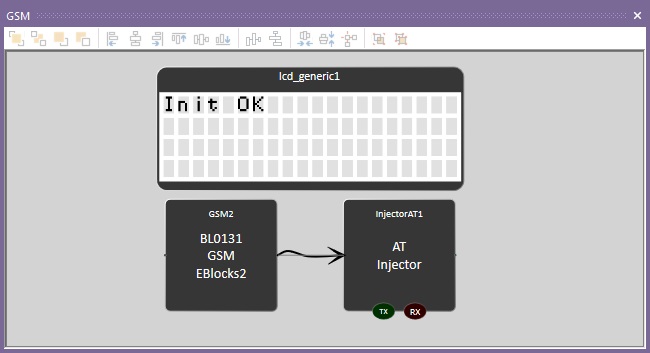
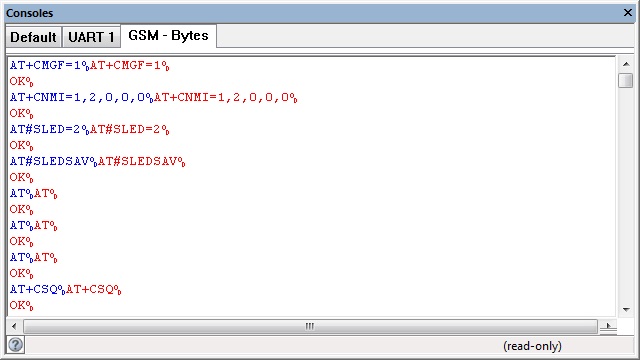
The AT injector component allows us to simulate the response of the GSM module.
CAN Example
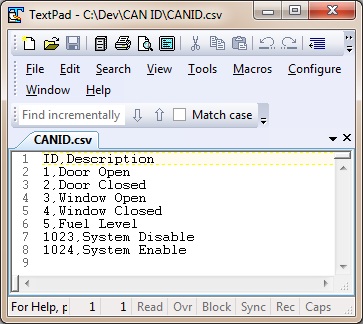
The CAN component works together with the injector component to allow you to decode a CAN message ID into a meaningful command.
CAN_Example1
When a key on the keypad is pressed the CAN components transmits a CAN packet.
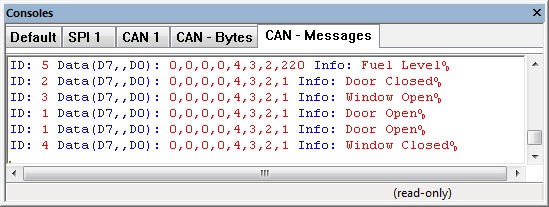
The CAN packet is decoded by the injector component to give us a meaningful log on the console window.
High Level CAN Data Console
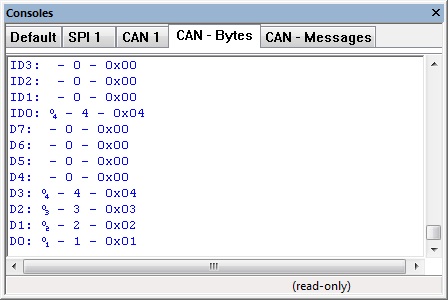
Low Level CAN Data Console
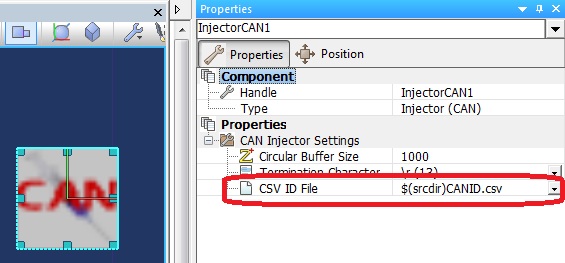
Reference from CAN Injector to ID decode file, $(srcdir) refers to the current project directory.
Demo CAN ID file File:CANID.csv
DS1307 Example
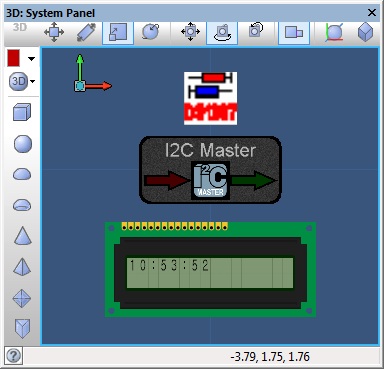
This example uses the I2C master component combined with the DS1307 injector to simulate an I2C communications bus between the target Microcontroller and the virtual DS1307 device.
I2C DS1307 Example
The panel displays the current time from the DS1307 RAM which is populated to match the system time.
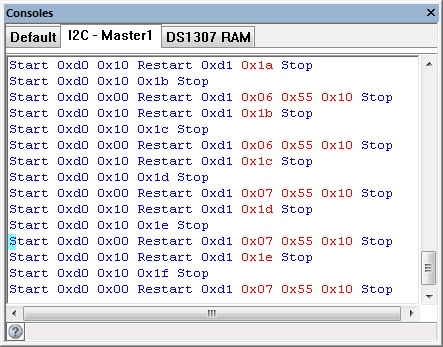
The I2C console shows the communications between the target microcontroller and simulated I2C device.
The DS1307 console shows the contents of RAM memory on the simulated I2C device.
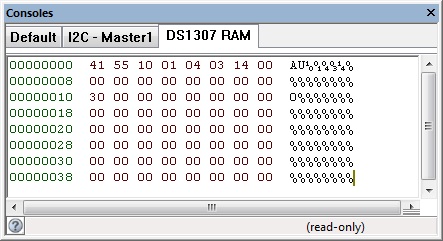
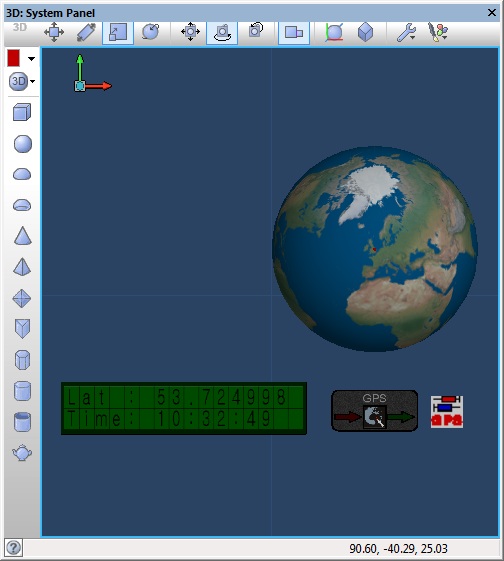
GPS Example
GPS Example File
GPS Example
Example should show the Latitude generated by the GPS injector as well as the system time in simulation or UTC time on hardware.
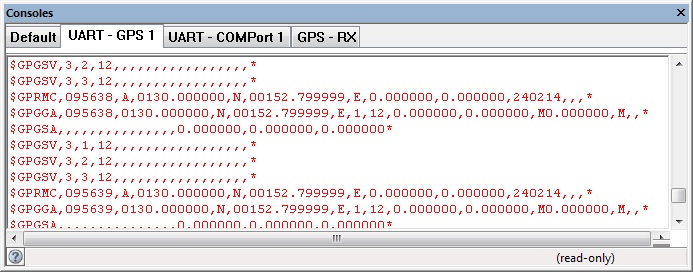
Example data provided by the GPS NMEA injector component
Human Interface Example
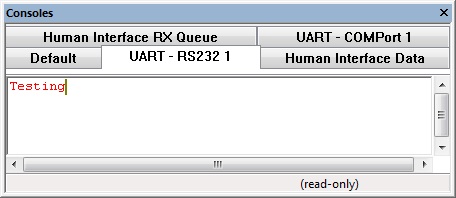
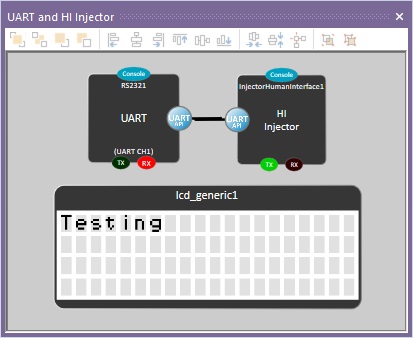
This example receives a character via the RS232 component and outputs it to the LCD, an injector has been added to allow you to type data into the console.
Human Interface Injector Example
The Console window has tabs for the human interface data injector allowing you to type in data that will be received by the component.
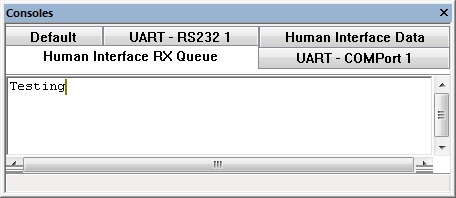
Again the RS232 console tabs reflect the data as it is sent and received.
LCD showing received data.
vNet Example
Here is an example of using the vNet injector to simulate a multi microcontroller system.
Microcontroller 1 is connected to a keypad and has a RS232 communications connection.
Microcontroller 2 is connected to a solenoid and has a RS232 communications connection.
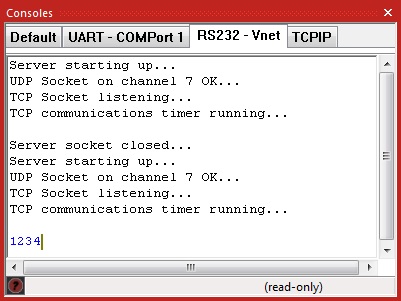
Any key presses detected on microcontroller 1 will be sent via RS232 to microcontroller 2. If the correct byte sequence (1234) is received by microcontroller 2 then the solenoid is fired to unlock a door for 5 seconds.
vNet Example Node 1
vNet Example Node 2
Communications over the vNet injector can be monitored using the console.
SCADA Slave Example
Using one of the SCADA Slave components together with one of the SCADA Slave injectors allows simulated comms data to be piped through to real world hardware. This allows for rapid prototyping and testing without the pains of repeated compilation and programming. This feature can be used with any component that contains SPI, I2C or UART based comms (depending on the hardware).
Here is an example using the Arduino Uno as the host board. The Arduino has been pre-programmed with the SCADA Slave firmware available from the Component: SCADA (Arduino Uno) (SCADA Slaves)
Simple Arduino Uno Demo
Creating New Injector Components
Here are some example Injector component source files which go a good way towards demonstrating how to create your own injector component.
DS1307 I2C Device Example Injector Source
InjectorDS1307
AT Device Example Injector Source
InjectorAT
More information is available here: Matrix Flowcode Blog: Flowcode and Injector Components
Macro reference
ChangeState

|
ChangeState
|
| Sets the state of the bus. SPI - Controls the chip select pin I2C - Controls the start/restart/stop status
|
 - BYTE - BYTE
|
State
|
| SPI: 0=CSLow, 1=CSHigh I2C: 0=Stop, 1=Start, 2=Restart
|
 - VOID - VOID
|
Return
|
GetRxConsoleHandle
|
|
GetRxConsoleHandle
|
| Gets the handle to the console allowing data displaying on the panel etc.
|
 - HANDLE - HANDLE
|
Return
|
GetTxConsoleHandle
|
|
GetTxConsoleHandle
|
| Gets the handle to the console allowing data displaying on the panel etc.
|
| - HANDLE
|
Return
|
InitialiseInjector
|
|
InitialiseInjector
|
|
|
 - STRING - STRING
|
InjectorName
|
|
|
| - BYTE
|
Return
|
RxByte
|
|
RxByte
|
| Attempt to receive a byte back from the injector 0 - 255 = Valid data 256 = RX timeout no data available
|
 - UINT - UINT
|
Return
|
RxByteCount
|
|
RxByteCount
|
| Returns the number of bytes currently sat in the receive buffer.
|
| - UINT
|
Return
|
TxByte
|
|
TxByte
|
| Transmit a byte out to the Injector
|
| - BYTE
|
Data
|
|
|
| - VOID
|
Return
|
Property reference

|
Properties
|

|
Circular Buffer Size
|
|
|


 - BYTE
 - VOID
 - HANDLE
 - STRING
 - UINT

