Generating extended debugging information after a crash

Any bugs you encounter with Flowcode should be discussed here.
Post Reply
Steve-Matrix
Matrix Staff
Posts: 1722
http://meble-kuchenne.info.pl
Joined: Sat Dec 05, 2020 10:32 am
Has thanked: 247 times
Been thanked: 407 times

Generating extended debugging information after a crash

Post by Steve-Matrix »

This post details registry changes that can enable "Windows Error Reporting" (WER) functionality for Flowcode which can provide extended debugging information after a Flowcode crash which can help our developers pinpoint the cause of the crash.

This WER functionality is turned off by default in Windows and requires changes to the registry to enable it. It can be turned on for all applications or just specific ones. I will detail how to enable it for Flowcode here using information gathered from this Microsoft post.

To enable WER for Flowcode v9, the following keys need to be added to the registry. This will require administrator-level access.

Code: Select all

HKEY_LOCAL_MACHINE\SOFTWARE\Microsoft\Windows\Windows Error Reporting\LocalDumps\FlowcodeV9.exe
"DumpFolder" (REG_EXPAND_SZ) = %LOCALAPPDATA%\FlowcodeV9\CrashDumps
"DumpCount" (REG_DWORD) = 16
"DumpType" (REG_DWORD) = 1
The attached zipped registry file can also be used - unzip its contents, right click the "enableminidumps.reg" file and select "merge". This attached file contains additional registry entries for the upcoming Flowcode v10.

Once the registry has been changed, you should have entries similar to the following:
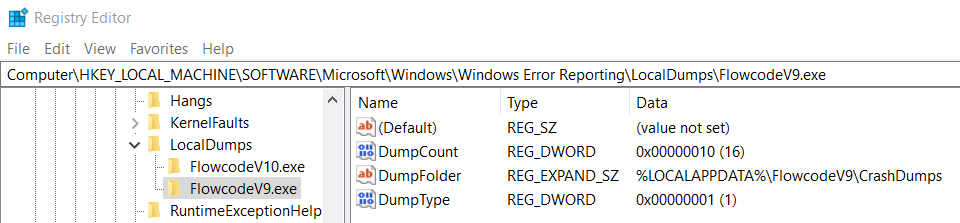
wer_settings.png
wer_settings.png (32.58 KiB) Viewed 23271 times
Any future crashes by Flowcode should produce a "minidump" file in the location specified (%LOCALAPPDATA%\FlowcodeV9\CrashDumps). If a Flowcode crash does produce a "minidump" file (named something like "FlowcodeV9.exe.26464.dmp"), please contact me via PM and I will provide instructions on how to upload this file so we can investigate.

Attachments
enableminidumps.zip
(426 Bytes) Downloaded 728 times

Steve-Matrix
Matrix Staff
Posts: 1722
Joined: Sat Dec 05, 2020 10:32 am
Has thanked: 247 times
Been thanked: 407 times

Re: Generating extended debugging information after a crash

Post by Steve-Matrix »

If Flowcode ever becomes unresponsive and needs to be closed by using Task Manager, a dump file can be created before closing it down by expanding the Flowcode entry and right-clicking one of the entries inside, as shown below.
createdump.png
createdump.png (33.73 KiB) Viewed 23267 times
Please contact me via PM is you have a Flowcode dump file you want to share with our dev team.

chipfryer27
Valued Contributor
Posts: 1864
Joined: Thu Dec 03, 2020 10:57 am
Has thanked: 407 times
Been thanked: 632 times

Re: Generating extended debugging information after a crash

Post by chipfryer27 »

Hi Steve

I expanded but the "Create Dump" option is grey'd out

Iain

Steve-Matrix
Matrix Staff
Posts: 1722
Joined: Sat Dec 05, 2020 10:32 am
Has thanked: 247 times
Been thanked: 407 times

Re: Generating extended debugging information after a crash

Post by Steve-Matrix »

Thanks, Iain.

Looking on the web, there are a number of possible causes/solutions such as:
  • Need to right-click a subprocess
  • System configuration has "write debugging information" set to 'none'
  • System files are corrupt (need to run sfc and/or dism to fix)
  • 3rd party tool to blocking dump creation
  • System has insufficient RAM or other hardware issue
You could also maybe try setting up WER as per the first post. If it's for Flowcode v11, then you'll need to add the appropriate registry keys yourself as these are not part of the reg script.

Note that this info was for Windows v10. I'm assuming that it's the same for Windows v11, but I have not specifically checked for any differences.

Steve-Matrix
Matrix Staff
Posts: 1722
Joined: Sat Dec 05, 2020 10:32 am
Has thanked: 247 times
Been thanked: 407 times

Re: Generating extended debugging information after a crash

Post by Steve-Matrix »

chipfryer27 wrote:
Tue Jan 20, 2026 6:14 pm
I expanded but the "Create Dump" option is grey'd out
I've discovered a possible way to get the dump file if this option is grey. Instead of looking in the "Processes" tab of Task manager, look in the "Details" tab and find the Flowcode task entry that is not responding and right-click that instead.

chipfryer27
Valued Contributor
Posts: 1864
Joined: Thu Dec 03, 2020 10:57 am
Has thanked: 407 times
Been thanked: 632 times

Re: Generating extended debugging information after a crash

Post by chipfryer27 »

Hi Steve

It does indeed generate a dump. Unfortunstely in my case it's just over 1GB in size, compressing to a modest 256MB :lol:

Regards

Steve-Matrix
Matrix Staff
Posts: 1722
Joined: Sat Dec 05, 2020 10:32 am
Has thanked: 247 times
Been thanked: 407 times

Re: Generating extended debugging information after a crash

Post by Steve-Matrix »

Thanks. I've posted a link to upload it in the VC forum.

chipfryer27
Valued Contributor
Posts: 1864
Joined: Thu Dec 03, 2020 10:57 am
Has thanked: 407 times
Been thanked: 632 times

Re: Generating extended debugging information after a crash

Post by chipfryer27 »

Thanks Steve

I will have look for it

Regards

Post Reply
