Hi Ben
I have two different computers and want to have exactly the same menu configuration settings.
Should I delete the entire mtxesp32_s3_sdconfig folder on one computer and copy it from the other, or is there another way?
this folder:
or files.
ESP32 S3 on two different computers same esp-idf
-
stefan.erni
- Valued Contributor
- Posts: 1290
- http://meble-kuchenne.info.pl
- Joined: Wed Dec 02, 2020 10:53 am
- Has thanked: 246 times
- Been thanked: 257 times
-
BenR
- Matrix Staff
- Posts: 2307
- Joined: Mon Dec 07, 2020 10:06 am
- Has thanked: 639 times
- Been thanked: 848 times
Re: ESP32 S3 on two different computers same esp-idf
Hello,
Yes that's how I would do it and probably the easiest way. I use a tool called freefilesync which if one of the computers shared the folder to the network could be synced together using the tool. If both computers share the folder then you would be able to sync from either.
I don't think you can use the remote shared folder directly as your compile folder as that would be ideal. C compilers don't tend to like this.
Yes that's how I would do it and probably the easiest way. I use a tool called freefilesync which if one of the computers shared the folder to the network could be synced together using the tool. If both computers share the folder then you would be able to sync from either.
I don't think you can use the remote shared folder directly as your compile folder as that would be ideal. C compilers don't tend to like this.
-
mnfisher
- Valued Contributor
- Posts: 2180
- Joined: Wed Dec 09, 2020 9:37 pm
- Has thanked: 177 times
- Been thanked: 1022 times
Re: ESP32 S3 on two different computers same esp-idf
...
After editing the file using idf.py menuconfig - can you just copy the sdkconfig file from the project directory?
Haven't tested - but if you edit for a 'custom' config it would save doing it twice...
After editing the file using idf.py menuconfig - can you just copy the sdkconfig file from the project directory?
Haven't tested - but if you edit for a 'custom' config it would save doing it twice...
-
stefan.erni
- Valued Contributor
- Posts: 1290
- Joined: Wed Dec 02, 2020 10:53 am
- Has thanked: 246 times
- Been thanked: 257 times
Re: ESP32 S3 on two different computers same esp-idf
Hi Ben, Hi Martin
I'll try both: the entire folder and also a specific config file.
If it works,I'm going to sync my computers
And I add the files to my batch file for backup or flash
I soon also add the .fcfx file and the docu.HTML
I hope I haven't forgotten anything else
When I'm done with the project, I copy the project file, the bin files and config files right away in a folder.
From there, I can then flash or restore my project.
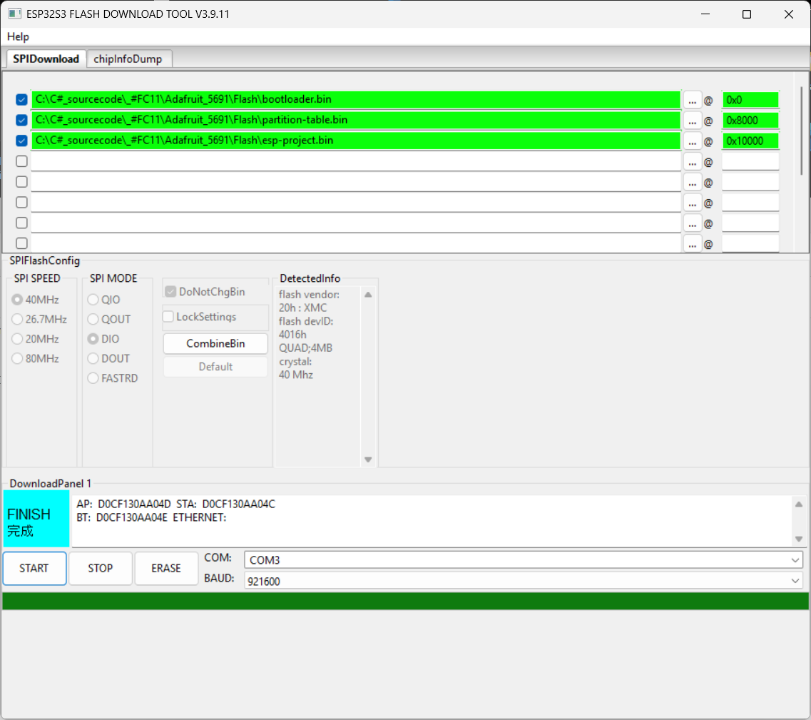
For flash them using a tool (flash_download_tool_3.9.11)
That way, I always have exactly the same program on every new device, and it goes very quickly.
To do this, I use a batch file and then copy `flash_download_tool_3.9.11` into the folder an run it
using in a batchfile:
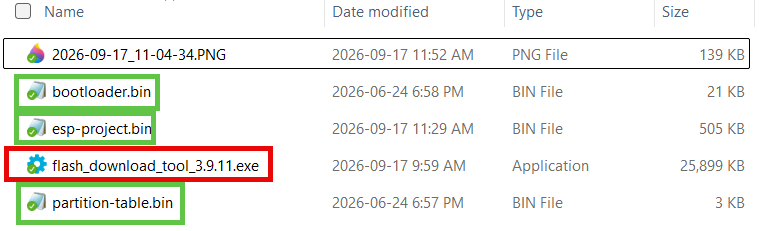
All the file for flash:
flash_download_tool:
I'll try both: the entire folder and also a specific config file.
If it works,I'm going to sync my computers
And I add the files to my batch file for backup or flash
I soon also add the .fcfx file and the docu.HTML
I hope I haven't forgotten anything else
When I'm done with the project, I copy the project file, the bin files and config files right away in a folder.
From there, I can then flash or restore my project.
For flash them using a tool (flash_download_tool_3.9.11)
That way, I always have exactly the same program on every new device, and it goes very quickly.
To do this, I use a batch file and then copy `flash_download_tool_3.9.11` into the folder an run it
using in a batchfile:
Code: Select all
@echo off
for /f %%i in ('powershell -command "Get-Date -Format yyyy_MM_dd"') do set datum=%%i
mkdir "%cd%\Backup_bin_%datum%"
copy "C:\FC_ESP\mtxesp32_s3_sdkconfig\build\bootloader\bootloader.bin" "Backup_bin_%datum%"
copy "C:\FC_ESP\mtxesp32_s3_sdkconfig\build\esp-project.bin" "Backup_bin_%datum%"
copy "C:\FC_ESP\mtxesp32_s3_sdkconfig\build\partition_table\partition-table.bin" "Backup_bin_%datum%"
All the file for flash:
flash_download_tool: