
|
Introduction to Microcontroller Programming * Course Index * Introduction * About the Author * About this Course * Feedback * Course Navigation * Quick Course Navigation * How to use this Course * Acronyms Used and Course Conventions About PICmicro Chips * What is a PICmicro? * Microcontrollers * Digital versus Analogue * Inputs and Outputs * Memory * Programming * 16F1937 Architecture Clocking Your PICmicro Devices * Introduction * The Clock Circuit * Clock Settings * Clock Confusion E-Blocks * Introduction to E-blocks * Using E-blocks * E-blocks Boards Flowcode Step By Step * Introduction to Flowcode * Basic Flowcode Functions * Digital Outputs * Digital Inputs * Basic Loops * The LCD Display * Binary Numbers * Decisions * Goto (Connection Point) * 7-Segment Displays * Software Macro * Strings and Memory * A Simple Hi-Fi PICmicro Projects * Introduction to PICmicro Projects * Construction Methods * Choosing a Power Source * Adding Inputs * Input Conditioning * Adding Outputs * Adding Drivers Labs * Introduction and Lesson Plan * 1. Output * 2. Delay * 3. Connection Point * 4. Calculations * 5. Loop * 6. Input * 7. Decision * 8. LCD * 9. Keypad * 10. Analogue + EEPROM * 11. Software Macro * 12. External Interrupt * 13. Timer Interrupt |
(:Summary:Contains the 'action' links (like Browse, Edit, History, etc.), placed at the top of the page, see site page actions:) (:comment This page can be somewhat complex to figure out the first time you see it. Its contents are documented at PmWiki.SitePageActions if you need help. :) * Print (:comment (:if group Site,SiteAdmin,Cookbook,Profiles,PmWiki*:) (:comment delete if and ifend to enable backlinks:) * %item rel=nofollow class=backlinks accesskey='$[ak_backlinks]'% [[{*$Name}?action=search&q=link={*$FullName} | $[Backlinks] ]] (:ifend:) :) * Login Main /
Course Navigation<^< Feedback | Course Index | Quick Course Navigation >^>(:nl:) 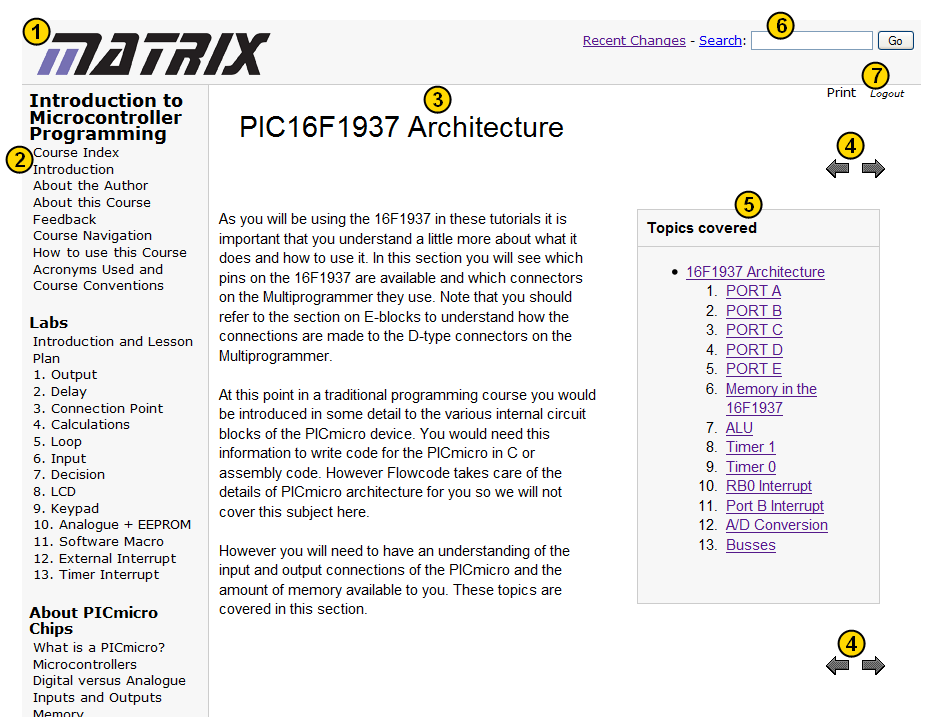 :'''1. ''''''Matrix logo''':Clicking this will take you to the Main page. :'''2. ''''''Navigation Sidebar''':This holds a map of the entire course. The course is given in a number chapters, each of which contains a set of pages. Clicking on the title of a chapter will take you to it's index page. The pages in the current chapter will also be displayed. Clicking on a page in the current chapter will take you to it. :'''3. ''''''Page title''':The title of the current page is displayed here. :'''4. ''''''Course Navigation Arrows''':These allow you to move forwards and backwards thorough the course. The course is designed to be followed through using these buttons. :'''5. ''''''Navigation Box''':Lists the items in the current chapter. Are only displayed on chapter index pages. :'''6. ''''''Search Box''':This can be used to search the entire site. Just enter the term you would like to search and click "Go". :'''7. ''''''Print and Logout''':Clicking the print button will format the current page you're on into a more printer friendly format. The Logout button logs you out of the system.(:nl:)(:table style="clear:both":)
| |
(:Summary: Website page footer:)
Print - (:comment (:if group Site,SiteAdmin,Cookbook,Profiles,PmWiki*:) (:comment delete if and ifend to enable backlinks:) %item rel=nofollow class=backlinks accesskey='$[ak_backlinks]'% [[{*$Name}?action=search&q=link={*$FullName} | $[Backlinks] ]] (:ifend:) :) Search - Login
Page last modified on January 30, 2012, at 02:45 PM