
|
Introduction to Microcontroller Programming * Course Index * Introduction * About the Author * About this Course * Feedback * Course Navigation * Quick Course Navigation * How to use this Course * Acronyms Used and Course Conventions About PICmicro Chips * What is a PICmicro? * Microcontrollers * Digital versus Analogue * Inputs and Outputs * Memory * Programming * 16F1937 Architecture Clocking Your PICmicro Devices * Introduction * The Clock Circuit * Clock Settings * Clock Confusion E-Blocks * Introduction to E-blocks * Using E-blocks * E-blocks Boards Flowcode Step By Step * Introduction to Flowcode * Basic Flowcode Functions * Digital Outputs * Digital Inputs * Basic Loops * The LCD Display * Binary Numbers * Decisions * Goto (Connection Point) * 7-Segment Displays * Software Macro * Strings and Memory * A Simple Hi-Fi PICmicro Projects * Introduction to PICmicro Projects * Construction Methods * Choosing a Power Source * Adding Inputs * Input Conditioning * Adding Outputs * Adding Drivers Labs * Introduction and Lesson Plan * 1. Output * 2. Delay * 3. Connection Point * 4. Calculations * 5. Loop * 6. Input * 7. Decision * 8. LCD * 9. Keypad * 10. Analogue + EEPROM * 11. Software Macro * 12. External Interrupt * 13. Timer Interrupt |
(:Summary:Contains the 'action' links (like Browse, Edit, History, etc.), placed at the top of the page, see site page actions:) (:comment This page can be somewhat complex to figure out the first time you see it. Its contents are documented at PmWiki.SitePageActions if you need help. :) * Print (:comment (:if group Site,SiteAdmin,Cookbook,Profiles,PmWiki*:) (:comment delete if and ifend to enable backlinks:) * %item rel=nofollow class=backlinks accesskey='$[ak_backlinks]'% [[{*$Name}?action=search&q=link={*$FullName} | $[Backlinks] ]] (:ifend:) :) * Login Microcontrollers<^< What is a PICmicro? | Course Index | Digital versus Analogue >^>(:nl:) 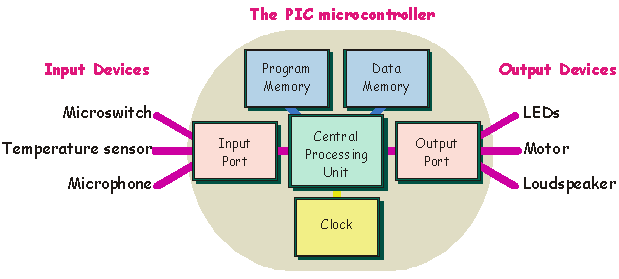 At their heart (or is it brain?) there is a Central Processing Unit (CPU). This processes the digital signals, does calculations and logic operations, creates time delays, sets up sequences of signals etc. How does it know what to do? It is following a program of instructions, which is stored in part of the memory, called the 'program memory', inside the PICmicro. From time to time, the CPU needs to store data, and then later retrieve it. It uses a different area of memory, called the 'data memory' to do this. The clock synchronises the activities of the CPU. It sends a stream of voltage pulses into the CPU that control when data is moved around the system, and when the instructions in the program are carried out. The faster the clock, the quicker the PICmicro runs through the program. Typically, the clock will run at a frequency of 20MHz (twenty million voltage pulses every second.) To talk to the outside world, the microcontroller has 'ports'. Each port has 8 connections - often referred to as 'bits' as each connection represents a bit on an 8 input port which in turn represents a byte of data. Information from sensors is fed into the system through the input port. The microcontroller processes this data and uses it to control devices that are connected to the output port. The ports themselves are complex electronic circuits - not simply a bunch of terminals to hang components on. When we use a PICmicro microcontroller, we have to specify how we want the ports to behave. The ports are bi-directional, meaning that they can act as either input ports or output ports. When we write a program for the PICmicro, we start by configuring the ports, telling them whether they are to behave as input ports or output ports. The input port can receive data (information) in one of two forms, as an analogue signal, or as a digital signal. It is important that we understand clearly the difference between these. (:nl:)(:table style="clear:both":)
| |
(:Summary: Website page footer:)
Print - (:comment (:if group Site,SiteAdmin,Cookbook,Profiles,PmWiki*:) (:comment delete if and ifend to enable backlinks:) %item rel=nofollow class=backlinks accesskey='$[ak_backlinks]'% [[{*$Name}?action=search&q=link={*$FullName} | $[Backlinks] ]] (:ifend:) :) Search - Login
Page last modified on August 19, 2011, at 10:06 AM