
|
Introduction to Microcontroller Programming * Course Index * Introduction * About the Author * About this Course * Feedback * Course Navigation * Quick Course Navigation * How to use this Course * Acronyms Used and Course Conventions About PICmicro Chips * What is a PICmicro? * Microcontrollers * Digital versus Analogue * Inputs and Outputs * Memory * Programming * 16F1937 Architecture Clocking Your PICmicro Devices * Introduction * The Clock Circuit * Clock Settings * Clock Confusion E-Blocks * Introduction to E-blocks * Using E-blocks * E-blocks Boards Flowcode Step By Step * Introduction to Flowcode * Basic Flowcode Functions * Digital Outputs * Digital Inputs ## Set up the Equipment ## Equivalent Circuit ## Where's the Fire? ## Set up the Flowchart ## Variables ## Using Variables ## Set up the Outputs ## Adding the Switches * Basic Loops * The LCD Display * Binary Numbers * Decisions * Goto (Connection Point) * 7-Segment Displays * Software Macro * Strings and Memory * A Simple Hi-Fi PICmicro Projects * Introduction to PICmicro Projects * Construction Methods * Choosing a Power Source * Adding Inputs * Input Conditioning * Adding Outputs * Adding Drivers Labs * Introduction and Lesson Plan * 1. Output * 2. Delay * 3. Connection Point * 4. Calculations * 5. Loop * 6. Input * 7. Decision * 8. LCD * 9. Keypad * 10. Analogue + EEPROM * 11. Software Macro * 12. External Interrupt * 13. Timer Interrupt |
(:Summary:Contains the 'action' links (like Browse, Edit, History, etc.), placed at the top of the page, see site page actions:) (:comment This page can be somewhat complex to figure out the first time you see it. Its contents are documented at PmWiki.SitePageActions if you need help. :) * Print (:comment (:if group Site,SiteAdmin,Cookbook,Profiles,PmWiki*:) (:comment delete if and ifend to enable backlinks:) * %item rel=nofollow class=backlinks accesskey='$[ak_backlinks]'% [[{*$Name}?action=search&q=link={*$FullName} | $[Backlinks] ]] (:ifend:) :) * Login Using Variables<^< Variables | Course Index | Set up the Outputs >^>(:nl:) In a previous section you added a variable to your program using the variable dialogue box: 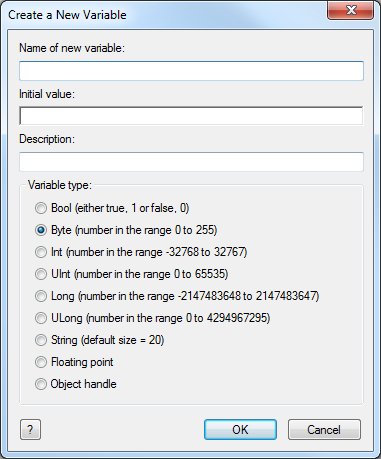 But what does this mean? Computers work on the principles of digital logic: 0's and 1's on each wire, and groups of 8 wires, or 8 'bits', forming 'bytes' of data. This grouping of 8 bits is used for much of the internal wiring inside the PICmicro device, and for the registers that hold and process data. It is also used for memory. This means that a memory register has 8 bits and can vary from 0 to 255. A variable inside Flowcode can be allocated to use just one memory register or more than one. In Flowcode you have eight different types of variables you can use: A 'bool' variable can either be a 1 or 0 (true or false). A single register is know as a 'Byte' variable and can vary from 0 to 255. A double register is known as an 'Int' variable and can vary from -32768 to +32767. A double register can also be used unsigned this is known as a 'UInt' variable and can vary from 0 to 65535. A quad register is known as a 'Long' variables and can vary from -2147483648 to 2147483647. A quad register can also be used unsigned this is known as a 'ULong' variable and can vary from 0 to 4294967295. You should use type Byte when you have simple counters and variables that will not go above the value 255. This is the most economical in terms of memory space and also the fastest: mathematical processes involving two bytes (often referred to as '16 bit arithmetic') will take longer for the PICmicro to execute. A multiple register is known as a 'String' variable and can consist of a number of Byte variables - the default in Flowcode is 20. Floating point numbers can also be used, although they represent a much wider range of values than an integer, it suffers a loss of accuracy over large ranges. Finally an object handle is used to reference a more complicated piece of data (such as a file, component or block of text) whose internal format is not known. So why is this important? The answer is that the number of registers inside the PICmicro device is limited, and in larger applications you will need to manage the variables in a program carefully to get them to fit inside the device. On downloading the variables in Flowcode are implemented in the Random Access Memory (RAM) part of the PICmicro device. In the 16F1937 there are 512 Bytes of memory. This means you can have 512 Byte variables, 265 Int type variables or 25 Strings each consisting of 20 Bytes or characters. (:nl:)(:table style="clear:both":)
| |
(:Summary: Website page footer:)
Print - (:comment (:if group Site,SiteAdmin,Cookbook,Profiles,PmWiki*:) (:comment delete if and ifend to enable backlinks:) %item rel=nofollow class=backlinks accesskey='$[ak_backlinks]'% [[{*$Name}?action=search&q=link={*$FullName} | $[Backlinks] ]] (:ifend:) :) Search - Login
Page last modified on July 05, 2013, at 02:40 PM