
|
Introduction to Microcontroller Programming * Course Index * Introduction * About the Author * About this Course * Feedback * Course Navigation * Quick Course Navigation * How to use this Course * Acronyms Used and Course Conventions About PICmicro Chips * What is a PICmicro? * Microcontrollers * Digital versus Analogue * Inputs and Outputs ## Getting Data into a PICmicro ## Outputting Data ## Current Limits * Memory * Programming * 16F1937 Architecture Clocking Your PICmicro Devices * Introduction * The Clock Circuit * Clock Settings * Clock Confusion E-Blocks * Introduction to E-blocks * Using E-blocks * E-blocks Boards Flowcode Step By Step * Introduction to Flowcode * Basic Flowcode Functions * Digital Outputs * Digital Inputs * Basic Loops * The LCD Display * Binary Numbers * Decisions * Goto (Connection Point) * 7-Segment Displays * Software Macro * Strings and Memory * A Simple Hi-Fi PICmicro Projects * Introduction to PICmicro Projects * Construction Methods * Choosing a Power Source * Adding Inputs * Input Conditioning * Adding Outputs * Adding Drivers Labs * Introduction and Lesson Plan * 1. Output * 2. Delay * 3. Connection Point * 4. Calculations * 5. Loop * 6. Input * 7. Decision * 8. LCD * 9. Keypad * 10. Analogue + EEPROM * 11. Software Macro * 12. External Interrupt * 13. Timer Interrupt |
(:Summary:Contains the 'action' links (like Browse, Edit, History, etc.), placed at the top of the page, see site page actions:) (:comment This page can be somewhat complex to figure out the first time you see it. Its contents are documented at PmWiki.SitePageActions if you need help. :) * Print (:comment (:if group Site,SiteAdmin,Cookbook,Profiles,PmWiki*:) (:comment delete if and ifend to enable backlinks:) * %item rel=nofollow class=backlinks accesskey='$[ak_backlinks]'% [[{*$Name}?action=search&q=link={*$FullName} | $[Backlinks] ]] (:ifend:) :) * Login Outputting Data<^< Getting Data into a PICmicro | Course Index | Current Limits >^>(:nl:) The PICmicro is a digital device - we have said that several times already! It outputs a digital signal. In most cases, we use this to turn something on and off - '0' = 'off' and '1' = '0n', for example. Suppose that we set up port B as the output port, or let Flowcode do it for us. There are eight pins on port B, so we can switch eight devices on and off. It is important to plan how we connect these devices, as otherwise they can work the opposite way round. The diagram shows eight LED's connected to port B. Notice that the four red LED's are connected between the positive supply rail and the port B pins. In this case the PICmicro is 'sinking' current. The green LED's are connected between the pins and the 0V rail. In this case the PICmicro is 'sourcing' current. Each red LED lights up when its pin is at a low voltage, outputting '0' in other words. Each green LED lights when its pin is at a high voltage, outputting a '1'. 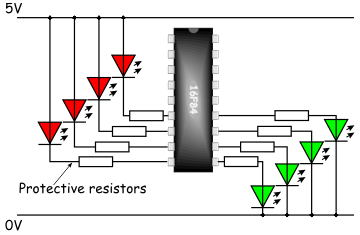 (There are limits as to how much current the ports can control. Typically, one output pin can manage up to 25mA. This is enough to drive LED's and buzzers directly, but higher-powered devices will need additional circuitry to interface with the PICmicro. These matters are dealt with later. However, the maximum current for the whole port is around 100mA, so not all pins can output 25mA at the same time.) As you will see shortly Flowcode has a simulation mode that allows you to attach LEDs to show the status of the pins on the microcontroller when they are used as outputs. The LED simulation function inside Flowcode assumes that current is sourced from the PICmicro device - like the green LEDs in the diagram above. (:nl:)(:table style="clear:both":)
| |
(:Summary: Website page footer:)
Print - (:comment (:if group Site,SiteAdmin,Cookbook,Profiles,PmWiki*:) (:comment delete if and ifend to enable backlinks:) %item rel=nofollow class=backlinks accesskey='$[ak_backlinks]'% [[{*$Name}?action=search&q=link={*$FullName} | $[Backlinks] ]] (:ifend:) :) Search - Login
Page last modified on August 19, 2011, at 10:45 AM