
|
Introduction to Microcontroller Programming * Course Index * Introduction * About the Author * About this Course * Feedback * Course Navigation * Quick Course Navigation * How to use this Course * Acronyms Used and Course Conventions About PICmicro Chips * What is a PICmicro? * Microcontrollers * Digital versus Analogue * Inputs and Outputs * Memory * Programming * 16F1937 Architecture Clocking Your PICmicro Devices * Introduction * The Clock Circuit * Clock Settings * Clock Confusion E-Blocks * Introduction to E-blocks * Using E-blocks * E-blocks Boards Flowcode Step By Step * Introduction to Flowcode * Basic Flowcode Functions ## What is Flowcode? ## Flowcode Overview ## Start a New Flowchart ## Opening an Existing Flowchart ## Saving a Flowchart ## Saving Flowchart Images ## Zooming the View ## Printing Flowcharts ## View Options * Digital Outputs * Digital Inputs * Basic Loops * The LCD Display * Binary Numbers * Decisions * Goto (Connection Point) * 7-Segment Displays * Software Macro * Strings and Memory * A Simple Hi-Fi PICmicro Projects * Introduction to PICmicro Projects * Construction Methods * Choosing a Power Source * Adding Inputs * Input Conditioning * Adding Outputs * Adding Drivers Labs * Introduction and Lesson Plan * 1. Output * 2. Delay * 3. Connection Point * 4. Calculations * 5. Loop * 6. Input * 7. Decision * 8. LCD * 9. Keypad * 10. Analogue + EEPROM * 11. Software Macro * 12. External Interrupt * 13. Timer Interrupt |
(:Summary:Contains the 'action' links (like Browse, Edit, History, etc.), placed at the top of the page, see site page actions:) (:comment This page can be somewhat complex to figure out the first time you see it. Its contents are documented at PmWiki.SitePageActions if you need help. :) * Print (:comment (:if group Site,SiteAdmin,Cookbook,Profiles,PmWiki*:) (:comment delete if and ifend to enable backlinks:) * %item rel=nofollow class=backlinks accesskey='$[ak_backlinks]'% [[{*$Name}?action=search&q=link={*$FullName} | $[Backlinks] ]] (:ifend:) :) * Login View Global Options<^< Printing Flowcharts | Course Index | Digital Outputs >^>(:nl:) To preview any of these settings simply click the 'Preview' button at the bottom of the window. Flowchart TabThis tab contains the settings for changing the appearance of the flowchart. This includes font options, icon colors and graphics, background colors and patterns etc. 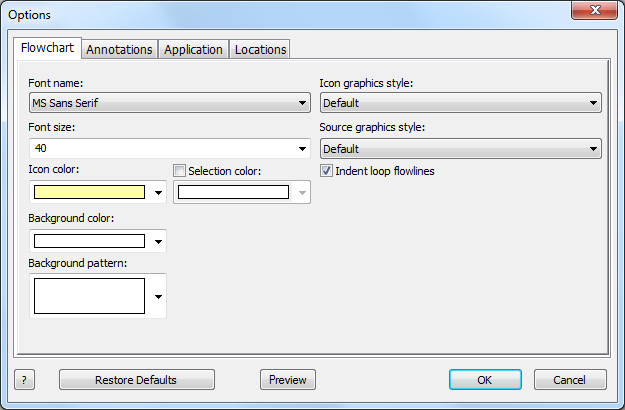 Annotation TabAll the settings on this tab relate to the annotations on the flowchart. Including icon text and descriptions as well as annotation and tooltip styles. 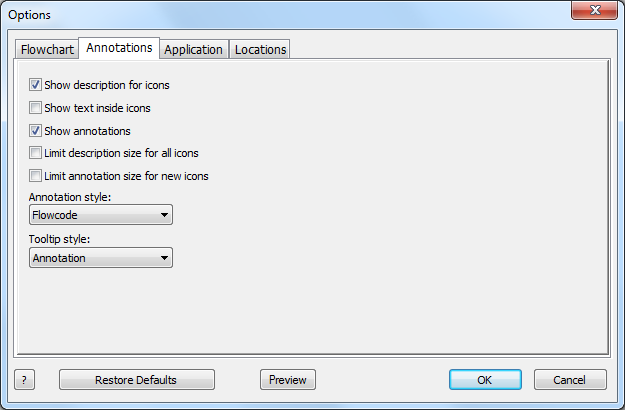 Application TabSettings here affect the look and feel of the overall program. You can change skin presets which changes the general look of Flowcode, it also offers options tab options, the ability to print in color as well as add icon comments to C code and change web access settings. 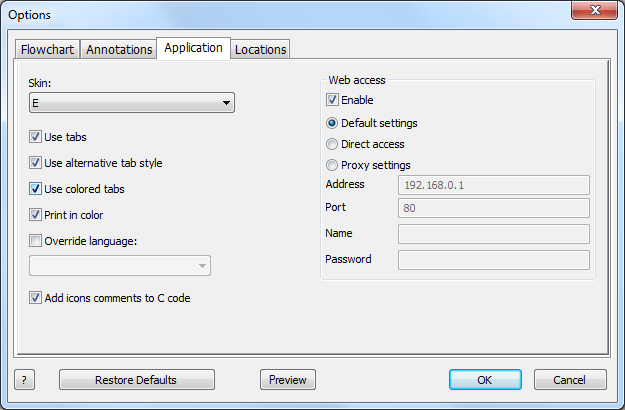 Override LanguageAllows the user to override the default Flowcode language settings and to display Flowcode in the specified language. Select the language from those available on the drop down list and restart Flowcode to see the new language. Note: The relevant language packs need to be installed for Flowcode to enable that particular language. See www.matrixmultimedia.com for available languages. Locations TabAllows you to control the target directory that Flowcode compiles to by default and also allows you to include directories for Flowcode to search when looking for components and dictionaries. 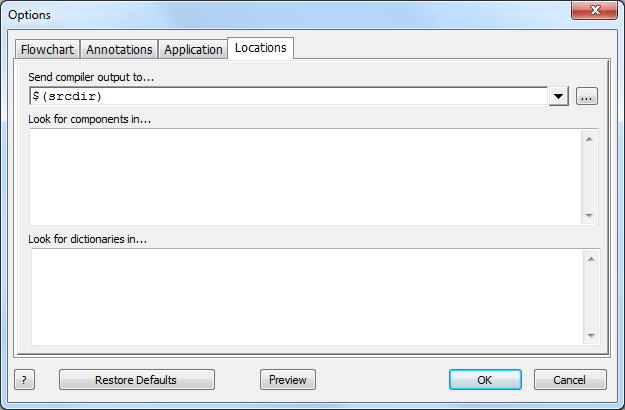 (:nl:)(:table style="clear:both":) (:nl:)(:table style="clear:both":)
| |
(:Summary: Website page footer:)
Print - (:comment (:if group Site,SiteAdmin,Cookbook,Profiles,PmWiki*:) (:comment delete if and ifend to enable backlinks:) %item rel=nofollow class=backlinks accesskey='$[ak_backlinks]'% [[{*$Name}?action=search&q=link={*$FullName} | $[Backlinks] ]] (:ifend:) :) Search - Login
Page last modified on June 14, 2013, at 10:37 AM