
|
Introduction to Microcontroller Programming * Course Index * Introduction * About the Author * About this Course * Feedback * Course Navigation * Quick Course Navigation * How to use this Course * Acronyms Used and Course Conventions About PICmicro Chips * What is a PICmicro? * Microcontrollers * Digital versus Analogue * Inputs and Outputs * Memory * Programming * 16F1937 Architecture Clocking Your PICmicro Devices * Introduction * The Clock Circuit * Clock Settings * Clock Confusion E-Blocks * Introduction to E-blocks * Using E-blocks * E-blocks Boards Flowcode Step By Step * Introduction to Flowcode * Basic Flowcode Functions * Digital Outputs * Digital Inputs * Basic Loops * The LCD Display * Binary Numbers * Decisions * Goto (Connection Point) * 7-Segment Displays * Software Macro * Strings and Memory * A Simple Hi-Fi ## Introduction ## Set up the Equipment ## Port B Interrupts ## Setting up the LCD ## Using the ADC ## PICmicro Projects * Introduction to PICmicro Projects * Construction Methods * Choosing a Power Source * Adding Inputs * Input Conditioning * Adding Outputs * Adding Drivers Labs * Introduction and Lesson Plan * 1. Output * 2. Delay * 3. Connection Point * 4. Calculations * 5. Loop * 6. Input * 7. Decision * 8. LCD * 9. Keypad * 10. Analogue + EEPROM * 11. Software Macro * 12. External Interrupt * 13. Timer Interrupt |
(:Summary:Contains the 'action' links (like Browse, Edit, History, etc.), placed at the top of the page, see site page actions:) (:comment This page can be somewhat complex to figure out the first time you see it. Its contents are documented at PmWiki.SitePageActions if you need help. :) * Print (:comment (:if group Site,SiteAdmin,Cookbook,Profiles,PmWiki*:) (:comment delete if and ifend to enable backlinks:) * %item rel=nofollow class=backlinks accesskey='$[ak_backlinks]'% [[{*$Name}?action=search&q=link={*$FullName} | $[Backlinks] ]] (:ifend:) :) * Login Finishing Touches<^< Using the ADC | Course Index | Introduction to PICmicro Projects >^>(:nl:) Your system is nearly complete. # In the Main routine drag a Macro icon into the loop. In this icon call the 'ADCmeasure' macro. Your project is now quite functional. If you simulate it then you should see that when you click on a channel button the LCD displays the channel number. When you move the Volume dial you should see the volume displayed. Of course there are some bits missing: you have not developed the hardware and software to connect to a radio system to actually alter the channel, and you have not made any use of the volume variable to alter the amplification of the output stage of your Hi-Fi. However you have completed a significant part of the overall design project. The following image shows the entire project. Hopefully in this section you have learned that it is really useful to break the stages of your development down into several individual programs - each in its own macro. This allows you to build and test one part of the program at a time. This also makes your main program very easy to read - although in this case readability is compromised slightly by the use of interrupts: it is not immediately obvious to someone who has not written the program how the 'Chandet' macro is called, although the two interrupt macro icons in the main program do give a clue. 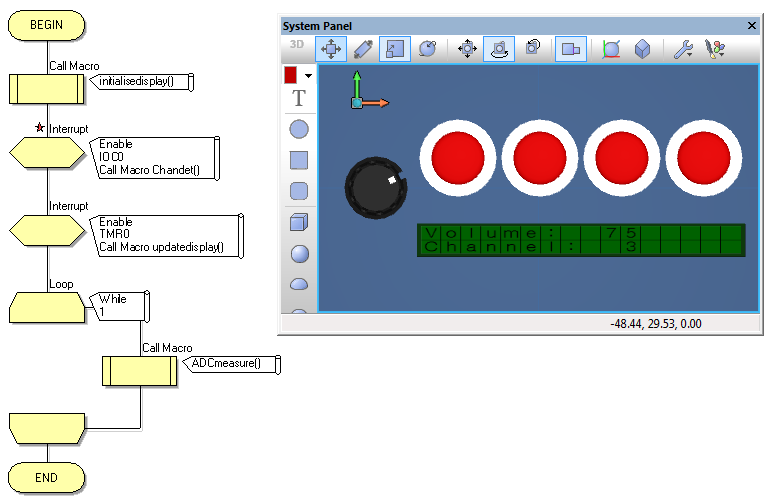 (:nl:)(:table style="clear:both":)
| |
(:Summary: Website page footer:)
Print - (:comment (:if group Site,SiteAdmin,Cookbook,Profiles,PmWiki*:) (:comment delete if and ifend to enable backlinks:) %item rel=nofollow class=backlinks accesskey='$[ak_backlinks]'% [[{*$Name}?action=search&q=link={*$FullName} | $[Backlinks] ]] (:ifend:) :) Search - Login
Page last modified on May 03, 2013, at 03:45 PM