
|
Introduction to Microcontroller Programming * Course Index * Introduction * About the Author * About this Course * Feedback * Course Navigation * Quick Course Navigation * How to use this Course * Acronyms Used and Course Conventions About PICmicro Chips * What is a PICmicro? * Microcontrollers * Digital versus Analogue * Inputs and Outputs * Memory * Programming * 16F1937 Architecture Clocking Your PICmicro Devices * Introduction * The Clock Circuit * Clock Settings * Clock Confusion E-Blocks * Introduction to E-blocks * Using E-blocks * E-blocks Boards ## E-blocks Documentation and Numbering ## Sensor Interface (EB003) ## LED Board (EB004) ## LCD Board (EB005) ## Multiprogrammer (EB006) ## Switch Board (EB007) ## Quad 7-segment Display (EB008) ## Keyboard (EB014) ## Prototype Board (EB016) ## Patch Board (EB017) Flowcode Step By Step * Introduction to Flowcode * Basic Flowcode Functions * Digital Outputs * Digital Inputs * Basic Loops * The LCD Display * Binary Numbers * Decisions * Goto (Connection Point) * 7-Segment Displays * Software Macro * Strings and Memory * A Simple Hi-Fi PICmicro Projects * Introduction to PICmicro Projects * Construction Methods * Choosing a Power Source * Adding Inputs * Input Conditioning * Adding Outputs * Adding Drivers Labs * Introduction and Lesson Plan * 1. Output * 2. Delay * 3. Connection Point * 4. Calculations * 5. Loop * 6. Input * 7. Decision * 8. LCD * 9. Keypad * 10. Analogue + EEPROM * 11. Software Macro * 12. External Interrupt * 13. Timer Interrupt |
(:Summary:Contains the 'action' links (like Browse, Edit, History, etc.), placed at the top of the page, see site page actions:) (:comment This page can be somewhat complex to figure out the first time you see it. Its contents are documented at PmWiki.SitePageActions if you need help. :) * Print (:comment (:if group Site,SiteAdmin,Cookbook,Profiles,PmWiki*:) (:comment delete if and ifend to enable backlinks:) * %item rel=nofollow class=backlinks accesskey='$[ak_backlinks]'% [[{*$Name}?action=search&q=link={*$FullName} | $[Backlinks] ]] (:ifend:) :) * Login E-blocks Documentation and Numbering<^< E-blocks Boards | Course Index | Sensor Interface (EB003) >^>(:nl:) E-blocks designs are in a constant process of development. Because of this you need to be aware of how the E-blocks product codes operate and where to go to find the correct information. A typical part number for an E-block is: 'EBAAA-BB-C'. For example 'EB006-00-6'. Here: 'AAA' refers to the part number: '006' is the code for the Multiprogrammer, '003' is the code for the Sensor board. BB refers to the item related to that part number. '00' is the code for the built and tested board, '30' is the code for the technical datasheet. 'C' refers to the version number. '1' is version 1, '6' is version 6. At the time of writing the Multiprogrammer is currently on version 8. This means that the part number for the board is EB006-00-8 and the part number for the datasheet is EB006-30-8. The part numbers are displayed on your circuit board. If you are looking for technical datasheets on E-blocks please make sure you have the correct part number. 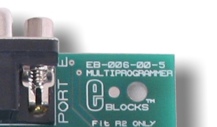 (:nl:)(:table style="clear:both":) (:nl:)(:table style="clear:both":)
| |
(:Summary: Website page footer:)
Print - (:comment (:if group Site,SiteAdmin,Cookbook,Profiles,PmWiki*:) (:comment delete if and ifend to enable backlinks:) %item rel=nofollow class=backlinks accesskey='$[ak_backlinks]'% [[{*$Name}?action=search&q=link={*$FullName} | $[Backlinks] ]] (:ifend:) :) Search - Login
Page last modified on September 19, 2011, at 01:25 PM