
|
Introduction to Microcontroller Programming * Course Index * Introduction * About the Author * About this Course * Feedback * Course Navigation * Quick Course Navigation * How to use this Course * Acronyms Used and Course Conventions About PICmicro Chips * What is a PICmicro? * Microcontrollers * Digital versus Analogue * Inputs and Outputs * Memory * Programming * 16F1937 Architecture Clocking Your PICmicro Devices * Introduction * The Clock Circuit * Clock Settings * Clock Confusion E-Blocks * Introduction to E-blocks * Using E-blocks * E-blocks Boards ## E-blocks Documentation and Numbering ## Sensor Interface (EB003) ## LED Board (EB004) ## LCD Board (EB005) ## Multiprogrammer (EB006) ## Switch Board (EB007) ## Quad 7-segment Display (EB008) ## Keyboard (EB014) ## Prototype Board (EB016) ## Patch Board (EB017) Flowcode Step By Step * Introduction to Flowcode * Basic Flowcode Functions * Digital Outputs * Digital Inputs * Basic Loops * The LCD Display * Binary Numbers * Decisions * Goto (Connection Point) * 7-Segment Displays * Software Macro * Strings and Memory * A Simple Hi-Fi PICmicro Projects * Introduction to PICmicro Projects * Construction Methods * Choosing a Power Source * Adding Inputs * Input Conditioning * Adding Outputs * Adding Drivers Labs * Introduction and Lesson Plan * 1. Output * 2. Delay * 3. Connection Point * 4. Calculations * 5. Loop * 6. Input * 7. Decision * 8. LCD * 9. Keypad * 10. Analogue + EEPROM * 11. Software Macro * 12. External Interrupt * 13. Timer Interrupt |
(:Summary:Contains the 'action' links (like Browse, Edit, History, etc.), placed at the top of the page, see site page actions:) (:comment This page can be somewhat complex to figure out the first time you see it. Its contents are documented at PmWiki.SitePageActions if you need help. :) * Print (:comment (:if group Site,SiteAdmin,Cookbook,Profiles,PmWiki*:) (:comment delete if and ifend to enable backlinks:) * %item rel=nofollow class=backlinks accesskey='$[ak_backlinks]'% [[{*$Name}?action=search&q=link={*$FullName} | $[Backlinks] ]] (:ifend:) :) * Login Switch Board EB007<^< Multiprogrammer (EB006) | Course Index | Quad 7-segment Display (EB008) >^>(:nl:) EB007 SWITCH BoardMore information can be found here. 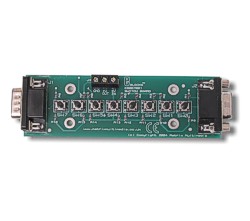 EB007 SWITCH Board Block Diagram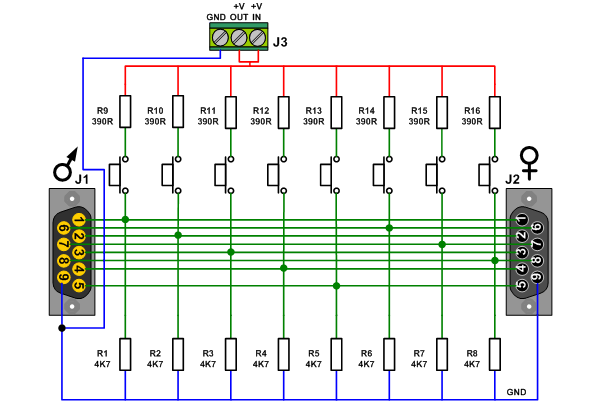 * Click EB007-30-1 for a datasheet. * The male D-type connector fits into the Female connector of one of the ports of an upstream board. * The Female connector is here to connect several boards in parallel. * Switch pressed: ** Small current flow through 390R-SW and 4K7. ** Voltage over 4K7 is +/- 4.7V is a clear '1' for the input pin of the PICmicro * Switch not pressed: ** No current flow ** No voltage over 4K7 resistor ** This is a clear '0' for the input of the PICmicro * BEWARE!!! ** All pins of the PICmicro can be configured either as an input or as an output. ** This is where the resistor of 390R is important: ** If you accidentally configure a pin as a low output and connect a switch to it then the 390R resistor limits the current into the PICmicro to (5V/390R) = 12mA. ** Be aware of this when you design your own circuits! ** This is well under the Imax of 25mA. ** If the 390R resistor would not have been in this circuit, there would have been no current limitation at all resulting in at least a broken PICmicro microcontroller. ** This is further explained in the drawing below. In this specific case the current will follow the orange path. 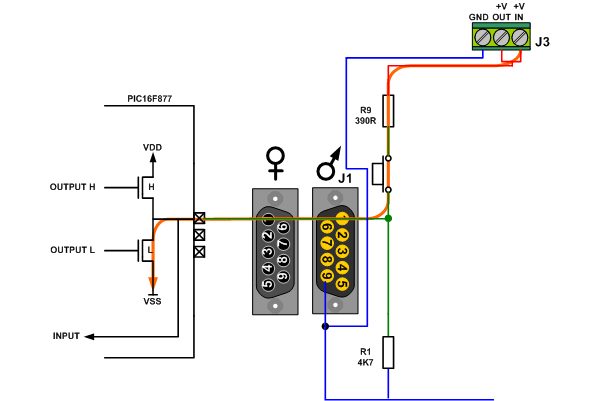 (:nl:)(:table style="clear:both":)
| |
(:Summary: Website page footer:)
Print - (:comment (:if group Site,SiteAdmin,Cookbook,Profiles,PmWiki*:) (:comment delete if and ifend to enable backlinks:) %item rel=nofollow class=backlinks accesskey='$[ak_backlinks]'% [[{*$Name}?action=search&q=link={*$FullName} | $[Backlinks] ]] (:ifend:) :) Search - Login
Page last modified on December 22, 2011, at 09:42 AM