|
Introduction to Microcontroller Programming * Course Index * Introduction * About the Author * About this Course * Feedback * Course Navigation * Quick Course Navigation * How to use this Course * Acronyms Used and Course Conventions About PICmicro Chips * What is a PICmicro? * Microcontrollers * Digital versus Analogue * Inputs and Outputs * Memory * Programming * 16F1937 Architecture Clocking Your PICmicro Devices * Introduction * The Clock Circuit * Clock Settings * Clock Confusion E-Blocks * Introduction to E-blocks * Using E-blocks * E-blocks Boards Flowcode Step By Step * Introduction to Flowcode * Basic Flowcode Functions * Digital Outputs * Digital Inputs * Basic Loops * The LCD Display * Binary Numbers * Decisions * Goto (Connection Point) * 7-Segment Displays * Software Macro * Strings and Memory * A Simple Hi-Fi PICmicro Projects * Introduction to PICmicro Projects * Construction Methods * Choosing a Power Source * Adding Inputs * Input Conditioning * Adding Outputs ## LED's ## Using LED's ## 7seg Displays ## LCD Displays ## Using LCD Displays ## Buzzers / Sounders ## Motors ## Stepper Motors ## Solenoids * Adding Drivers Labs * Introduction and Lesson Plan * 1. Output * 2. Delay * 3. Connection Point * 4. Calculations * 5. Loop * 6. Input * 7. Decision * 8. LCD * 9. Keypad * 10. Analogue + EEPROM * 11. Software Macro * 12. External Interrupt * 13. Timer Interrupt |
(:Summary:Contains the 'action' links (like Browse, Edit, History, etc.), placed at the top of the page, see site page actions:) (:comment This page can be somewhat complex to figure out the first time you see it. Its contents are documented at PmWiki.SitePageActions if you need help. :) * Print (:comment (:if group Site,SiteAdmin,Cookbook,Profiles,PmWiki*:) (:comment delete if and ifend to enable backlinks:) * %item rel=nofollow class=backlinks accesskey='$[ak_backlinks]'% [[{*$Name}?action=search&q=link={*$FullName} | $[Backlinks] ]] (:ifend:) :) * Login Buzzers / Sounders<^< Using LCD Displays | Course Index | Motors >^>(:nl:) Many applications require an audible warning when something happens. Here are two devices that can provide that, buzzers and sounders.
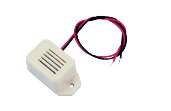
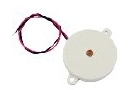
The job they do is identical - produce a single tone when a voltage is applied to them. The way they do that job is different. Buzzers are usually electromagnetic devices. When an electric current flows through a coil of wire inside the buzzer, it becomes an electromagnet, and pulls a metal plate towards it. This movement opens a pair of contacts, switching off the current. The plate springs back to its original position, causing the contacts to close and restoring the current. This sequence continues, with the result that the metal plate vibrates in and out, causing a sound wave. Sounders use an effect known as piezoelectricity. Some crystals change shape when you apply a voltage to them. If you apply an ac voltage, then the surface of the crystal vibrates backwards and forwards, as the direction of the electric current changes. Under the right conditions, we hear this vibration as a sound. Most sounders have a built in oscillator, to generate the ac voltage when you connect the sounder to a power supply. In using these devices, the main consideration is the current they need to operate. Piezoelectric devices usually require a lower current, typically 25mA, and so are often more suitable for portable devices. (:nl:)(:table style="clear:both":)
| |
(:Summary: Website page footer:)
Print - (:comment (:if group Site,SiteAdmin,Cookbook,Profiles,PmWiki*:) (:comment delete if and ifend to enable backlinks:) %item rel=nofollow class=backlinks accesskey='$[ak_backlinks]'% [[{*$Name}?action=search&q=link={*$FullName} | $[Backlinks] ]] (:ifend:) :) Search - Login
Page last modified on August 26, 2011, at 10:10 AM