
|
Introduction to Microcontroller Programming * Course Index * Introduction * About the Author * About this Course * Feedback * Course Navigation * Quick Course Navigation * How to use this Course * Acronyms Used and Course Conventions About PICmicro Chips * What is a PICmicro? * Microcontrollers * Digital versus Analogue * Inputs and Outputs * Memory * Programming * 16F1937 Architecture Clocking Your PICmicro Devices * Introduction * The Clock Circuit * Clock Settings * Clock Confusion E-Blocks * Introduction to E-blocks * Using E-blocks * E-blocks Boards Flowcode Step By Step * Introduction to Flowcode * Basic Flowcode Functions * Digital Outputs * Digital Inputs * Basic Loops * The LCD Display * Binary Numbers * Decisions * Goto (Connection Point) * 7-Segment Displays * Software Macro * Strings and Memory * A Simple Hi-Fi PICmicro Projects * Introduction to PICmicro Projects * Construction Methods * Choosing a Power Source * Adding Inputs * Input Conditioning * Adding Outputs ## LED's ## Using LED's ## 7seg Displays ## LCD Displays ## Using LCD Displays ## Buzzers / Sounders ## Motors ## Stepper Motors ## Solenoids * Adding Drivers Labs * Introduction and Lesson Plan * 1. Output * 2. Delay * 3. Connection Point * 4. Calculations * 5. Loop * 6. Input * 7. Decision * 8. LCD * 9. Keypad * 10. Analogue + EEPROM * 11. Software Macro * 12. External Interrupt * 13. Timer Interrupt |
(:Summary:Contains the 'action' links (like Browse, Edit, History, etc.), placed at the top of the page, see site page actions:) (:comment This page can be somewhat complex to figure out the first time you see it. Its contents are documented at PmWiki.SitePageActions if you need help. :) * Print (:comment (:if group Site,SiteAdmin,Cookbook,Profiles,PmWiki*:) (:comment delete if and ifend to enable backlinks:) * %item rel=nofollow class=backlinks accesskey='$[ak_backlinks]'% [[{*$Name}?action=search&q=link={*$FullName} | $[Backlinks] ]] (:ifend:) :) * Login LCD Displays<^< 7seg Displays | Course Index | Using LCD Displays >^>(:nl:) LED displays are luminous - they give off light. Another common form of display, the LCD (liquid crystal display) does not give off light, but controls the passage of light through it. For this reason, they are very energy efficient, and their low power consumption makes them ideal output devices for battery powered systems. 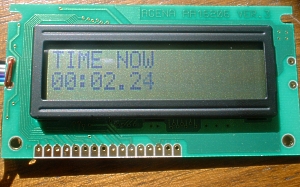 Solids and liquids:In solids, the molecules stay lined up in the same position relative to each other. All they can do is vibrate slightly about that fixed position. In liquids the molecules can point in any direction and move anywhere in the liquid. Liquid crystals behave in some ways like solids, and in other ways like liquids. Their molecules, which are long and thin, can move around quite freely, as in a liquid. However, they tend to line up and point in the same direction like the molecules in a solid. This lining up of the molecules affects the way light passes through the crystal. A diagram of a typical liquid crystal display is shown in the diagram. 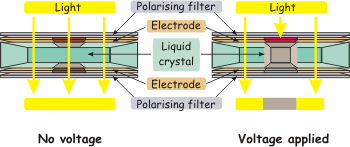 The liquid crystal is sandwiched between plates carrying conducting electrodes, with polarising filters on the top and bottom of the sandwich. The electrodes are shaped into the letters, numbers etc. that the designer wants to appear on the display. The polarising filters allow light to pass through, normally. When a voltage is applied to the electrodes, the pattern of the molecules in the liquid crystal changes. This changes the way the light is polarised, and it can no longer pass through the filters. Those electrodes that have a voltage applied appear dark against a light background. (:nl:)(:table style="clear:both":)
| |
(:Summary: Website page footer:)
Print - (:comment (:if group Site,SiteAdmin,Cookbook,Profiles,PmWiki*:) (:comment delete if and ifend to enable backlinks:) %item rel=nofollow class=backlinks accesskey='$[ak_backlinks]'% [[{*$Name}?action=search&q=link={*$FullName} | $[Backlinks] ]] (:ifend:) :) Search - Login
Page last modified on August 26, 2011, at 10:05 AM