
|
Introduction to Microcontroller Programming * Course Index * Introduction * About the Author * About this Course * Feedback * Course Navigation * Quick Course Navigation * How to use this Course * Acronyms Used and Course Conventions About PICmicro Chips * What is a PICmicro? * Microcontrollers * Digital versus Analogue * Inputs and Outputs * Memory * Programming * 16F1937 Architecture Clocking Your PICmicro Devices * Introduction * The Clock Circuit * Clock Settings * Clock Confusion E-Blocks * Introduction to E-blocks * Using E-blocks * E-blocks Boards Flowcode Step By Step * Introduction to Flowcode * Basic Flowcode Functions * Digital Outputs * Digital Inputs * Basic Loops * The LCD Display * Binary Numbers * Decisions * Goto (Connection Point) * 7-Segment Displays * Software Macro * Strings and Memory * A Simple Hi-Fi PICmicro Projects * Introduction to PICmicro Projects * Construction Methods * Choosing a Power Source * Adding Inputs * Input Conditioning * Adding Outputs ## LED's ## Using LED's ## 7seg Displays ## LCD Displays ## Using LCD Displays ## Buzzers / Sounders ## Motors ## Stepper Motors ## Solenoids * Adding Drivers Labs * Introduction and Lesson Plan * 1. Output * 2. Delay * 3. Connection Point * 4. Calculations * 5. Loop * 6. Input * 7. Decision * 8. LCD * 9. Keypad * 10. Analogue + EEPROM * 11. Software Macro * 12. External Interrupt * 13. Timer Interrupt |
(:Summary:Contains the 'action' links (like Browse, Edit, History, etc.), placed at the top of the page, see site page actions:) (:comment This page can be somewhat complex to figure out the first time you see it. Its contents are documented at PmWiki.SitePageActions if you need help. :) * Print (:comment (:if group Site,SiteAdmin,Cookbook,Profiles,PmWiki*:) (:comment delete if and ifend to enable backlinks:) * %item rel=nofollow class=backlinks accesskey='$[ak_backlinks]'% [[{*$Name}?action=search&q=link={*$FullName} | $[Backlinks] ]] (:ifend:) :) * Login Using LCD Displays<^< LCD Displays | Course Index | Buzzers / Sounders >^>(:nl:) The principle is straightforward - apply a voltage to the electrode segments that you want to display. However there are two problems! '''1.''' If you apply a dc voltage to the electrode, it will eventually produce a permanent change in the pattern of the molecules, making the LCD display unusable. '''The answer:''' Apply an ac voltage, so that the molecules are moved first one way and then the other, cancelling out any permanent change. With a high enough frequency, greater than about 50Hz, the flickering produced on the display will not be noticeable. '''2.''' Actual LCD displays can have hundreds of electrodes, to allow them to generate a wide range of characters. That makes it a difficult device to drive on an electrode-by-electrode basis! '''The answer:''' Use an LCD module, which contains not only the liquid crystal display, but also an integrated circuit, such as the Hitachi HD 44780, to take care of much of the hard work. 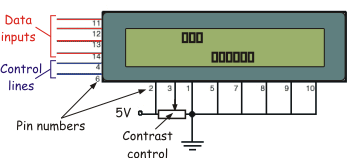 The LCD module is controlled by inputting instructions and data via the data inputs, and control signals, via the control lines. Instructions include clearing the display, moving the cursor back to the home position, and defining factors such as the number of display lines and character font. The control lines tell the module whether the signal on the data inputs is an instruction, or data, and enable the LCD module, allowing it to carry out the instructions. On the PICmicro development board, the four data inputs lines and two control lines are connected to Port B of the PICmicro chip. (:nl:)(:table style="clear:both":)
| |
(:Summary: Website page footer:)
Print - (:comment (:if group Site,SiteAdmin,Cookbook,Profiles,PmWiki*:) (:comment delete if and ifend to enable backlinks:) %item rel=nofollow class=backlinks accesskey='$[ak_backlinks]'% [[{*$Name}?action=search&q=link={*$FullName} | $[Backlinks] ]] (:ifend:) :) Search - Login
Page last modified on January 30, 2012, at 03:19 PM