
|
Introduction to Microcontroller Programming * Course Index * Introduction * About the Author * About this Course * Feedback * Course Navigation * Quick Course Navigation * How to use this Course * Acronyms Used and Course Conventions About PICmicro Chips * What is a PICmicro? * Microcontrollers * Digital versus Analogue * Inputs and Outputs * Memory * Programming * 16F1937 Architecture Clocking Your PICmicro Devices * Introduction * The Clock Circuit * Clock Settings * Clock Confusion E-Blocks * Introduction to E-blocks * Using E-blocks * E-blocks Boards Flowcode Step By Step * Introduction to Flowcode * Basic Flowcode Functions * Digital Outputs * Digital Inputs * Basic Loops * The LCD Display * Binary Numbers * Decisions * Goto (Connection Point) * 7-Segment Displays * Software Macro * Strings and Memory * A Simple Hi-Fi PICmicro Projects * Introduction to PICmicro Projects * Construction Methods * Choosing a Power Source * Adding Inputs * Input Conditioning * Adding Outputs ## LED's ## Using LED's ## 7seg Displays ## LCD Displays ## Using LCD Displays ## Buzzers / Sounders ## Motors ## Stepper Motors ## Solenoids * Adding Drivers Labs * Introduction and Lesson Plan * 1. Output * 2. Delay * 3. Connection Point * 4. Calculations * 5. Loop * 6. Input * 7. Decision * 8. LCD * 9. Keypad * 10. Analogue + EEPROM * 11. Software Macro * 12. External Interrupt * 13. Timer Interrupt |
(:Summary:Contains the 'action' links (like Browse, Edit, History, etc.), placed at the top of the page, see site page actions:) (:comment This page can be somewhat complex to figure out the first time you see it. Its contents are documented at PmWiki.SitePageActions if you need help. :) * Print (:comment (:if group Site,SiteAdmin,Cookbook,Profiles,PmWiki*:) (:comment delete if and ifend to enable backlinks:) * %item rel=nofollow class=backlinks accesskey='$[ak_backlinks]'% [[{*$Name}?action=search&q=link={*$FullName} | $[Backlinks] ]] (:ifend:) :) * Login Using LED's<^< LED's | Course Index | 7seg Displays >^>(:nl:) LED's are very robust mechanically, compared to glass-encased filament lamps. However, electrically it is the other way round! LED's are a form of diode. A diode will pass electric current in one direction only. The symbol indicates this - the arrow in the symbol shows the allowed direction of current flow, called the forward direction. 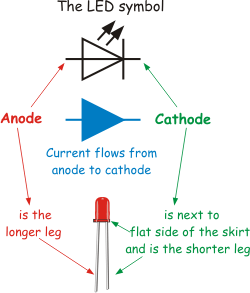 Electric current flows from positive to negative around the circuit, and from anode to cathode in the led, when the LED is biased correctly, in the forward direction. ('Biased' means 'connected to a voltage supply'.) The LED will be damaged if too much electric current passes through it in the forward direction, however, or if too great a voltage is applied to it in the reverse direction (trying to make current flow the wrong way through the LED.) The LED is protected from excessive current in the forward direction by connecting it in series (in line) with a resistor. The value of this resistor depends on the power supply voltage used. The table gives recommended sizes for this resistor.
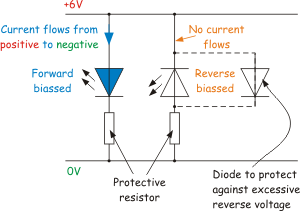 When there is a risk of excessive voltage in the reverse direction, a 'normal' (i.e. not light-emitting,) diode can be connected as shown to protect the LED. (The normal diode is forward biased, and so conducts a current. The voltage across the diode then drops to 0.7V, a small enough reverse voltage for the LED to cope with.) (:nl:)(:table style="clear:both":)
| |
(:Summary: Website page footer:)
Print - (:comment (:if group Site,SiteAdmin,Cookbook,Profiles,PmWiki*:) (:comment delete if and ifend to enable backlinks:) %item rel=nofollow class=backlinks accesskey='$[ak_backlinks]'% [[{*$Name}?action=search&q=link={*$FullName} | $[Backlinks] ]] (:ifend:) :) Search - Login
Page last modified on August 26, 2011, at 10:01 AM